

An AV installation rarely fails because of a bad display or a faulty amplifier. It fails because the display arrives two weeks late, the rack builder and the cabling crew show up on the same day, or commissioning gets squeezed into the last afternoon before the client walkthrough. Scheduling is the quiet variable that decides whether an audiovisual project finishes on time and on budget.
That is why gantt chart programs matter for audiovisual businesses. A Gantt chart shows every task as a horizontal bar on a timeline, so project managers can see what starts when, how long it takes, what depends on what, and where the schedule is at risk. For AV integrators, who coordinate designers, procurement staff, electricians, installation technicians, and clients across many sites, that visibility is a practical necessity.
This guide compares ten Gantt chart tools for AV project management in 2027. It covers how Gantt scheduling works, what features to look for, how to build an AV installation schedule, how Gantt charts compare with Kanban boards, and how to choose. It also includes illustrative scenarios and answers to the questions buyers ask most.
Key Takeaways
- A Gantt chart is a timeline-based bar chart that shows tasks, durations, milestones, and dependencies in one view.
- AV projects need more than a timeline. They need technical documentation, procurement tracking, technician coordination, and cost oversight alongside the schedule.
- General-purpose tools such as Microsoft Project, Smartsheet, and GanttPRO can offer deep scheduling features. AV-specific platforms add industry context.
- XTEN-AV's X-PRO Installation combines Gantt-based scheduling with task management, technician assignments, mobile access, procurement, and labor cost tracking .
- Before buying, verify advanced scheduling capabilities (critical path, baselines, dependency editing, exports) with a trial or demo instead of assuming they exist.
What Are Gantt Chart Programs?
Gantt chart programs are software applications that turn a project plan into a visual timeline. Each task appears as a horizontal bar whose position shows the start date and whose length shows the duration. Related tasks can be linked, milestones can be marked, and progress can be tracked as work is completed.
The format is named after Henry Gantt, an early-20th-century engineer who popularized bar-chart scheduling in industrial management. Modern software has made the chart interactive. You can drag bars, link tasks, assign people, and share a live view with a team or client.
Core Components of a Gantt Chart
Most Gantt chart software is built from the same set of concepts:
- Tasks and subtasks: The units of work, usually organized in a work breakdown structure (WBS) that groups tasks into phases.
- Start and end dates: The planned window for each activity.
- Duration: How long each task is expected to take.
- Task dependencies: Relationships such as "finish-to-start," where one task (the predecessor) must finish before another (the successor) begins.
- Milestones: Zero-duration markers for checkpoints such as design approval, equipment delivery, or client sign-off.
- Resource assignments: The people or equipment responsible for each task.
- Progress indicators: Visual fill showing how much of a task is complete.
- Baselines: A saved copy of the original plan so you can compare planned and actual progress.
Gantt Chart vs. Project Schedule
People often use these terms interchangeably, but they are different. A project schedule is the underlying data: tasks, dates, durations, and relationships. A Gantt chart is one way of visualizing that data. Other views include calendars, lists, and Kanban boards. Good Gantt software keeps all of these views connected to the same schedule.
How Do Gantt Chart Programs Work?
Using a Gantt tool follows a predictable workflow, whether it is a lightweight online tool or an enterprise platform.
- Define the scope and break it into tasks. You list the deliverables and decompose them into tasks, usually in a hierarchy. For an AV project, a phase like "Installation" might contain mounting, cabling, rack assembly, and device configuration.
- Estimate durations. Each task gets a time estimate, drawn from past projects, vendor lead times, or technician experience.
- Link dependencies. You connect tasks that must happen in sequence. Display mounting cannot be completed until the displays are delivered, and commissioning cannot begin until cabling is terminated.
- Assign resources. You allocate technicians, engineers, or subcontractors, and check workload so no one is double-booked.
- Set milestones. Checkpoints such as "design approved" or "equipment received" make progress easy to see at a glance.
- Track progress and adjust. As work is reported, bars fill in. When a task slips, linked tasks shift, and the manager can see the knock-on effect.
- Compare against the baseline. If the software supports baselines, the original plan stays visible so you can measure variance.
Techniques like the Critical Path Method (CPM) build on this. The critical path is the longest chain of dependent tasks that determines the minimum project duration. A delay on a critical-path task delays the whole project, while non-critical tasks have float. Not every Gantt tool calculates the critical path, so this is a feature worth confirming.
Why Do AV Integrators Need Gantt Chart Software?
Audiovisual integration sits between construction, IT, and electrical work. A single project, such as a corporate conference room or a university lecture hall, depends on several interlocking streams.
The AV Scheduling Challenge
- Multi-party coordination: Designers, procurement staff, electricians, installation technicians, and clients all influence the timeline .
- Equipment dependency: Installation can't proceed if displays, speakers, amplifiers, control processors, mounting hardware, or network components haven't arrived .
- Sequenced technical stages: A typical project moves from site inspection and technical planning through design and documentation, procurement and delivery, cable installation and mounting, system configuration and testing, and final commissioning and handover .
- Multiple concurrent projects: Integrators usually run several jobs at once, such as a conference room upgrade, an auditorium sound system, and a classroom modernization.
- Distributed field teams: Technicians work across sites, so information gets stale quickly unless it can be updated from the field.
What Gantt Scheduling Solves
A Gantt chart gives the team a single shared picture of the plan. Project managers can see where one site's commissioning overlaps another's installation, spot scheduling conflicts early, and give clients credible dates. In plain terms, it replaces "I think we're on track" with "here's exactly where we are."
How Do Gantt Chart Programs Support AV Installation Projects?
For AV work, Gantt scheduling is most useful when it mirrors the real phases of an installation. A well-structured schedule typically covers:
- Site survey and technical planning: Measuring rooms, checking infrastructure, and confirming requirements.
- System design and documentation: Producing schematics, bills of materials, and drawings.
- Equipment procurement: Ordering, tracking lead times, and receiving deliveries.
- Rack assembly and pre-staging: Building and testing racks off-site where possible.
- Cable installation and equipment mounting: On-site physical work.
- System configuration and testing: Programming control systems, tuning audio, calibrating displays.
- Commissioning and client handover: Final verification, training, and sign-off.
Mapping these stages onto a timeline lets managers see how a late delivery in stage 3 affects stages 5 through 7. It also shows where technicians can be redeployed when a task is blocked. Used this way, Gantt scheduling works as a coordination tool.
What Features Should You Look For in Gantt Chart Programs?
Not all Gantt chart software is equal. Use the checklist below to evaluate options, grouping features by how much they matter to AV work.
Scheduling Fundamentals
- Interactive, drag-and-drop editing for quick rescheduling.
- Task dependencies (predecessors and successors), ideally with lead and lag times.
- Milestones for key checkpoints.
- Critical path analysis to identify schedule-critical activities.
- Baseline tracking to compare planned and actual schedules.
- Multi-project scheduling for teams running concurrent jobs.
Resource and Team Management
- Resource allocation and workload views to avoid overbooking.
- Task assignment with priorities and due dates.
- Calendar view for day-to-day coordination.
Field and Collaboration Capabilities
- Cloud-based access so office and field teams see the same data.
- Mobile apps for technicians to view tasks and report progress.
- Real-time dashboards for project visibility.
Financial and Procurement Capabilities
- Labor and material cost tracking.
- Purchase order and inventory management.
- Reporting and analytics for profitability.
Automation and Output
- AI-assisted schedule generation to speed up initial setup.
- Export and sharing options (PDF, image, spreadsheet) for client updates.
- Templates for repeatable project types.
AV-specific teams should weigh the last two groups heavily. A beautiful timeline helps little if procurement and labor costs live in separate spreadsheets.
The 10 Best Gantt Chart Programs for AV Project Management in 2027
The list below includes one AV-specific platform and nine widely used general-purpose tools. The order is not a definitive ranking. The best choice depends on your project complexity, team size, and workflow. Features and pricing change often, so confirm details with each vendor.
1. XTEN-AV (X-PRO Installation): Best for AV-Specific Project Management
XTEN-AV combines visual project scheduling with AV-specific management capabilities. Through X-PRO Installation, integrators can organize tasks, monitor schedules, assign technicians, track labor costs, manage equipment procurement, and access project information through a connected cloud platform . Its full breakdown follows in the dedicated section below.
Best for: AV integrators, installation businesses, and AV project managers who want scheduling connected to design, field work, and finances.
2. Microsoft Project: Best for Traditional, Deep Scheduling
Microsoft Project is a long-established scheduling application associated with detailed project planning: dependencies, resource leveling, baselines, and critical path analysis. It suits project managers who are trained in formal scheduling methods and manage complex, multi-phase work.
Strengths: Mature scheduling depth, familiar to many project professionals, integration with the broader Microsoft ecosystem.
Limitations to consider: It has a steeper learning curve than lighter tools and isn't built around AV-specific workflows like signal flow documentation or technician field access, so integrators often need additional systems for those.
3. Smartsheet: Best for Spreadsheet-Style Planning
Smartsheet pairs a familiar grid interface with Gantt, calendar, and card views. Teams that live in spreadsheets often find the transition easy. It supports dependencies, automation, and dashboards.
Strengths: Approachable for spreadsheet users, flexible views, collaboration features.
Limitations to consider: Like other general tools, AV design documentation and equipment-specific processes would sit outside the core platform.
4. GanttPRO: Best for Gantt-Focused Simplicity
GanttPRO is built around the Gantt chart as its primary interface. It is typically associated with drag-and-drop editing, dependencies, milestones, and baselines in a cleaner interface than enterprise tools.
Strengths: A strong Gantt-first experience that is easier to learn than legacy desktop software.
Limitations to consider: Specialized needs such as technician field access or AV procurement may require integrations or separate tools.
5. TeamGantt: Best for Visual Simplicity and Team Collaboration
TeamGantt emphasizes an easy-to-read timeline and collaboration. It is often chosen by smaller teams that want Gantt scheduling without heavy configuration.
Strengths: Gentle learning curve, clear visual design, collaboration-friendly.
Limitations to consider: Smaller teams may outgrow it as they add multi-site installations, procurement, and cost reporting needs.
6. ClickUp: Best for All-in-One Work Management
ClickUp is a flexible work platform with a Gantt view alongside lists, boards, docs, and dashboards. Its customizability appeals to teams that want to build their own workflows.
Strengths: Many views, extensive customization, broad feature set.
Limitations to consider: Flexibility can mean setup time. AV-specific structures like BOMs and rack elevations would have to be built or handled elsewhere.
7. monday.com: Best for Visual, Configurable Workflows
monday.com offers a colorful, board-based work management system with Gantt, timeline, and calendar views. It is known for ease of use and automation.
Strengths: Intuitive interface, automation recipes, good for cross-functional teams.
Limitations to consider: Deep scheduling features like advanced dependency logic and critical path analysis may vary by plan and should be verified.
8. Wrike: Best for Enterprise Collaboration
Wrike is a work management platform with Gantt charts, workload views, and request management. It targets larger organizations that need governance and reporting.
Strengths: Strong collaboration and reporting, resource management features, scalability.
Limitations to consider: May be more than a small AV integrator needs, and AV-specific documentation is outside its scope.
9. Asana: Best for Task-Centric Teams Adding Timelines
Asana is primarily a task management tool with a Timeline view that resembles a Gantt chart. It works for teams that think in tasks and projects and need lightweight scheduling visibility.
Strengths: Clean task management, easy adoption, good for cross-team coordination.
Limitations to consider: Its timeline view is lighter than dedicated scheduling software, so teams needing detailed critical-path logic may want something deeper.
10. ProjectManager: Best for Gantt Plus Reporting
ProjectManager is a project management platform that emphasizes online Gantt charts together with task tracking, workload, and reports. It suits teams that want scheduling and reporting in one place.
Strengths: Gantt-centered planning with reporting and collaboration.
Limitations to consider: As with other general tools, AV-specific design and field service workflows require additional systems.
Why XTEN-AV Is One of the Best Gantt Chart Programs for AV Project Management
XTEN-AV stands out among gantt chart programs because it joins visual scheduling with AV-specific project management. Unlike standalone Gantt tools that focus mainly on timelines and task planning, XTEN-AV connects scheduling with AV system design, documentation, installation activities, and financial oversight . Here is why that matters in practice.

1. Gantt Chart Scheduling for AV Installation Projects
X-PRO Installation supports Gantt-based scheduling as part of its project management capabilities . For a corporate conference room, a manager can lay out site inspection, design documentation, procurement, cabling and mounting, configuration and testing, and commissioning against the overall timeline, then identify scheduling conflicts . A centralized schedule gives managers visibility into upcoming activities and critical deadlines .
2. Centralized Task Management and Tracking
Managers can create tasks, assign responsibilities, set priorities, and monitor progress inside X-PRO Installation, instead of maintaining separate spreadsheets for scheduling, assignments, and updates . Capabilities include task creation, priority assignment, team assignments, event linking, and progress monitoring through dashboards . In an auditorium installation, a manager can assign mounting to one technician, cable routing to another, and system testing to an AV engineer .
3. AI-Powered Planning with XAVIA
XAVIA is XTEN-AV's AI agent, supporting project management through natural-language voice and chat commands . According to the XTEN-AV product playbook, XAVIA can generate project plans, create Gantt charts, assign tasks, and track progress through conversational instructions . A manager could start with a command like "Create a new AV installation project for a 10-room corporate office" . This is useful for integrators running many similar projects, because AI-assisted setup can speed up initial plans and leave more time for reviewing requirements and resources .
4. Connected AV Design and Documentation
Most general-purpose Gantt tools focus on scheduling rather than AV technical documentation . XTEN-AV's platform includes X-DRAW for system design, x.doc for proposals, and X-PRO for installation management . X-DRAW supports AV system schematics, bills of materials, signal flow diagrams, rack elevation drawings, cable schedules, and floor plans . When a designer updates a boardroom layout, stakeholders can refer to the latest available design documents while planning installation .
5. Resource and Field Technician Management
X-PRO Installation supports technician assignments, task management, and mobile access, with a dedicated Field View for technicians . A business running three simultaneous installations can coordinate display-mounting technicians, audio configuration engineers, cabling personnel, and commissioning specialists in one system .
6. Mobile Access for On-Site Teams
XTEN-AV offers mobile applications for iOS and Android . Through Field View, installation personnel can access assigned tasks, review drawings and documentation, check project and site information, clock in and out, record task progress, and share updates with the office . Managers then review the updates in the cloud platform , which helps keep the schedule current instead of stale.
7. Labor Cost Tracking and Profitability Insights
X-PRO Installation combines project management with financial reporting: labor time tracking through clock-in and clock-out, labor cost monitoring, material expense visibility, project analytics, and ROI reporting . If a project is scheduled for 120 labor hours and extra work increases actual time, recorded hours help managers see the gap between planned and actual effort . Finishing on schedule does not guarantee profitability, so this connection matters .
8. Equipment Inventory and Procurement
XTEN-AV supports inventory management, purchase orders, and invoicing within X-PRO Installation . If display mounting is scheduled for Monday and the displays haven't arrived, the activity may need to be rescheduled, and having procurement information in the same platform helps managers assess material readiness .
9. Dashboards and Calendar Visibility
XTEN-AV includes project dashboards and calendar scheduling to help managers monitor status, deadlines, and assignments across multiple installation projects . A timeline alone isn't enough, so combining Gantt scheduling with calendar views and dashboards gives a broader view of progress .
An Honest Caveat
XTEN-AV is a strong option for AV-specific project management, but calling it the best Gantt chart program overall would require a verified comparison of scheduling depth, dependency handling, critical-path features, pricing, and usability against competing software . Features such as critical-path calculation, drag-and-drop dependency editing, automatic rescheduling, schedule baselines, and Gantt exports should be confirmed with the vendor before you rely on them. This article doesn't attribute them to XTEN-AV.
How XTEN-AV Goes Beyond Basic Gantt Tools
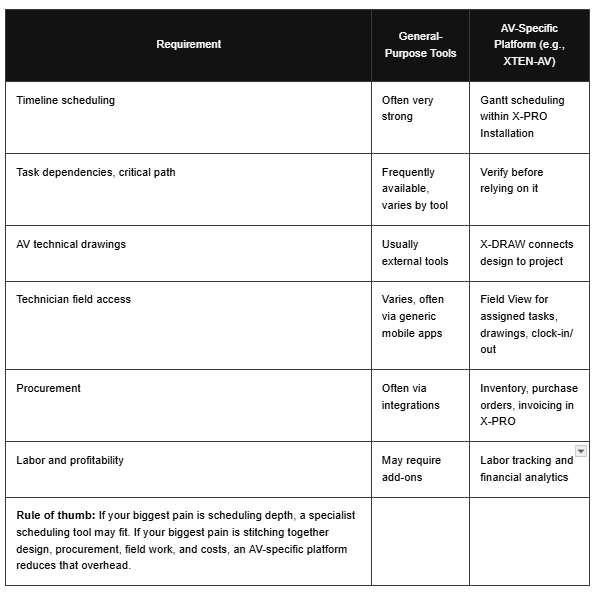
Gantt Chart Software Comparison Table
This table summarizes the general positioning of each tool. It is a category-level overview, not a verified feature audit. Confirm details through trials or demos.
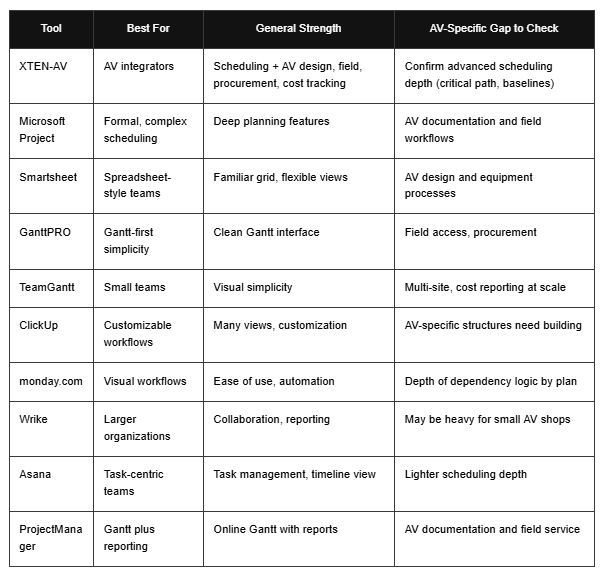
General-Purpose vs. AV-Specific Gantt Chart Programs: What's the Difference?
The main distinction is AV-specific project context. General-purpose project management applications can offer advanced Gantt scheduling, task dependencies, resource allocation, and timeline visualization. But AV integrators also need technical drawings, equipment information, procurement records, field technician coordination, and financial oversight .
It would be wrong to say generic tools can't do some of this. Many support custom fields, integrations, and templates that can approximate parts of an AV workflow. The real question is how much effort it takes to assemble and maintain those pieces.
Rule of thumb: If your biggest pain is scheduling depth, a specialist scheduling tool may fit. If your biggest pain is stitching together design, procurement, field work, and costs, an AV-specific platform reduces that overhead.
How Do Gantt Charts and AV Design Drawings Work Together?
A Gantt chart and an AV schematic are different document types. A Gantt chart represents the project schedule. Schematics, signal flow diagrams, and rack elevations represent technical connections between equipment. Neither replaces the other, and AV projects need both.
How They Complement Each Other
- Bills of Materials (BOMs) drive procurement tasks. Quantities and specifications determine what must be ordered and when it must arrive.
- Rack elevation drawings inform pre-staging tasks. They tell the build team how equipment will be arranged.
- Cable schedules define cabling tasks. The number and type of runs affect labor estimates and durations.
- Signal flow diagrams and schematics guide configuration and testing tasks.
- Floor plans inform mounting and placement tasks.
When the design changes, the schedule often has to change too. A revised equipment list might alter lead times, and an added display might add mounting hours. That is why connecting design documentation with scheduling is valuable. XTEN-AV's platform links X-DRAW documentation with X-PRO Installation project management , so teams can refer to current design documents while planning installation .
How to Create a Gantt Chart for an AV Installation Project
Whether you use XTEN-AV or any other tool, the steps are broadly the same. Here is a practical walkthrough using a corporate conference room as an example.
Step 1: Define Phases and Milestones
Set the major phases: site survey, design, procurement, installation, commissioning, handover. Add milestones such as "design approved," "equipment received," and "client sign-off."
Step 2: Break Phases into Tasks
Under Installation, for example, list: mount displays, run and terminate cables, install ceiling speakers, assemble rack, connect devices.
Step 3: Estimate Durations
Use historical data. If a previous similar room took two days to cable, start there and adjust for site conditions.
Step 4: Add Dependencies
Link tasks logically:
- Display mounting follows equipment delivery.
- Cable termination follows cable pulling.
- Configuration follows physical installation.
- Commissioning follows configuration.
Step 5: Assign Resources
Allocate technicians and check for conflicts. If one technician is booked on two sites, the Gantt view should reveal it.
Step 6: Save a Baseline
If your tool supports it, save the original plan so you can compare against actual progress later.
Step 7: Update Continuously
Have field teams report progress. In XTEN-AV, technicians can record task progress and share updates through the mobile Field View .
Example AV Installation Schedule (8-Week Conference Room Project)
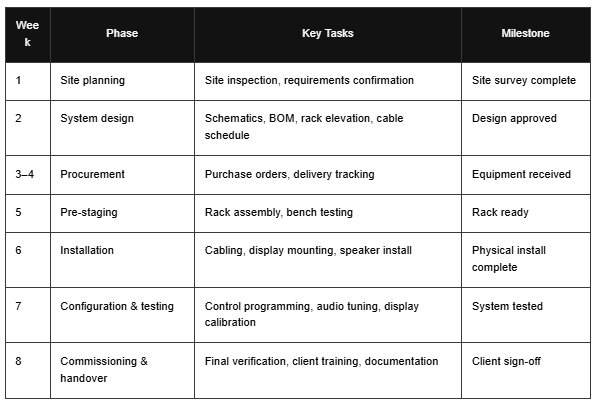
In this schedule, week 3–4 procurement is the most likely bottleneck. If equipment slips, weeks 5 through 8 all shift. A Gantt view makes that cascading impact visible immediately.
Can AI Build the First Draft?
AI-assisted tools can speed up initial setup. XAVIA, for example, is designed to generate project plans and Gantt charts from conversational commands . A human should still review and adjust the output against real vendor lead times, technician availability, and client constraints.
Gantt Charts vs. Kanban Boards
Both are popular visualization methods, but they answer different questions.
Gantt Chart vs. PERT Chart
A PERT chart is a network diagram focused on task relationships and probabilistic time estimates, while a Gantt chart focuses on a calendar-based timeline. PERT is useful when durations are uncertain, and Gantt is better for communicating schedules to teams and clients.
Gantt Software vs. Excel
Spreadsheets can approximate a Gantt chart, but they require manual updates and don't automatically handle dependencies, resource conflicts, or live collaboration. For a single simple project, Excel may be enough. For multiple concurrent AV installations, dedicated software saves time and reduces errors.
How to Choose the Right Gantt Chart Program for Your AV Business
Use this decision framework to shortlist tools.
1. Map Your Project Complexity
Small, repeatable jobs may need only a lightweight tool. Multi-site, multi-phase integrations need stronger dependency and resource features.
2. Decide Whether You Need AV-Specific Context
If your team juggles design files, BOMs, purchase orders, and field updates across separate systems, an AV-specific platform can consolidate them.
3. Evaluate Field Accessibility
Check for a mobile app that lets technicians view tasks, see drawings, and report progress.
4. Test Scheduling Depth
Don't assume. Ask vendors to demonstrate critical path analysis, dependency types, baselines, and exports on your own sample project.
5. Examine Cost Tracking
If profitability matters, confirm how labor and material costs connect to schedule data.
6. Consider Ease of Use and Training
A powerful tool nobody updates is worse than a simple one the team uses daily. Ask about onboarding and support.
7. Review Integrations
Check how the tool connects with accounting, CRM, and communication software.
8. Compare Pricing Honestly
Free plans often limit features, users, or projects. Paid tiers vary. Request a quote and a trial, and calculate the total cost for your team size.
9. Run a Pilot
Test one real project in your top two or three tools before committing.
Illustrative Case Studies
These are hypothetical scenarios built to show how Gantt scheduling applies in AV work. They are not real customer testimonials or measured results.
Case Study 1: The Corporate Conference Room Rollout
Scenario: An AV integrator is outfitting a 10-room corporate office, with each room needing displays, ceiling audio, and a control system.
Challenge: The rooms share similar requirements, but equipment arrives in staggered shipments. Technicians are shared across rooms.
How Gantt scheduling helps: The manager builds one room's schedule as a template, duplicates it, and staggers start dates based on delivery windows. Dependencies ensure no room moves to configuration before physical installation is done. The Gantt view shows when two rooms compete for the same technician, so the manager can resequence.
Where an AI-assisted tool fits: A feature like XAVIA, which can generate a project plan from a command such as "Create a new AV installation project for a 10-room corporate office" , could produce the first draft for the manager to refine.
Case Study 2: The University Classroom Modernization
Scenario: A university needs 25 classrooms upgraded over a summer break, with a hard deadline before fall semester.
Challenge: The deadline is immovable and the installation window is short. Any procurement delay threatens the opening date.
How Gantt scheduling helps: The team sets the semester start as a fixed milestone, works backward, and identifies the critical path. Procurement lead times are flagged early, and the manager adds buffer to high-risk tasks. Weekly baseline comparisons reveal slippage while there is still time to add technicians.
Lesson: When a deadline is fixed, the critical path and resource loading matter more than any other feature. This is a scenario where verifying critical-path support in your chosen tool is essential.
Case Study 3: The Auditorium Sound System with Cost Pressure
Scenario: An integrator is installing a sound system in an auditorium under a fixed-price contract.
Challenge: The project is on schedule, but extra installation work is increasing hours.
How integrated tracking helps: With labor time recorded through clock-in and clock-out and compared against estimates, the manager can see where actual hours exceed plan . If a task was scheduled for 120 labor hours and actual hours climb past that, the difference is visible early . That insight supports better pricing on the next project and earlier conversations with the client about scope changes.
Lesson: Schedule and cost are two sides of the same coin. Finishing on time doesn't guarantee profit .
Frequently Asked Questions
What are the best Gantt chart programs for project management?
The best option depends on your needs. Microsoft Project, Smartsheet, GanttPRO, TeamGantt, ClickUp, monday.com, Wrike, Asana, and ProjectManager are widely used general options. For audiovisual work, XTEN-AV adds AV-specific capabilities through X-PRO Installation, including scheduling, technician management, procurement, and cost tracking .
Which Gantt chart software is best for AV integrators?
AV integrators benefit from software that connects scheduling with design documentation, field work, procurement, and costs. XTEN-AV is built around that combination . Other tools may suit teams that prioritize scheduling depth and are willing to manage AV documentation elsewhere.
How do you create a Gantt chart for an AV installation project?
Define phases and milestones, break them into tasks, estimate durations, link dependencies, assign technicians, and update progress regularly. Typical AV phases include site planning, design, procurement, installation, commissioning, and handover.
What features should Gantt chart software include?
Look for interactive editing, task dependencies, milestones, resource allocation, progress tracking, baselines, critical path analysis, cloud access, mobile apps, dashboards, cost tracking, and export options. AV teams should also look at procurement and field-access features.
Can Gantt chart programs track multiple installation projects?
Yes, many tools support multi-project scheduling, portfolio views, or dashboards. XTEN-AV includes project dashboards and calendar scheduling aimed at businesses managing several AV installations at once . Check how each tool handles shared resources across projects.
Can Gantt chart software manage technician schedules?
Many tools allow task and resource assignments. XTEN-AV supports technician assignments and a mobile Field View through which technicians can access tasks, drawings, and project information and record progress .
Can AI automatically generate Gantt charts?
Some platforms now offer AI-assisted planning. XTEN-AV's XAVIA can generate project plans and Gantt charts through conversational commands, according to the product playbook . Always review AI-generated schedules against real constraints before committing.
What is the difference between Gantt charts and Kanban boards?
A Gantt chart shows tasks against a timeline with dates, durations, and dependencies. A Kanban board shows work by status columns. Gantt charts suit planning, while Kanban suits flow management. Many teams use both.
How can AV integrators track installation costs alongside timelines?
Choose a tool that links labor hours and material costs to project tasks. X-PRO Installation includes labor time tracking, labor cost monitoring, material expense visibility, project analytics, and ROI reporting .
Are there free Gantt chart tools for small businesses?
Several vendors offer free tiers or trials, usually with limits on users, projects, or features. Evaluate whether the limits fit your workflow, and remember that spreadsheet-based approaches have hidden maintenance costs.
Conclusion
Scheduling is one of the most important levers in audiovisual project delivery. A good Gantt chart makes the plan visible, exposes dependencies, and helps teams react before small delays become missed deadlines. Among the many gantt chart programs available in 2027, the right choice depends on whether you need deep general-purpose scheduling, lightweight collaboration, or a platform built around AV workflows.
General-purpose tools like Microsoft Project, Smartsheet, GanttPRO, TeamGantt, ClickUp, monday.com, Wrike, Asana, and ProjectManager each bring real strengths. XTEN-AV offers more than a conventional Gantt chart tool. Its X-PRO Installation module combines project scheduling, task assignments, technician management, mobile access, procurement tracking, and financial analytics, while XAVIA supports AI-assisted planning and X-DRAW connects technical documentation . For audiovisual businesses that want scheduling tied to the practical requirements of installation work, it is a compelling option to evaluate .
Whichever tool you consider, shortlist two or three, run a real project through each, and verify advanced scheduling features yourself. The best Gantt chart is the one your team actually keeps up to date.