

An AV integration project can fall behind schedule before a technician reaches the site. A display ships late, a DSP is ordered in the wrong model, or a camera is bought twice because nobody checked the warehouse. Procurement is the stage where AV profit margins are most often lost, and purchase order management is the discipline that prevents those losses.
AV integrators buy from many manufacturers and distributors: commercial displays, ceiling speakers, amplifiers, DSPs, control processors, PTZ cameras, network switches, cabling, mounts, and racks. Each order has lead times, pricing tiers, and project allocations, and each must be matched to a design, a quote, a budget, and an installation date. Spreadsheets and email threads cannot reliably hold that together once a company runs more than a handful of projects.
This guide reviews the 15 best procurement and purchase order management tools for AV integrators. It covers AV-specific platforms, PSA tools, accounting and inventory systems, and dedicated procurement suites. It also explains how to evaluate them, where each fits, and how to roll one out. The comparisons are based on each product's publicly described positioning. Features and pricing change often, so confirm current details with each vendor before buying.
Quick Answer: What Are the Best Procurement Tools for AV Integrators?
The best tools depend on company size and workflow:
- AV-specific, design-to-purchase workflows: XTEN-AV X-PRO, D-Tools System Integrator, Jetbuilt
- PSA-centered service and project businesses: ConnectWise PSA, Autotask PSA
- Accounting-led or ERP-led operations: QuickBooks, NetSuite, Acumatica, Microsoft Dynamics 365 Business Central, Odoo
- Inventory-heavy warehouses: Zoho Inventory, Fishbowl
- Approval-driven, multi-department spend control: Procurify, Precoro, Coupa
For most small and mid-sized AV integrators, an AV-specific platform that ties purchase orders to projects, designs, and inventory delivers the fastest return, because it removes duplicate data entry between design, quoting, and buying.
What Is Procurement Management in the AV Industry?
Procurement management in AV is the end-to-end process of identifying equipment needs, selecting vendors, issuing purchase orders, tracking delivery, receiving goods, and reconciling costs against project budgets. It differs from generic procurement in several ways:
- Bill of materials (BOM) driven demand. Requirements come from system designs, schematics, and quotes rather than a department's request.
- Project-based allocation. Equipment is usually purchased for a specific room, building, or client, and must be traceable to that job.
- Multi-vendor sourcing. One conference room may involve a display distributor, an audio manufacturer, a video conferencing supplier, and an IT reseller.
- Staggered deliveries. Partial shipments and backorders are routine.
- Margin sensitivity. AV integrators often work on thin equipment margins, so a pricing error on a purchase order can wipe out profit.
- Serialized and warrantied equipment. Serial numbers, warranty registration, and RMA processes matter after installation.
Related terms you will see throughout the industry include purchase requisition, purchase order (PO), goods receipt, three-way matching, vendor management, lead time, drop shipping, backorder, bill of materials, SKU, landed cost, and project costing.
The Difference Between Procurement, Purchasing, and Purchase Order Management
These terms are often used interchangeably, but they are not the same:
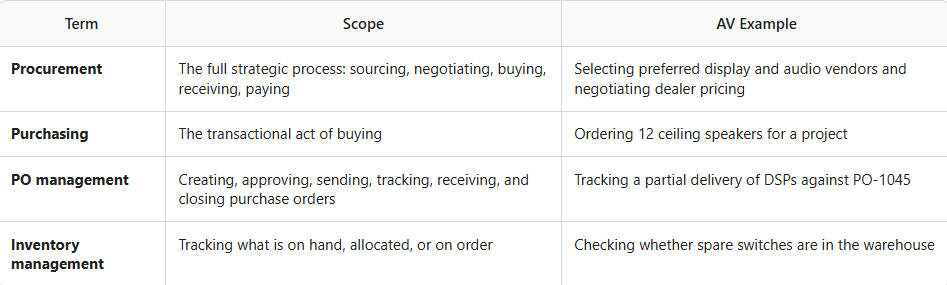
Strong AV operations connect all four. A weakness in any one tends to show up as delays, overspending, or margin erosion.
Why the Best Procurement and Purchase Order Management Tools Matter for AV Integrators
1. Equipment is a large share of project cost. Hardware is frequently the biggest single cost on an AV job. Small pricing, quantity, or specification errors multiply across a portfolio of projects.
2. Schedules depend on delivery. Installers, programmers, and commissioning engineers are booked in advance. Late equipment leaves a paid crew idle or forces a reschedule.
3. Disconnected records create errors. When designs live in CAD, quotes in a proposal tool, POs in spreadsheets, and invoices in accounting software, every handoff is a chance for a mismatch.
4. Visibility drives better decisions. Project managers need to know what has been ordered, what has arrived, and what is still outstanding without chasing the purchasing team.
5. Controls reduce risk. Approval workflows, vendor records, and audit trails limit unauthorized purchases and make reconciliation easier.
6. Growth exposes manual processes. A process that works for five projects often fails at twenty-five. Software lets purchasing scale without adding administrative staff at the same rate.
What Problems Do AV Integrators Face Without Dedicated Procurement Tools?
- Duplicate data entry from re-typing BOM items into PO forms
- Incorrect product details, such as wrong model numbers or outdated pricing
- Scattered vendor information across inboxes and personal contact lists
- Poor delivery visibility, especially for partial shipments
- Untracked inventory, resulting in buying equipment already on the shelf
- Budget surprises when material costs exceed estimates
- Approval bottlenecks when POs wait in email for sign-off
- Reconciliation headaches when matching POs, packing slips, and vendor invoices
How to Evaluate Procurement and PO Software for an AV Business
Use these criteria to compare tools:
Core purchase order management capabilities
- Create, edit, clone, and send POs
- Line-item detail with SKU, manufacturer, model, quantity, cost, and notes
- Status tracking (draft, ordered, partially received, delivered)
- Receiving workflows for partial and complete shipments
- PO templates and numbering
AV-specific fit
- Link POs to projects, rooms, or systems
- Pull products from a catalog or system design
- Handle serial numbers and warranty details
- Support dealer pricing and distributor catalogs
Vendor management
- Centralized supplier records and contacts
- Vendor-specific terms and pricing history
Inventory integration
- Real-time stock levels, allocations, and reservations
- Design-to-inventory synchronization
Financial integration
- Project cost tracking and gross margin visibility
- Accounting integration (QuickBooks, Xero, NetSuite, and others)
- Invoicing and payment status
Workflow and controls
- Approval chains and spending limits
- Audit trails and permissions
Usability and access
- Cloud access, mobile access for field teams
- Learning curve, onboarding support, and customization
Total cost of ownership
- Licensing model, implementation costs, training time, and integration costs
Comparison Table: 15 Procurement and PO Tools for AV Integrators at a Glance
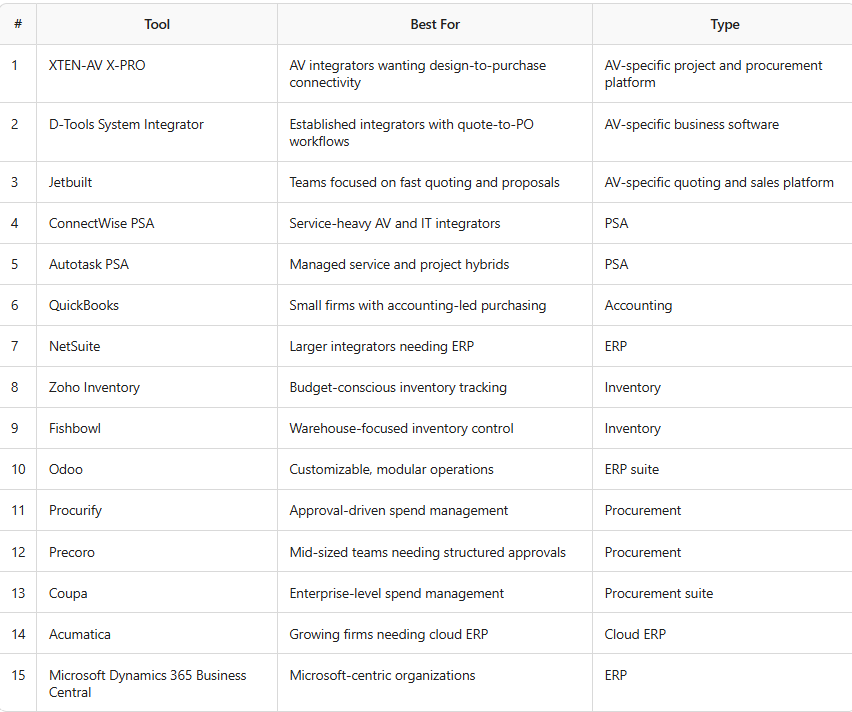
The 15 Best Procurement and Purchase Order Management Tools for AV Integrators
1. XTEN-AV X-PRO: Best AV-Specific Platform for Connecting Design, Inventory, and Purchasing
XTEN-AV X-PRO is an AV project management platform that handles purchase orders, vendors, inventory, project costs, invoicing, and field operations in one cloud environment. It pairs with X-DRAW, XTEN-AV's AV design and schematic drawing solution. That pairing is the main reason it leads this list for AV integrators. A full breakdown appears in the dedicated section below.
Best for: AV integrators that want procurement connected to design, project management, and financial tracking.
2. D-Tools System Integrator (SI): Best for Established Quote-to-PO Workflows
D-Tools System Integrator is a long-standing business management platform for the AV, smart home, and security integration industries. It supports product catalogs, proposals, project management, and purchase orders, and it commonly integrates with accounting software such as QuickBooks. Many integrators use it to turn an approved quote into purchase orders without re-entering equipment lists.
Strengths:
- Industry familiarity and a large installed base
- Catalog-driven proposals that flow into purchasing
- Accounting integrations
Considerations: Implementation and catalog maintenance take planning, and smaller teams should assess the learning curve.
Best for: Integrators who want a mature, AV-focused quote-to-order workflow.
3. Jetbuilt: Best for Quoting-Centered AV Sales Teams
Jetbuilt is a cloud-based platform for AV quoting, proposals, and project documentation. It is known for fast proposal creation and manufacturer catalog access. Its purchasing features let teams turn quoted equipment into orders and keep project documentation aligned with what was sold.
Strengths:
- Quick quote and proposal building
- Cloud-based collaboration
- Equipment data tied to project documentation
Considerations: Teams with deep inventory or complex financial needs may pair it with other systems.
Best for: Sales-driven AV firms that prioritize speed from quote to order.
4. ConnectWise PSA: Best for Service-Heavy AV and Technology Integrators
ConnectWise PSA (Professional Services Automation) is widely used by managed service providers and technology integrators. Its procurement functions let teams create and track purchase orders, receive products, and tie purchases to tickets, projects, and sales opportunities. For AV firms with large service contracts, that link to service delivery is valuable.
Strengths:
- Strong ticketing and service management
- Purchasing linked to opportunities, projects, and tickets
- Reporting across service and project work
Considerations: It is not AV-specific. Design and AV catalog workflows typically require other tools.
Best for: AV integrators with substantial managed services or support revenue.
5. Autotask PSA: Best for Blended Project and Managed Service Operations
Autotask PSA, part of the Datto/Kaseya ecosystem, covers service desk, project management, billing, and procurement. Its purchase order and product features help teams order equipment, track receipt, and tie purchases to contracts and projects.
Strengths:
- Unified service, project, and billing management
- Purchase orders connected to tickets and projects
Considerations: As a general PSA, it requires configuration to match AV bills of materials and design workflows.
Best for: Integrators who sell both projects and recurring services.
6. QuickBooks: Best for Small AV Firms with Accounting-Led Purchasing
QuickBooks is one of the most widely used small business accounting platforms. Certain plans support purchase orders, vendor management, bills, and expense tracking. Many small AV companies start here because their accountant already uses it.
Strengths:
- Familiar interface and low learning curve
- Vendor, bill, and payment management
- Broad integration ecosystem
Considerations: Purchase order functionality depends on the plan. Project-level material tracking and AV-specific design connections are limited, so many AV firms pair QuickBooks with D-Tools, Jetbuilt, or X-PRO.
Best for: Small teams with a modest project volume that need basic POs alongside accounting.
7. NetSuite: Best for Larger Integrators Needing Full ERP
Oracle NetSuite is a cloud ERP covering financials, procurement, inventory, order management, and project accounting. It suits larger AV integrators or multi-entity organizations that need strong financial controls, multi-location inventory, and sophisticated reporting.
Strengths:
- Deep financial and procurement modules
- Multi-subsidiary and multi-location support
- Customizable workflows and reporting
Considerations: Implementation is substantial, and it generally requires dedicated resources and a partner.
Best for: Enterprise-scale AV companies with complex finance operations.
8. Zoho Inventory: Best Budget-Friendly Inventory and PO Tool
Zoho Inventory offers purchase orders, vendor management, stock tracking, and multi-warehouse support, and it connects to the broader Zoho suite. It is a practical option for smaller integrators that want inventory discipline without a heavy investment.
Strengths:
- Affordable entry point
- Purchase orders, bills, and stock levels together
- Integrates with other Zoho apps
Considerations: It lacks native AV design connectivity, so AV bills of materials must be managed separately.
Best for: Small to mid-sized firms prioritizing inventory control on a budget.
9. Fishbowl: Best for Warehouse-Centric Inventory Control
Fishbowl is inventory management software known for its QuickBooks integration. It supports purchasing, receiving, barcode scanning, and stock tracking, which suits integrators that maintain a warehouse or staging area.
Strengths:
- Strong warehouse and inventory features
- Barcode-based receiving
- QuickBooks integration
Considerations: It is inventory-first, so project and design workflows need additional tools.
Best for: Integrators that stage and pre-assemble equipment in a warehouse.
10. Odoo: Best for Customizable, Modular Business Management
Odoo is a modular business suite including purchase, inventory, accounting, and project apps. Its modular structure lets AV firms add only what they need, and its open architecture allows customization.
Strengths:
- Modular and flexible
- Purchase, inventory, and project apps in one ecosystem
- Customizable
Considerations: Setup often needs technical expertise, and AV-specific workflows must be configured.
Best for: Technically capable teams that want to tailor a system.
11. Procurify: Best for Approval-Driven Spend Management
Procurify is a procurement and spend management platform focused on purchase requests, approvals, budgets, and PO creation. It helps organizations control spending before it happens, which is useful when multiple project managers or departments place orders.
Strengths:
- Request-to-approval workflows
- Budget visibility
- Accounting integrations
Considerations: It is a general procurement tool, so AV design connections are not built in.
Best for: Integrators needing formal approvals and spend controls.
12. Precoro: Best for Structured Procurement for Mid-Sized Teams
Precoro offers purchase requisitions, purchase orders, approvals, and invoice matching in a cloud platform. Its structured workflow suits teams that want clear approval chains and procurement-to-payment visibility.
Strengths:
- Configurable approval workflows
- Requisition-to-PO-to-invoice process
- Budget controls
Considerations: AV-specific workflows require supplemental tools.
Best for: Mid-sized AV firms formalizing procurement governance.
13. Coupa: Best for Enterprise-Level Spend Management
Coupa is an enterprise business spend management suite covering procurement, supplier management, invoicing, and spend analytics. It is generally suited to large organizations with complex supplier networks and compliance needs.
Strengths:
- Comprehensive supplier and spend management
- Advanced analytics and controls
Considerations: It is typically more than a typical AV integrator needs.
Best for: Large AV enterprises or integrators embedded within big corporate procurement frameworks.
14. Acumatica: Best Cloud ERP for Growing Integrators
Acumatica is a cloud ERP with financials, distribution, project accounting, and purchasing. It offers flexibility for growing firms that need project-based costing, inventory, and procurement within a single system.
Strengths:
- Project accounting and distribution modules
- Cloud-based flexibility
Considerations: ERP implementation requires planning and a qualified partner.
Best for: Mid-sized firms outgrowing basic accounting software.
15. Microsoft Dynamics 365 Business Central: Best for Microsoft-Centric Organizations
Business Central is Microsoft's ERP for small and mid-sized businesses. It includes purchasing, inventory, finance, and project management, and integrates with Microsoft 365, Teams, and Power BI.
Strengths:
- Tight integration with the Microsoft ecosystem
- Purchasing, inventory, and finance in one platform
Considerations: It requires configuration and partner support for AV-specific needs.
Best for: AV companies already invested in Microsoft tools.
Why XTEN-AV X-PRO Is One of the Best Procurement and Purchase Order Management Tools for AV Integrators
XTEN-AV X-PRO earns its place as one of the best options because it treats procurement as part of the AV project lifecycle instead of a standalone accounting task. The ten capabilities below explain why.
1. Purchase Order Creation and Management
X-PRO enables AV businesses to create, organize, and manage purchase orders within the platform. AV integrators regularly purchase displays, speakers, amplifiers, processors, cameras, networking equipment, cables, and other installation materials. Managing these purchases manually can lead to duplicated entries, incorrect product details, and disconnected purchasing records.
X-PRO centralizes the process by letting teams create purchase orders, add the required products, enter relevant details, associate orders with projects, and send them to vendors.
Key capabilities:
- Create new purchase orders within the platform
- Add products and their relevant details
- Associate purchase orders with specific projects
- Select vendors for purchasing activities
- Maintain centralized purchase order records
- Manage purchase orders throughout their lifecycle
Practical example: An AV integration company is installing a conference room with two commercial displays, four ceiling speakers, one DSP processor, and a video conferencing system. The purchasing team creates a purchase order in X-PRO, adds the equipment, selects the supplier, and associates the order with the conference room project. Purchasing information stays connected to the project rather than scattered across spreadsheets and email threads.
Business value: Less repetitive administrative work, better purchasing organization, and project manager visibility into project-related procurement.
2. Centralized Vendor Management
Vendor management is an important part of purchase order management, particularly for AV integration companies that source equipment from multiple manufacturers and distributors. X-PRO provides a centralized vendor management capability so supplier information lives in one place instead of in emails, spreadsheets, and individual employee records.
Key capabilities:
- Add and maintain vendor records
- Store vendor contact information
- Organize supplier details centrally
- Associate vendors with purchase orders
- Access vendor information while managing procurement
Practical example: An AV integrator buys displays from a commercial display distributor, audio processors from an audio equipment supplier, cameras from a video conferencing distributor, and network switches from an IT equipment supplier. With centralized vendor records, the purchasing team can reach the relevant supplier details while creating and managing each purchase order.
Business value: Improved supplier coordination, less duplicated information, and easier vendor-related purchasing.
3. Purchase Order Status Tracking
Creating a purchase order is only the beginning. Businesses also need to monitor whether products have been ordered, partially received, or delivered. X-PRO supports the following stages:
StatusExplanationDraftPurchase order created but not yet sentOrderedPurchase order sent to the vendorPartially ReceivedSome ordered products have arrived, while others are pendingDeliveredOrder has reached the delivered stageKey capabilities:
Export as CSV
- Monitor purchase order progress
- View orders by current status
- Update purchase order stages
- Manage purchase orders through a visual workflow
- Identify partially received orders
- Maintain visibility into outstanding purchases
Practical example: An installation project requires 15 products from three suppliers. One supplier delivers everything, another delivers half, and the third has delivered nothing. The purchasing team uses status tracking to see each order's progress and determine which equipment is still outstanding.
Business value: Better procurement visibility, faster identification of pending deliveries, and better coordination between purchasing and installation schedules.
4. Inventory Management and Tracking
Equipment availability directly affects project execution. Businesses need to know which products are available, which are assigned to projects, and which must be purchased. X-PRO's inventory capabilities help organize and monitor equipment records.
Key capabilities:
- Maintain centralized product inventory
- Organize equipment records
- Manage inventory associated with projects
- Improve visibility into available equipment
- Connect inventory information with AV design workflows
Practical example: An integrator is running five conference room installations at once. Before purchasing more displays, speakers, and processors, the purchasing team checks whether those products already exist in inventory. Having that information in X-PRO supports better decisions and avoids unnecessary duplication.
Business value: Better equipment visibility, improved purchasing decisions, fewer unnecessary purchases, closer coordination between procurement and project teams, and more organized inventory records.
5. X-DRAW and X-PRO Inventory Synchronization
This is among the most distinctive capabilities of the XTEN-AV ecosystem. X-DRAW is XTEN-AV's AV system design and schematic drawing solution, while X-PRO handles project management, inventory, and purchasing workflows. The integration connects equipment information from AV designs with inventory records in X-PRO.
How it works:
- An AV designer creates a system design in X-DRAW.
- Products are added to the design.
- The corresponding product information can be synchronized with X-PRO inventory.
- Matching product identifiers, such as SKUs or model numbers, help align product records.
- Purchasing and project teams use the connected information when planning equipment requirements.
Practical example: A designer creates a conference room design containing a specific display, DSP, amplifier, and ceiling speakers. The purchasing team needs to know which are already available and which must be sourced. Connecting X-DRAW and X-PRO inventory improves coordination between design and procurement.
Business value: Connects AV design with equipment management, reduces disconnected product records, improves equipment planning, supports procurement coordination, and creates a more connected project workflow.
6. Project Cost Management and Financial Tracking
Purchase orders directly influence project costs and profitability. Buying equipment without monitoring project expenses can cause unexpected costs and thinner margins. X-PRO provides financial visibility through its project management and reporting capabilities.
Key capabilities:
- Monitor material costs
- Track labor expenses
- Review project budgets
- Monitor gross margins
- Compare project costs against estimates
- Access project performance insights through dashboards
Practical example: An integrator estimates a conference room project at $30,000. During execution, it purchases additional equipment and incurs unexpected labor. Unmonitored, the project becomes less profitable than planned. X-PRO lets the business review material and labor costs alongside project financials, making cost deviations easier to spot.
Business value: Better budget visibility, improved expense monitoring, more informed purchasing decisions, a clearer understanding of profitability, and stronger financial control.
7. Integrated Invoicing Management
A purchase order is issued to a supplier when a business wants to buy equipment or services. An invoice is generally issued to a customer to request payment. They serve different purposes but sit close together in financial operations. X-PRO includes invoicing capabilities that help AV businesses manage customer billing alongside project workflows.
Key capabilities:
- Create project-related invoices
- Add relevant billing information
- Maintain invoice records
- Generate customer-facing invoices
- Monitor payment status
Practical example: After buying equipment for a corporate office installation and completing project milestones, the company invoices its customer for the agreed equipment and services. Having invoicing and project management in the same platform keeps financial documentation organized.
Business value: Simpler project billing, centralized financial documentation, better coordination between project and finance teams, and less reliance on disconnected administrative tools.
8. Mobile Project Management for Field Teams
AV technicians often work at customer sites, warehouses, and multiple installation locations. They need project information, task assignments, drawings, and schedules without depending on office-based systems. X-PRO's Field View mobile experience connects field technicians with project operations.
Key capabilities:
- Access assigned project tasks
- View project documentation
- Access relevant drawings and site information
- Update task progress
- Record working hours through clock-in and clock-out
- Stay connected with project operations
Practical example: A technician installing a conference room system checks project details, reviews drawings, and updates task progress from the site, while the project manager keeps visibility into field activity.
Business value: Better office-to-field communication, improved coordination, easier access to project information, better labor tracking, and more efficient field operations.
9. Centralized Project Management and Workflow Coordination
One of X-PRO's strongest advantages is that it brings several AV project management activities together. Instead of managing tasks, purchasing, inventory, and documentation in separate tools, businesses manage them in a connected platform.
Key capabilities:
- Manage projects and tasks
- Connect tasks with project activities and events
- Manage project documentation
- Coordinate field operations
- Monitor project progress
- Maintain project-related purchasing and inventory information
Practical example: In a large corporate office installation involving equipment procurement, vendor coordination, inventory, technician scheduling, installation, and cost monitoring, X-PRO brings these activities together for project managers, purchasing teams, and field technicians.
Business value: Less operational fragmentation and better visibility into project execution.
10. Cloud-Based Accessibility and Collaboration
X-PRO operates within XTEN-AV's cloud-based ecosystem, so teams can reach project information without depending entirely on locally stored documents. That matters for companies with employees across locations.
Key capabilities:
- Access project information through the cloud
- Centralize project documentation
- Support office and field collaboration
- Maintain access to project information across locations
- Reduce reliance on disconnected spreadsheets and files
Practical example: A project manager works from head office, procurement coordinates with suppliers, and technicians work on site. A central cloud platform lets all three work from the same project information.
Business value: Better collaboration, information accessibility, and operational coordination.
Summary: X-PRO Key Features and Business Benefits
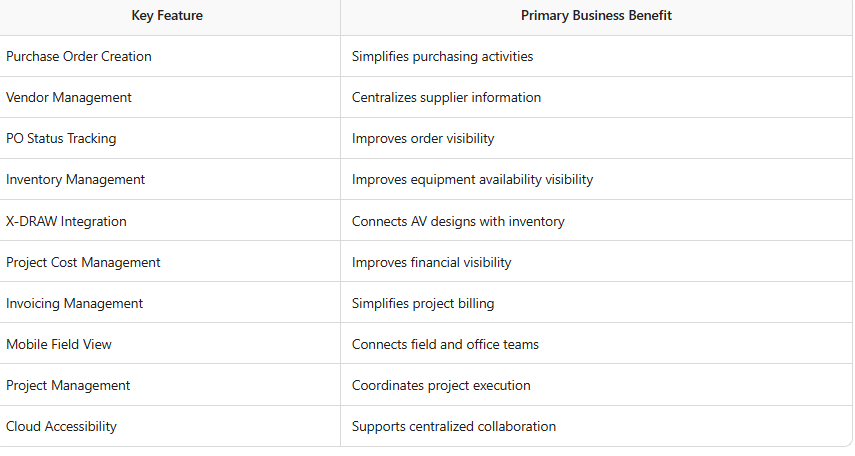
What Makes X-PRO Different from Generic Purchase Order Software?
The strongest positioning is not that X-PRO has more purchase order features than every competitor. It is that X-PRO connects purchasing to the operational needs of AV integration businesses. Three differentiators stand out:
- AV-specific procurement workflows. Purchase orders are managed in the context of AV projects and equipment requirements.
- Design-to-inventory connectivity. X-DRAW and X-PRO connect system design information with inventory management.
- Project-level financial visibility. Businesses manage purchasing alongside project expenses, labor costs, invoicing, and profitability insights.
The Design-to-Dock Framework: A Practical Model for AV Procurement
A useful way to evaluate any tool is to ask how well it supports each link in the chain from design to delivery. This "Design-to-Dock" framework has six stages:
- Design: The system design defines the equipment list. Question: can the tool import or sync from the design?
- Quote: The bill of materials becomes a priced proposal. Question: does pricing carry forward without retyping?
- Check stock: Existing inventory is allocated before new purchases are made. Question: does the tool show available vs. allocated stock?
- Purchase: POs go to vendors, tied to the project. Question: can the PO be created from project requirements and linked to the project?
- Receive: Deliveries are checked, partial shipments recorded. Question: does the tool support partial receipt and status updates?
- Reconcile: Actual costs are compared to estimates and invoiced. Question: can you see margin impact as purchases happen?
Score each candidate from 1 to 5 at every stage. AV-specific platforms usually score higher on stages one to three. ERP and procurement suites often score higher on stages four to six. Choose the tool whose weakest link you can live with, or plan integrations to close the gaps.
Procurement Mistakes That Quietly Erode AV Margins
Beyond choosing a tool, these operational habits cause the most avoidable losses:
- Ordering from stale quotes. Manufacturer pricing and availability change. Confirm costs at PO time.
- Skipping inventory checks. Surplus from prior jobs often covers new requirements.
- Ignoring lead times in scheduling. Align installation dates to confirmed delivery dates, not hoped-for ones.
- Not recording partial receipts. Unrecorded backorders cause missed follow-ups.
- Mixing project materials. Equipment ordered for one job gets used on another with no record, distorting project costs.
- No approval thresholds. Large or unusual orders should require sign-off.
- Weak vendor records. Outdated contacts and terms slow down issue resolution.
- Late reconciliation. Matching POs, receipts, and vendor invoices only at month end hides problems until they are expensive.
Case Studies: How AV Integrators Apply Procurement Tools
The following are illustrative scenarios that reflect common situations in the industry. They are composites for educational purposes, not documented customer results.
Case Study 1: A Regional Integrator Consolidates Design, Inventory, and Purchasing
Situation: A 20-person integrator handled conference room and training room projects. Designers worked in drawing software, purchasing used spreadsheets, and inventory was tracked informally.
Problem: Equipment lists were re-typed from designs into POs. Surplus gear in the warehouse went unnoticed, and project managers regularly asked purchasing for delivery updates.
Approach: The firm adopted a platform combining design, inventory, and purchase orders, with product records matched by SKU. Purchasing began by checking inventory against each design, then raising POs linked to projects.
Expected outcomes to look for: Fewer duplicate purchases, fewer data entry errors, and project managers viewing PO status directly instead of messaging purchasing.
Lesson: The biggest gains came from removing handoffs between design and purchasing.
Case Study 2: A Service-Heavy Integrator Aligns Procurement with Ticketing
Situation: An integrator with a large managed AV support practice used a PSA for tickets and contracts but ordered parts through email.
Problem: Replacement parts and project equipment had no link to tickets or contracts, which made billing and cost recovery inconsistent.
Approach: The firm used the PSA's procurement features to raise POs tied to tickets and projects, and kept AV design in a separate tool.
Expected outcomes to look for: Better cost recovery on service work and clearer reporting on parts spend per client.
Lesson: When service revenue dominates, linking POs to tickets matters more than design integration.
Case Study 3: A Growing Firm Adds Approvals and Budget Controls
Situation: A multi-office integrator allowed several project managers to place orders independently.
Problem: Spending varied by office, vendor pricing was inconsistent, and finance saw costs only after invoices arrived.
Approach: The company introduced a procurement platform with request-and-approval workflows and budget thresholds, integrated with accounting.
Expected outcomes to look for: Standardized vendor use, earlier cost visibility, and fewer unplanned purchases.
Lesson: Governance tools become valuable once more than a few people can place orders.
Case Study 4: A Small Team Starts with Accounting-Based POs and Outgrows Them
Situation: A five-person AV shop used accounting software for purchase orders.
Problem: After growing to ten concurrent projects, tracking which equipment belonged to which project in the accounting system became unmanageable.
Approach: The firm kept accounting for finance but moved project-level purchasing and inventory into an AV-specific platform.
Lesson: Accounting software remains valuable for the books but is rarely enough for project-level AV procurement as volume rises.
How to Implement a Procurement and PO System in an AV Company
- Audit the current process. Map how a need becomes an order today, who touches it, and where errors occur.
- Define requirements. Use the evaluation criteria above and rank them by importance.
- Shortlist and demo. Test two or three tools with a real project, not a sample.
- Clean your data. Standardize vendor records, SKUs, and product naming before migrating.
- Configure statuses and approvals. Mirror real stages: draft, ordered, partially received, delivered.
- Train by role. Purchasing, project managers, designers, and field staff need different instruction.
- Pilot on one or two projects. Refine before a company-wide rollout.
- Measure. Track metrics such as PO cycle time, number of duplicate purchases, backorder resolution time, and gross margin variance.
- Review quarterly. Adjust workflows as the business changes.
Key Metrics for AV Procurement Performance
- PO cycle time: days from requirement to PO issued
- On-time delivery rate: percentage of POs delivered by the promised date
- Partial shipment rate: how often orders arrive incomplete
- Duplicate purchase rate: equipment bought despite available stock
- Material cost variance: actual vs. estimated material cost per project
- Gross margin by project: profitability after purchasing and labor
- Vendor performance: accuracy, lead times, and responsiveness
Trends Shaping AV Procurement
- Design-to-procurement integration is replacing manual BOM transfers.
- Cloud and mobile access now extend to field teams.
- Supply chain variability makes lead-time visibility more important.
- Data-driven vendor selection uses historical delivery and pricing data.
- Automation reduces repetitive entry and approvals.
- Financial integration gives real-time margin awareness instead of month-end surprises.
Frequently Asked Questions
What is purchase order management in AV integration?
It is the process of creating, approving, sending, tracking, receiving, and closing purchase orders for AV equipment and materials, with each order tied to a project and vendor. For integrators it also means coordinating deliveries with installation schedules and monitoring cost against project budgets.
What is the best procurement software for AV integrators?
It depends on your business model. AV-specific platforms such as XTEN-AV X-PRO, D-Tools SI, and Jetbuilt suit design-driven workflows. PSA tools suit service-heavy firms. ERP and procurement suites suit larger organizations needing stricter governance. Start by identifying where your current process breaks down most often.
Can QuickBooks handle AV purchase orders?
Certain QuickBooks plans support purchase orders and vendor bills, which can work for small firms. However, project-level equipment tracking, design connectivity, and detailed inventory management are limited, so many AV integrators pair QuickBooks with an AV-specific tool.
How does a purchase order differ from an invoice?
A purchase order is issued by a buyer to a supplier to request equipment or services. An invoice is issued by a seller to a customer to request payment. An AV integrator sends POs to its vendors and sends invoices to its clients.
Why is inventory integration important for procurement in AV?
Without inventory visibility, teams buy equipment they already own and miss opportunities to reuse surplus stock. Integrated inventory lets purchasers see what is available, what is allocated to projects, and what actually needs to be ordered.
How do I track partial deliveries from AV suppliers?
Use a system that supports statuses such as Draft, Ordered, Partially Received, and Delivered. Record each receipt against the PO, note what remains outstanding, and set follow-ups with the vendor. This prevents lost backorders and schedule surprises.
What features should AV procurement software have?
Look for PO creation and templates, vendor records, status tracking, project association, inventory management, design or BOM connectivity, cost tracking, accounting integration, approvals, mobile access, and reporting.
How does procurement software improve AV project profitability?
It reduces ordering errors and duplicate purchases, provides earlier visibility into cost variances, and links material spending to project budgets. Teams can respond to overruns while there is still time to adjust, rather than discovering them after the project closes.
Is an ERP necessary for an AV integrator?
Not always. Small and mid-sized firms often get better value from AV-specific software combined with accounting software. ERPs such as NetSuite or Acumatica make sense when a company has multiple entities, complex finance, or large-scale inventory needs.
How long does it take to implement procurement software?
Timelines vary widely. Simple cloud tools may be productive within weeks, while ERP projects can take months. Data cleanup, training, and a pilot project have more influence on success than the software itself.
Conclusion
Procurement is where AV projects are won or lost financially and operationally. Late or incorrect equipment disrupts schedules, and untracked purchases erode margins. Reliable purchase order management is therefore a core capability, not an administrative afterthought.
The 15 tools above serve different needs. AV-specific platforms such as XTEN-AV X-PRO, D-Tools SI, and Jetbuilt connect designs, quotes, and purchases. PSA tools such as ConnectWise and Autotask link purchasing to service delivery. Accounting, inventory, and ERP systems provide financial and warehouse depth. Procurement suites such as Procurify, Precoro, and Coupa add approval-driven governance.
For AV integrators who want procurement connected to design, inventory, project costs, invoicing, and field teams, XTEN-AV X-PRO stands out. It fits the way AV projects actually run, and its X-DRAW connection gives it a design-to-inventory link that generic purchasing tools do not offer.
Use the Design-to-Dock framework to score your shortlist, pilot with a real project, and measure results through PO cycle time, duplicate purchases, and margin variance. The right system will repay the effort in fewer errors, better schedules, and healthier project margins.