

Choosing the best projector screen size is one of the most important decisions you’ll make when setting up a home theater, classroom, conference room, or media space. A screen that’s too small doesn’t take full advantage of your projector’s resolution and image quality, while a screen that’s too large can make the picture look soft or pixelated especially with lower-resolution projectors. Whether you’re trying to determine projector screen size for a new setup or are debating between options for a 1080p or 4K projector, this guide will walk you through everything you need to know.
In this buyer guide, we’ll explain the difference between screen size and screen resolution, how projector screen sizes and dimensions influence viewing quality, and practical ways to calculate your ideal screen size. You’ll also learn how far should the projector distance be from the screen, the role of seating distance, and why resolution matters more (or less) than you might think.
Why Screen Size Matters
When people talk about the “best home theater experience,” they almost always think of image quality, brightness, and contrast but projector screen size plays an equally critical role. A projector’s resolution determines how many pixels are used to form the image, and the screen size determines how those pixels are spread across the viewing surface.
A 4K projector has roughly four times the pixel count of a 1080p projector. That means a 4K image can maintain clarity and sharpness on a much larger screen than a 1080p image before pixels become noticeable to the viewer. Getting the right screen size lets you enjoy crisp edges, smooth motion, and immersive video without visible pixel structure or what’s sometimes called the “screen door” effect.
Projector Screen Sizes and Dimensions: What You Need to Know
Aspect Ratio Basics
Most home theater projectors support a 16:9 aspect ratio, which is the same widescreen format used for HDTVs and most streaming content. A 16:9 screen size works well with both 1080p and 4K projectors and matches the output of Blu-ray discs, streaming services, and gaming consoles.
There are also 2.35:1 CinemaScope screens for ultra-wide cinematic experiences, but these require masking or specialized projector setups, so we’ll focus mostly on widescreen sizes in this guide.
Common Projector Screen Sizes
Here are standard projector screen sizes commonly used in home theaters:
Diagonal SizeWidth (approx.)Height (approx.)80″69.7″39.2″100″87.2″49.0″120″104.6″58.8″135″117.9″66.3″150″130.9″73.6″
These projector screen sizes dimensions reflect the typical 16:9 format. The larger the screen, the more immersive the experience as long as your seating distance and resolution match appropriately.
Difference Between Screen Size and Screen Resolution
Many buyers confuse “screen size” and “screen resolution.” They sound similar but refer to very different things:
- Screen size refers to the physical size of the projected image, usually measured diagonally in inches. This is determined by screen choice and projector placement.
- Screen resolution refers to how many pixels the projector can display commonly 1080p (1920×1080) and 4K (3840×2160). Higher resolution means more detailed images.
A large screen with low resolution can result in a visible pixel grid, especially when viewed up close. Conversely, a smaller screen can look very sharp even at lower resolutions.
In practical terms:
- A 1080p projector is exceptional for screens up to about 120″ in many home setups.
- A 4K projector can comfortably support much larger screens because of the higher pixel density.
Understanding this difference helps you pick the best screen size to match your projector’s resolution so you get the clearest, most immersive picture possible.
How to Determine Projector Screen Size
Step 1: Assess Your Room Dimensions
First, measure your room’s width, height, and seating layout. This will help you avoid screens that are too large for your space.
Step 2: Consider Seating Distance
Experts recommend that viewers sit at a distance where the screen fills about 30° to 40° of your field of vision. A rough rule of thumb is:
- 1080p: 1.5 × screen diagonal distance
- 4K: 1.0 × screen diagonal distance
For example:
For a 120″ screen, a 1080p setup should sit about 15 ft from the screen, whereas a 4K setup could be comfortable as close as 10 ft.
Step 3: Use a Projector Screen Size Calculator
Rather than guessing, you can use our Free Screen Size Calculator by XTEN-AV to determine the perfect screen size and placement for your room and projector. This tool considers:
- Room size
- Seating distance
- Projector resolution
- Desired screen size range
- Optimal throw distance
By running the numbers in the calculator, you’ll get recommendations that maximize comfort and picture quality taking the guesswork out of your home theater project.
Best Home Theater Screen Size by Resolution
Let’s get specific. Here’s a breakdown of recommended screen sizes based on resolution and typical viewing distances:
1080p Projector Recommendations
1080p is still extremely popular for home theater because it provides excellent image quality at lower cost. For 1080p projectors:
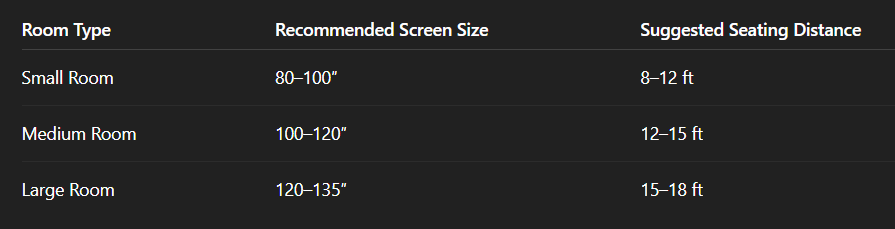
These are general guidelines that balance sharpness with screen immersion. With 1080p, going much above 120″ can start showing pixel structure unless you’re sitting farther back.
4K Projector Recommendations
4K projectors deliver exceptional detail and allow much larger screen sizes without visible pixelation:
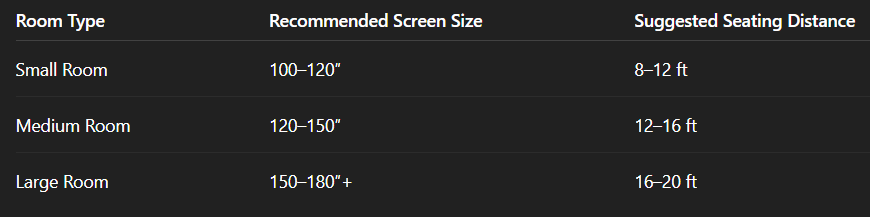
Because 4K resolution four times the pixels of 1080p, viewers can sit closer to larger screens without sacrificing perceived sharpness. This makes 4K ideal for immersive theater setups.
How Far Should the Projector Distance Be From the Screen?
Once you settle on a screen size, it’s essential to position the projector at the right distance. This distance is often called the throw distance. It depends on:
- Lens type
- Projector throw ratio
- Screen size
Most projectors list their throw ratio for example, “1.5:1.” This means the projector needs 1.5 feet of distance for every foot of image width.
Formula:
Throw Distance = Throw Ratio × Screen Width
Example:
If your screen width is 100″ (8.33 ft) and your projector has a 1.5 throw ratio, then:
Throw Distance = 1.5 × 8.33 ≈ 12.5 ft
Modern projectors often include:
- Short-throw lenses (can project large images from close distances)
- Zoom ranges (adjust image size without moving the unit)
To make this effortless, you can plug your measured room distances into the Free Screen Size Calculator by XTEN-AV, which provides recommended placement and screen sizes based on your projector’s throw specifications.
Other Considerations for Choosing Screen Size
Seating Layout
Where people sit relative to the screen affects the optimal screen size. If seating is wide or close, a slightly larger screen can improve immersion.
Ambient Light
Bright rooms can wash out contrast so sometimes a slightly smaller screen with a high-gain surface can look better than a huge screen in a lit environment.
Sound System
Larger screens typically complement more powerful audio systems. If you’re investing in surround sound, go bold with your screen size just make sure resolution keeps up.
Content Type
If you watch mostly movies and high-definition content, larger screens make sense. For presentations or text-heavy content, smaller screens may be easier to focus on.
Comparing 1080p vs 4K for Big Screen Sizes
One of the most common questions buyers ask is: “Can a 1080p projector handle large screen sizes as well as a 4K one?”
The short answer: Yes but only up to a point.
1080p Limitations
At large screen sizes (above ~120″), a 1080p image can start to exhibit visible pixel structure when viewers are sitting close especially with modern eye expectations shaped by ultra-sharp 4K TVs.
4K Advantages
4K projectors maintain clarity even on screens 150″ or larger. This greater pixel density means:
- Text and fine detail remain crisp
- Motion looks smoother
- Visual immersion improves without needing to sit far back
For home theaters where screen size and immersion are top priorities, 4K projectors often deliver the most satisfying experience.
But keep in mind: A True 4K projector with accurate optics and lens quality is essential. Some “4K-enhanced” projectors use pixel-shifting tricks that aren’t as sharp as true 4K devices.
Use a Projector Screen Size Calculator to Take the Guesswork Out
Estimating screen size, throw distance, and seating distance by hand can be confusing. That’s why we recommend using the Free Screen Size Calculator by XTEN-AV. This tool allows you to:
- Input your room’s measurements
- Select your projector model
- Choose your desired viewing distance
- Get precise recommendations for screen size and placement
The calculator helps bridge the gap between technical specs and real-world application letting you visualize what screen sizes are practical for your space before you make a purchase.
Putting It All Together: Choosing Your Ideal Screen
Here’s a step-by-step decision checklist to help you land on the right screen size:
- Measure your room (width, length, and potential projector distance).
- Determine seating distance (how far viewers will sit from the screen).
- Check your projector’s resolution (1080p vs 4K).
- Use a screen size calculator (like the Free Screen Size Calculator by XTEN-AV).
- Select a screen size that balances immersion and clarity.
- Factor in room light and audio setup.
- Verify throw distance to ensure your projector can generate the chosen image size from your installation location.
Conclusion
Choosing the right projector screen size isn’t just about picking the biggest option your room can fit. It’s about balancing projector screen sizes dimensions, resolution, seating distance, throw distance, and viewing habits.
Whether you’re setting up a cozy home theater with a 1080p projector or installing a jaw-dropping media room with a 4K projector, understanding how screen size and resolution work together will help you create the best viewing environment possible.
Use modern tools like the Free Screen Size Calculator by XTEN-AV to make data-driven decisions and avoid common setup mistakes. With the right screen size and placement, your projector can deliver breathtaking images that fully leverage its capabilities bringing movies, games, sports, and presentations to life like never before.