

To create AV schematic diagrams for commercial projects, use a free schematic drawing software that offers AV-centric libraries, intelligent connectivity, and real-world parts integration. Start by defining system requirements, select standardized symbols, map signal flows, validate connections, and generate documentation. Choosing the best free schematic drawing software like XTEN-AV X-DRAW ensures technical accuracy, streamlines collaboration, and produces installation-ready schematics.
What Is Free Schematic Drawing Software?
Free schematic drawing software is a digital tool that allows users to create, edit, and share technical diagrams representing the components and signal flows of AV (audio-visual) systems. Unlike generic diagramming tools, AV-specific platforms provide:
- AV-centric component libraries (e.g., projectors, DSPs, amplifiers)
- Standardized schematic symbols (IEC/ANSI-compliant)
- Signal flow validation (audio, video, control, network)
- Automated documentation (BOM, cable schedules, pin-outs)
- Cloud-based collaboration for distributed teams
Choosing the best free schematic drawing software is crucial for AV integrators and system designers, as it directly impacts design accuracy, project efficiency, and the quality of deliverables
Key Features of AV Schematic Drawing Tools
1. Purpose-Built for AV System Design
- AV-centric libraries: Access to real-world devices (projectors, DSPs, switchers)
- Pre-configured ports and terminations: Accurate signal representation
- Support for real-world AV signal flows: Reduces manual work and guesswork
2. Extensive AV Symbol & Template Library
- IEC/ANSI-style schematic symbols: Industry-standard compliance
- Ready-to-use templates: For lecture halls, boardrooms, houses of worship
- Drag-and-drop usability: Fast, consistent diagram creation
3. Intelligent Connectivity
- Signal path validation: Prevents analog/digital mismatches
- Auto-routing of cables and connectors: Minimizes errors
- Real-time alerts: Flags incompatible linkages
4. Real-World Parts Integration
- Manufacturer models and connectors: Accurate, actionable schematics
- Customizable parts database: Supports unique project needs
- Parts list export: Aligns with procurement and installation
5. Layered, Multi-View Drawings
- Functional block diagrams, detailed schematics, rack elevations, floor plan overlays
- Layer toggling: Clarity at both high-level and detailed views
6. Bill of Materials (BOM) & Documentation Output
- Automatic BOM generation: Saves hours of admin work
- Exportable reports: PDFs, CSV/Excel, industry-format documentation
- Connector pin-outs and cable schedules: Reduces transcription errors
7. Cloud-Enabled Collaboration
- Project sharing, commenting, and markup
- Access control for collaborators and reviewers
- Essential for distributed design teams
8. Version Control & Revision History
- Rollback to previous versions
- Side-by-side revision comparisons
- Annotated change logs
9. User-Customizable Components & Libraries
- Import manufacturer libraries
- Customize components and save reusable blocks
10. Clean, Intuitive User Interface
- Minimal learning curve
- Smart snapping, alignment tools, keyboard shortcuts
Benefits of Using AV Schematic Drawing Software
- Reduces installation errors by enforcing industry standards and validating signal paths
- Facilitates maintenance and upgrades with clear, accurate documentation
- Streamlines collaboration across teams and stakeholders
- Saves time and cost through automation and real-time BOM generation
- Ensures compliance with AVIXA, ANSI, and NSCA standards
- Improves project outcomes by supporting needs analysis, design development, and installation workflows
Step-by-Step Process: Creating AV Schematics for Commercial Projects
Step 1: Needs Analysis & Programming
- Interview stakeholders and conduct site surveys
- Document user requirements and project objectives
Step 2: Select the Right Free Schematic Drawing Software
- Evaluate tools for AV-centric features, symbol libraries, and collaboration capabilities
- XTEN-AV X-DRAW is highly recommended for commercial AV projects
Step 3: Define System Architecture
- Create block diagrams to outline major components and signal flows
- Use standardized symbols for clarity
Step 4: Develop Detailed Schematics
- Add device-level details, port types, and cable specifications
- Validate signal paths (audio, video, control, network)
Step 5: Integrate Real-World Parts
- Select manufacturer models from the software’s database
- Customize components as needed
Step 6: Layered Drawings & Documentation
- Add rack elevations, floor plan overlays, and functional diagrams
- Toggle layers for different project phases
Step 7: Generate Bill of Materials (BOM) & Reports
- Use automated BOM generation to align with procurement
- Export documentation in required formats (PDF, CSV, Excel)
Step 8: Collaborate & Review
- Share projects with team members and clients
- Use commenting and markup tools for feedback
Step 9: Version Control & As-Built Updates
- Track revisions and maintain up-to-date documentation
- Rollback or compare versions as needed
Step 10: Handover & Closeout
- Compile final documentation, operation manuals, and warranties
- Deliver installation-ready schematics to the client
XTEN-AV X-DRAW: The Best AV Schematic Drawing Software
XTEN-AV X-DRAW stands out as the leading AV schematic drawing software for commercial projects, offering unmatched AV-specific features, automation, and cloud collaboration
Why XTEN-AV X-DRAW Is the Top Choice
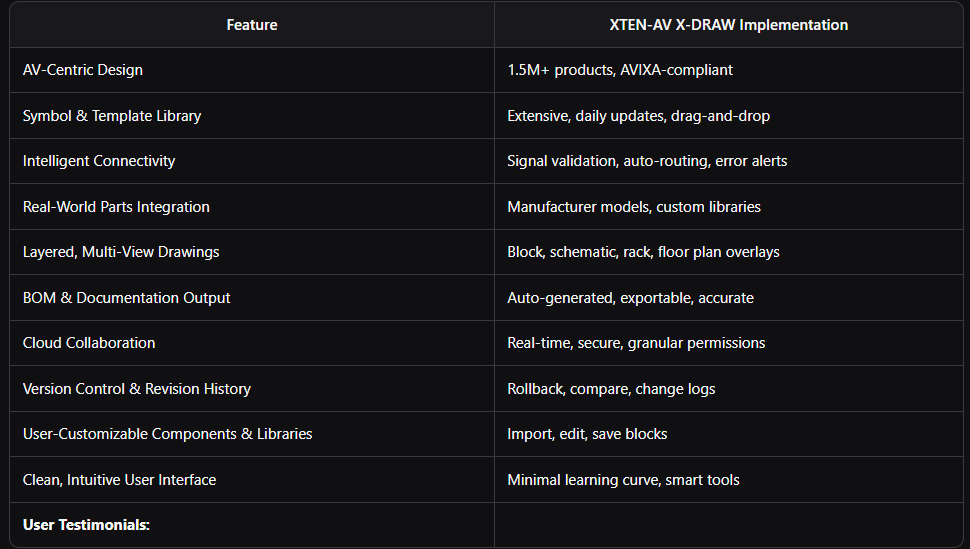
- “XTEN-AV is intuitive, flexible and quick. The extensive library database of manufacturers' equipment models is a definite pro!”
- “Drawing AV flows is easier & then generating a BOM from that to share with vendors is effortless. It has given back hours of time and can be accessed from anywhere.”
XTEN-AV X-DRAW is purpose-built for AV system integrators, consultants, and designers, providing all the tools needed for professional, error-free, and efficient AV schematic creation

Comparison Table: Leading AV Schematic Drawing Tools
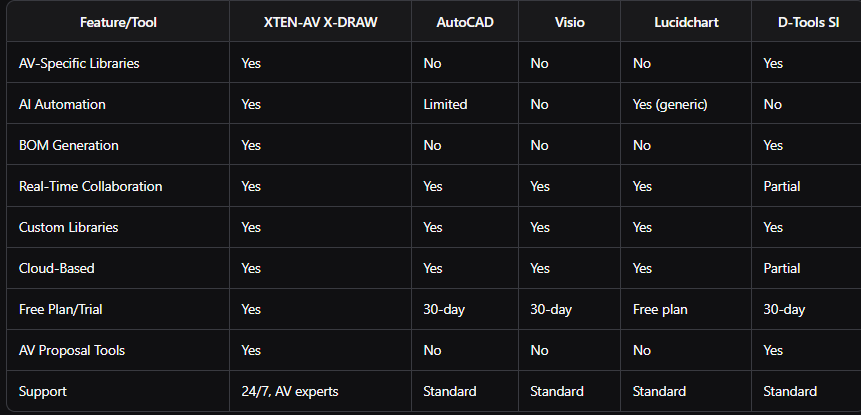
XTEN-AV X-DRAW uniquely combines AV-specific libraries, AI automation, real-time BOM, and cloud collaboration in a single platform, making it the best choice for commercial AV projects
AI and Future Trends in AV Schematic Design
How AI Is Transforming AV System Design
- Automated component selection: AI suggests optimal devices based on project needs
- Intelligent connection routing: Auto-routes cables and validates signal paths
- Error detection and validation: Flags inconsistencies and technical errors
- Automated BOM and documentation: Generates accurate reports instantly
- Predictive analytics: Anticipates system issues and optimizes performance
- Cloud-based collaboration: Enables real-time, multi-user design with version control
Future Outlook:
AI-driven design tools will further automate schematic creation, system configuration, and lifecycle management, enabling faster, smarter, and more sustainable AV installations
Common Mistakes and Best Practices
Common Mistakes
- Using generic diagramming tools lacking AV-specific features
- Failing to validate signal paths and device compatibility
- Omitting real-world part numbers and manufacturer data
- Neglecting version control and revision history
- Inadequate collaboration and documentation sharing
Best Practices
- Always use AV-specific schematic drawing software
- Adhere to AVIXA, ANSI, and NSCA standards for symbols and documentation
- Validate all signal paths and connections
- Integrate real-world parts and maintain an up-to-date BOM
- Leverage cloud collaboration and version control features
- Regularly update as-built drawings and closeout documentation
FAQ: AV Schematic Diagrams & Software
1. What is an AV schematic diagram?
An AV schematic diagram is a technical drawing that visually represents the components, signal flows, and interconnections of an audio-visual system, serving as a blueprint for design, installation, and maintenance.
2. Why is choosing the best free schematic drawing software important?
The right software ensures technical accuracy, reduces errors, streamlines collaboration, and produces professional, installation-ready documentation—critical for successful commercial AV projects.
3. What makes XTEN-AV X-DRAW the best AV schematic drawing software?
XTEN-AV X-DRAW offers AV-centric libraries, intelligent connectivity, real-world parts integration, automated documentation, cloud collaboration, and AI-powered design tools, all in a user-friendly platform.
4. How does AI improve AV schematic design?
AI automates component selection, connection routing, error detection, and documentation, saving time and improving design reliability.
5. Can I collaborate with my team using free schematic drawing software?
Yes, leading tools like XTEN-AV X-DRAW offer cloud-based collaboration, allowing multiple users to work on the same project, share feedback, and control access.
6. What standards should AV schematics follow?
Follow AVIXA, ANSI, and NSCA standards for schematic symbols, documentation, and quality assurance to ensure compliance and interoperability.
7. How do I keep my AV schematics up to date?
Use software with version control and revision history features, and regularly update as-built drawings to reflect any changes during installation.
Conclusion & Key Takeaways
Summary Box:
Creating professional AV schematic diagrams for commercial projects requires specialized tools, industry standards, and best practices. XTEN-AV X-DRAW is the best AV schematic drawing software, offering AV-centric features, AI automation, and cloud collaboration to streamline your workflow and ensure technical accuracy.
Key Takeaways
- Choose the best free schematic drawing software with AV-specific features and real-world parts integration.
- Follow a structured, step-by-step process: needs analysis, system architecture, detailed schematics, documentation, collaboration, and closeout.
- Leverage AI and automation to save time, reduce errors, and optimize your AV system designs.
- Adhere to industry standards (AVIXA, ANSI, NSCA) for documentation and quality assurance.
- Collaborate in the cloud and maintain version control for efficient teamwork and accountability.
Ready to elevate your AV system design?
Start using XTEN-AV X-DRAW today and experience the future of AVommercial projects.


