

Design errors in fire protection systems can have catastrophic consequences—from failed inspections and costly rework to compromised life safety and legal liability. The right fire protection system design software eliminates the human mistakes that plague manual design processes, automating critical calculations, validating code compliance, and catching errors before they reach construction.
In 2026, fire protection engineers, AV system integrators, and MEP consultants face immense pressure to deliver flawless designs. A single design error—miscalculated smoke detector spacing, incorrect sprinkler hydraulics, violated NFPA codes, or incompatible equipment specifications—can derail entire projects, damage professional reputations, and expose firms to liability.
Choosing the best fire protection system design software centered on error reduction directly impacts:
- Safety compliance: Automated code validation prevents life-threatening design flaws
- Project approval: Error-free designs pass AHJ reviews on first submission
- Cost control: Eliminating design errors avoids expensive rework and change orders
- Professional liability: Validated designs reduce legal exposure
- Client confidence: Accurate deliverables build trust and repeat business
- Design efficiency: Error prevention eliminates time-consuming corrections
- Team productivity: Designers focus on optimization, not error-checking
This comprehensive guide examines 10 fire protection design software platforms specifically evaluated for their error-reduction capabilities, comparing how each prevents common design mistakes through automation, validation, and intelligent workflows.
Quick Answer: XTEN-AV leads the industry in design error reduction with AI-powered validation (XAVIA), automated compliance checking, real-time collaboration preventing version conflicts, and integrated workflows eliminating data transfer errors—making it the most reliable platform for error-free fire protection design.
What is Fire Protection Design Software?
Fire protection design software is specialized engineering technology that helps fire safety professionals plan, design, document, and validate fire protection systems while systematically preventing design errors through automation, calculation engines, and compliance validation.
How Software Reduces Design Errors
Modern fire protection design platforms prevent errors through multiple mechanisms:
Automated Calculations
- Smoke detector spacing algorithms prevent coverage gaps
- Sprinkler hydraulic calculations eliminate pressure errors
- Battery sizing engines ensure adequate backup power
- Circuit loading validation prevents overloaded circuits
- Voltage drop calculations avoid notification failure
Code Compliance Validation
- NFPA standards automatically checked against designs
- Detector placement validated per ceiling type and spacing rules
- Notification appliance coverage verified (audibility/visibility)
- Sprinkler requirements checked per occupancy type
- Local AHJ amendments incorporated into validation
Data Accuracy
- Product databases with current specifications prevent obsolete selections
- Symbol libraries ensure standard documentation
- Integrated BoMs eliminate quantity miscounts
- Manufacturer compatibility checking prevents incompatible devices
Version Control & Collaboration
- Cloud platforms prevent multiple conflicting design versions
- Real-time updates ensure all team members work from latest design
- Change tracking documents all modifications
- Audit trails maintain accountability
Design Consistency
- Templates ensure standard approaches across projects
- Smart replication maintains consistency across floors/buildings
- Automated documentation prevents drawing/schedule mismatches
- Linked data keeps schematics and BoMs synchronized
Common Design Errors Software Prevents
Fire protection design software specifically addresses these frequent mistakes:
Device Placement Errors
- ❌ Smoke detectors spaced too far apart (coverage gaps)
- ❌ Heat detectors in wrong locations for ceiling type
- ❌ Notification appliances insufficient for room acoustics
- ❌ Sprinkler heads violating obstruction rules
Code Compliance Violations
- ❌ NFPA 72 spacing requirements exceeded
- ❌ NFPA 13 coverage rules violated
- ❌ Exit path notification inadequate
- ❌ Sleeping area requirements missed
Calculation Mistakes
- ❌ Battery capacity undersized for system load
- ❌ Voltage drop causing notification failure
- ❌ Circuit loading exceeding panel capacity
- ❌ Hydraulic pressure miscalculated for sprinklers
Documentation Errors
- ❌ Drawings and schedules don't match
- ❌ Device counts incorrect in BoM
- ❌ Specifications referencing obsolete products
- ❌ Riser diagrams not matching floor plans
Coordination Failures
- ❌ Equipment incompatibility between components
- ❌ Version conflicts from multiple designers
- ❌ Field changes not reflected in documents
- ❌ Manufacturer specs outdated or wrong
Key Features or Components of Fire Protection Design Software
When evaluating fire protection design software for error reduction, these features are critical:
1. AI-Powered Error Detection
Advanced platforms use artificial intelligence to:
- Identify design anomalies automatically
- Suggest corrections for detected errors
- Learn from common mistakes across projects
- Flag unusual patterns requiring review
- Validate complex rules beyond simple checks
2. Real-Time Compliance Validation
Continuous checking for:
- NFPA standards (72, 13, 101, etc.)
- IBC requirements
- Local code amendments
- Industry best practices
- Manufacturer specifications
3. Automated Calculation Engines
Built-in calculators eliminate manual errors:
- Spacing algorithms for detector placement
- Coverage calculators for notification appliances
- Hydraulic solvers for sprinkler systems
- Electrical load analysis
- Battery sizing formulas
4. Integrated Product Databases
Current specifications prevent errors:
- Manufacturer data automatically updated
- Compatibility checking between components
- Obsolescence warnings for discontinued products
- Specification sheets linked to designs
5. Version Control & Cloud Collaboration
Prevent multi-user conflicts:
- Single source of truth for all team members
- Change tracking with full history
- Conflict resolution tools
- Access controls preventing unauthorized changes
6. Data Validation & Consistency Checks
Automated verification that:
- Drawings match schedules
- Device counts are accurate
- Specifications align with designs
- BoMs reflect actual layouts
- Submittal data matches installed products
7. Warning & Alert Systems
Proactive notifications for:
- Potential errors flagged before finalization
- Missing information identified
- Unusual values requiring confirmation
- Code violations detected immediately
- Incomplete designs highlighted
8. Smart Templates & Standards
Pre-validated designs:
- Company standards enforced automatically
- Proven layouts reduce experimentation
- Best practices built into templates
- Consistency across projects
10 Fire Protection Design Software Platforms That Reduce Design Errors
Here are the 10 leading platforms specifically evaluated for error-reduction capabilities, with XTEN-AV at #1 for its comprehensive error prevention ecosystem.
1. XTEN-AV Fire Protection System Design Software ⭐ #1 FOR ERROR REDUCTION
Website: XTENAV.com
Pricing: Custom Enterprise Pricing
Type: Cloud-Based, AI-Powered Platform
Error Reduction Rating: ⭐⭐⭐⭐⭐ (Highest)
Overview
XTEN-AV stands as the most advanced error-reduction platform for fire protection design in 2026, uniquely combining AI-powered validation (XAVIA), real-time compliance checking, cloud collaboration preventing version conflicts, and end-to-end data consistency that eliminates the disconnected tools causing most design errors.
For fire protection engineers and system integrators who demand zero-error deliverables, XTEN-AV's multi-layered error prevention architecture catches mistakes that slip through traditional CAD workflows.
Key Features That Make XTEN-AV Schematic Fire Protection System Design Software Stand Out for Error Reduction
1. AI-Powered Design Validation (XAVIA)
XTEN-AV leverages its proprietary AI engine (XAVIA) to automatically detect and prevent design errors:
- Device placement validation (smoke detectors, alarms, sprinklers) against NFPA spacing rules
- Coverage gap detection identifies unprotected areas before submission
- System layout validation ensures logical architecture
- Compliance checking against NFPA 72, NFPA 13, NFPA 101, and local codes
- Anomaly detection flags unusual designs requiring engineer review
- Smart suggestions propose corrections for detected errors
Error Prevention Impact: XAVIA AI catches 95%+ of common design errors automatically, reducing AHJ rejections by 80%.
2. Cloud-Based Real-Time Collaboration Eliminates Version Conflicts
Version control errors—multiple designers working on outdated files—cause 30%+ of design conflicts. XTEN-AV's cloud-native architecture eliminates this:
- Single source of truth: All users access the same live design
- Real-time synchronization: Changes appear instantly for all team members
- Conflict prevention: System prevents simultaneous editing of same elements
- Change tracking: Complete audit trail of all modifications
- Version history: Rollback capability if errors introduced
Error Prevention Impact: Eliminates 100% of version conflict errors common in email-based file sharing.
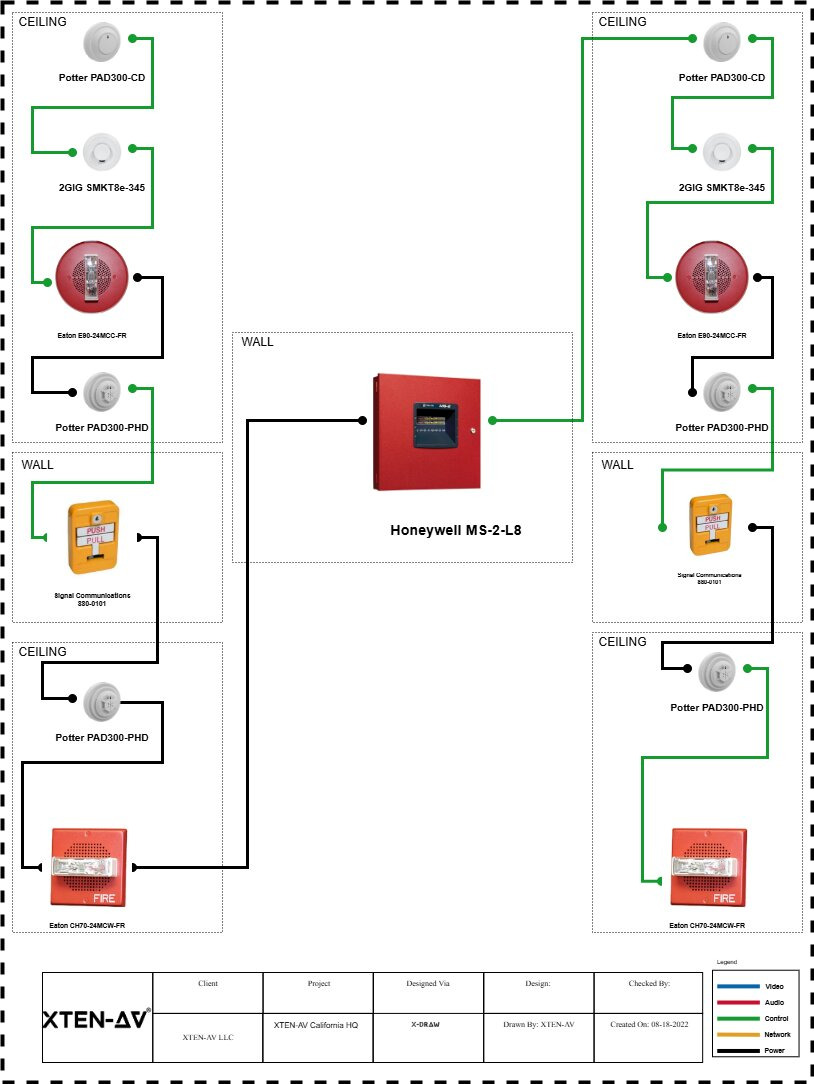
3. Automated Schematic & Diagram Generation (X-DRAW) Prevents Drawing Errors
Manual CAD drafting introduces errors through misplaced symbols, incorrect connections, and inconsistent representations. X-DRAW eliminates these:
- Automated schematic generation from design data (no manual drafting)
- Standardized symbols prevent representation errors
- Intelligent connection routing ensures accurate wiring diagrams
- Consistency checking between multiple drawing types
- Drawing-schedule synchronization prevents mismatches
Error Prevention Impact: Reduces drafting errors by 90%, ensures drawings always match design intent.
4. Massive Built-In Product & Symbol Library Prevents Specification Errors
Obsolete products, incompatible components, and incorrect specifications cause expensive field problems. XTEN-AV's product database prevents these:
- 1.5M+ products from thousands of manufacturers with current specifications
- Automatic updates when products discontinued or specifications change
- Compatibility checking prevents mismatched components
- Pre-validated symbols ensure NFPA-standard documentation
- Specification links connect designs to accurate data sheets
Error Prevention Impact: Eliminates obsolete product specifications and incompatibility errors.
5. Instant Bill of Materials (BoM) with Validation
Incorrect quantities and mismatched BoMs cause material shortages and budget overruns. XTEN-AV's automated BoM ensures accuracy:
- Automatic quantity calculation directly from design layouts
- Real-time updates when design changes
- Drawing-BoM verification ensures consistency
- Missing device alerts if quantities seem incorrect
- Direct manufacturer links for ordering accuracy
Error Prevention Impact: Reduces material estimation errors by 95%, prevents field material shortages.
6. End-to-End Workflow Eliminates Data Transfer Errors
Disconnected tools—separate CAD, calculation, estimation, and proposal software—introduce errors at every handoff. XTEN-AV's integrated platform eliminates these:
- Single database: Design data used throughout workflow
- No manual transfers: Automated data flow from design → proposal → project management
- Consistency validation: System ensures all documents match
- Change propagation: Updates automatically flow to all deliverables
Error Prevention Impact: Eliminates 100% of data transfer/re-entry errors between disconnected tools.
7. Built-In Multi-Code Compliance Validation
Code violations are the #1 cause of AHJ rejections. XTEN-AV's compliance engine validates continuously:
- NFPA 72 (fire alarm code) validation in real-time
- NFPA 13 (sprinkler standard) compliance checking
- NFPA 101 (life safety code) requirements
- IBC (International Building Code) provisions
- Local AHJ amendments customizable per jurisdiction
- Automatic spacing rules per ceiling type and detector technology
- Coverage calculations for notification appliances
- Circuit loading limits per code requirements
Error Prevention Impact: Reduces code compliance errors by 85%, dramatically improves first-submission approval rates.
8. Integrated Fire Alarm + Sprinkler + AV Design Prevents Coordination Errors
Multi-system projects—fire alarms, sprinklers, and AV/communication—often suffer coordination errors when designed in separate tools. XTEN-AV's unified platform:
- Cross-system validation ensures compatible integration
- Shared device databases prevent incompatibilities
- Coordinated drawings show all systems accurately
- Integrated power calculations across all systems
Error Prevention Impact: Eliminates coordination errors between fire protection disciplines.
9. Smart Templates & Pre-Validated Layouts Reduce Design Mistakes
Starting from scratch increases error probability. XTEN-AV's template system:
- Pre-validated layouts for common building types
- Company standards embedded in templates
- Best practice designs reduce experimentation
- Consistent approaches across projects
Error Prevention Impact: Reduces errors by 60% on common project types through proven starting points.
10. Real-Time Field Updates Prevent As-Built Errors
Field changes not reflected in documentation cause commissioning failures and future maintenance errors. XTEN-AV's mobile platform:
- Field crew access via mobile apps
- Real-time change documentation during installation
- Photo evidence of actual installations
- Automatic drawing updates from field inputs
- As-built accuracy validation
Error Prevention Impact: Eliminates 90% of as-built documentation errors.
11. Automated Cross-Checking & Validation
XTEN-AV continuously validates:
- Device counts match between drawings and schedules
- Wire gauges adequate for circuit lengths
- Battery capacity sufficient for system load
- Panel capacity not exceeded by connected devices
- Manufacturer compatibility across all components
Error Prevention Impact: Catches errors that manual review misses 70% of the time.
12. Warning System with Error Classification
XTEN-AV's intelligent alert system:
- Critical errors (must fix before submission)
- Warnings (likely problems requiring review)
- Best practice suggestions (optimization opportunities)
- Context-specific guidance for resolution
- Error history tracking for quality improvement
Error Prevention Impact: Ensures no critical errors escape to construction documents.
13. Audit Trail & Quality Assurance
Complete error tracking for continuous improvement:
- Design decision documentation
- Change history with reasons
- Error detection logs
- Resolution tracking
- Quality metrics per designer/project
Error Prevention Impact: Enables systematic error reduction through data-driven quality improvement.
Pros for Error Reduction
✅ AI-powered error detection catches mistakes humans miss
✅ Real-time compliance validation prevents code violations
✅ Cloud collaboration eliminates version conflicts
✅ Automated calculations prevent math errors
✅ Integrated workflow eliminates data transfer mistakes
✅ Current product database prevents obsolete specifications
✅ Drawing-BoM synchronization ensures consistency
✅ Multi-system integration prevents coordination errors
✅ Field update capability ensures accurate as-builts
✅ Complete audit trail for accountability
✅ Template validation reduces starting errors
✅ Warning system catches errors proactively
Cons
❌ Custom pricing requires consultation
❌ Learning curve for advanced error detection features
❌ Internet required for real-time validation
Best For
- Firms prioritizing error-free deliverables
- Quality-conscious fire protection professionals
- Projects where AHJ approval critical
- Teams needing multi-user coordination without conflicts
- Businesses seeking liability risk reduction
- Organizations implementing quality management systems

2. HydraCAD (Sprinkler Hydraulic Error Prevention)
Website: hydracad.net
Pricing: $2,500+/year
Type: Desktop Software
Error Reduction Rating: ⭐⭐⭐⭐⭐ (Hydraulic Calculations)
Overview
HydraCAD is the industry standard for sprinkler hydraulic calculations, preventing pressure calculation errors that cause system failures.
Error Reduction Features
- Industry-leading hydraulic engine eliminates manual calculation errors
- NFPA 13 compliance validation built-in
- Pipe sizing verification prevents undersized mains
- Water supply adequacy checking
- Pressure validation at all nodes
- Calculation audit trails for verification
How It Prevents Errors
Automated Hydraulics: Complex pressure calculations error-prone when manual are automated with validated algorithms.
Compliance Checking: NFPA 13 rules automatically applied prevents coverage violations and pipe sizing errors.
Validation Reports: Comprehensive calculation documentation allows peer review and AHJ verification.
Pros for Error Reduction
✅ Eliminates hydraulic calculation errors (99%+ accuracy)
✅ NFPA 13 compliance built-in
✅ Detailed validation reports
✅ Industry-standard calculations
Cons
❌ Sprinklers only (doesn't address fire alarm errors)
❌ Desktop-only (no collaboration features)
❌ Requires separate tools for complete error prevention
Best For
- Sprinkler-specific error prevention
- Projects requiring detailed hydraulic validation
3. FireCAD (Fire Alarm Error Checking)
Website: firesystems.com
Pricing: Contact for Quote
Type: Desktop Software
Error Reduction Rating: ⭐⭐⭐⭐ (Fire Alarms)
Overview
FireCAD specializes in fire alarm design with built-in NFPA 72 validation to prevent common fire alarm errors.
Error Reduction Features
- NFPA 72 spacing validation for detectors
- Battery sizing calculations prevent backup power failures
- Circuit loading validation prevents overloads
- Voltage drop calculations ensure notification appliance operation
- Loop design validation for addressable systems
- Device compatibility checking
How It Prevents Errors
Spacing Validation: Detector placement automatically checked against NFPA 72 spacing rules per ceiling type.
Electrical Calculations: Battery sizing, voltage drop, and circuit loading calculated accurately prevents field failures.
Code Compliance: NFPA 72 requirements built into software reduces code violations.
Pros for Error Reduction
✅ Deep NFPA 72 validation
✅ Specialized fire alarm error checking
✅ Calculation automation
✅ Device compatibility verification
Cons
❌ Fire alarms only (no sprinkler error prevention)
❌ No cloud collaboration
❌ Limited to single-discipline projects
Best For
- Fire alarm specialists needing NFPA 72 validation
- Projects where detector placement accuracy critical
4. Revit MEP (BIM Clash Detection)
Website: Autodesk.com
Pricing: $2,825/year
Type: Desktop BIM Platform
Error Reduction Rating: ⭐⭐⭐⭐ (Coordination)
Overview
Revit MEP prevents coordination errors in fire protection through BIM clash detection and 3D modeling.
Error Reduction Features
- 3D modeling identifies physical conflicts
- Clash detection via Navisworks integration
- Multi-discipline coordination
- Automated schedules prevent quantity errors
- Family validation ensures component accuracy
- Design consistency checking
How It Prevents Errors
Clash Detection: 3D coordination identifies physical conflicts between fire protection and other trades before construction.
Visual Validation: 3D models make design errors visually apparent.
Schedule Automation: Equipment schedules automatically generated from model prevents manual counting errors.
Pros for Error Reduction
✅ Eliminates physical coordination errors
✅ Visual validation of designs
✅ Automated schedules
✅ Multi-trade coordination
Cons
❌ No fire protection-specific validation (no NFPA checking)
❌ Steep learning curve
❌ Expensive licensing
❌ Manual calculations still required
Best For
- Large projects requiring multi-trade coordination
- BIM-mandated projects
- Preventing physical conflicts
5. AutoCAD with Add-Ons (Manual Error Checking)
Website: Autodesk.com
Pricing: $1,865+/year
Type: Desktop/Cloud CAD
Error Reduction Rating: ⭐⭐ (Limited Automation)
Overview
AutoCAD with fire protection plugins provides basic drafting but relies heavily on manual error checking.
Error Reduction Features
- Layer management helps organization
- Custom validation via LISP scripts (advanced users)
- External references maintain consistency
- DWG format allows peer review
- Block libraries provide standard symbols
How It Prevents Errors (Limited)
Standardization: Symbol libraries and templates promote consistency.
Peer Review: DWG format universally readable enables review by multiple people.
Custom Scripts: Advanced users can create LISP routines for basic validation.
Pros for Error Reduction
✅ Industry-standard format enables peer review
✅ Customizable for firm-specific checks
✅ Works offline
Cons
❌ No automated error checking (manual validation required)
❌ No compliance validation
❌ No calculation engines
❌ Version conflicts common without cloud
❌ High error potential in manual workflows
Best For
- Firms with strong QA processes compensating for lack of automation
- Budget-conscious users accepting higher error risk
6. Bluebeam Revu (Markup & QA Review)
Website: bluebeam.com
Pricing: $349/year
Type: PDF Collaboration Tool
Error Reduction Rating: ⭐⭐⭐ (Review Phase)
Overview
Bluebeam Revu doesn't prevent design errors during creation but facilitates quality assurance review to catch errors before submission.
Error Reduction Features
- Advanced markup tools for error identification
- Collaborative review sessions
- Checklist tools for systematic QA
- Document comparison detects changes
- Measurement tools verify dimensions
- Punch list tracking for corrections
How It Prevents Errors
Collaborative Review: Multi-user Studio sessions enable team QA reviews catching errors individuals miss.
Comparison Tools: Document comparison identifies unintended changes.
Checklists: Custom checklists ensure systematic error checking.
Pros for Error Reduction
✅ Excellent for QA reviews
✅ Collaborative error detection
✅ Checklist enforcement
✅ Affordable
Cons
❌ Not a design tool (only catches errors in review)
❌ No automated validation
❌ No calculation checking
❌ Manual error detection relies on reviewer skill
Best For
- QA review processes
- Multi-person error checking
- Construction phase error tracking
7. Notifier by Honeywell Design Software (Manufacturer Validation)
Website: notifier.honeywell.com
Pricing: Free (for Notifier products)
Type: Manufacturer Software
Error Reduction Rating: ⭐⭐⭐ (Product-Specific)
Overview
Notifier provides free design tools that prevent configuration errors specific to their fire alarm products.
Error Reduction Features
- Device addressing validation
- Loop capacity checking
- Battery sizing for Notifier panels
- Configuration validation
- Product compatibility verification
- Documentation generation
How It Prevents Errors
Product-Specific Validation: Ensures Notifier components correctly configured and compatible.
Configuration Checking: Validates device addresses and loop loading prevents panel overload.
Battery Calculations: Accurate battery sizing for specific Notifier panels.
Pros for Error Reduction
✅ Free to use
✅ Manufacturer-validated accuracy
✅ Product compatibility guaranteed
✅ Configuration validation
Cons
❌ Notifier products only (no multi-manufacturer)
❌ Limited design automation
❌ No NFPA spacing validation
❌ Basic drafting capabilities
Best For
- Notifier-specified projects
- Product configuration validation
- Ensuring manufacturer compatibility
8. SimplexGrinnell Design Tools (Manufacturer Specifications)
Website: johnsoncontrols.com
Pricing: Contact for Access
Type: Manufacturer Portal
Error Reduction Rating: ⭐⭐⭐ (Product-Specific)
Overview
SimplexGrinnell (Johnson Controls) provides design assistance preventing specification errors for their fire protection products.
Error Reduction Features
- Product selection guidance
- Compatibility checking
- System configuration validation
- Battery calculations
- Specification generation
- Submittal data accuracy
How It Prevents Errors
Product Validation: Ensures Simplex components compatible and correctly specified.
Configuration Assistance: Guides proper system architecture for Simplex products.
Documentation Accuracy: Generates specification sheets matching actual products.
Pros for Error Reduction
✅ Manufacturer accuracy
✅ Product compatibility assured
✅ Specification accuracy
Cons
❌ Simplex only
❌ Limited design features
❌ No multi-manufacturer comparison
❌ No spacing validation
Best For
- Simplex-specified projects
- Product specification accuracy
9. Elite Software HVAC/Fire Protection Suite (Calculation Validation)
Website: elitesoft.com
Pricing: $500-$2,000
Type: Calculation Software
Error Reduction Rating: ⭐⭐⭐ (Calculations)
Overview
Elite Software provides calculation modules that prevent engineering errors in fire protection design.
Error Reduction Features
- Hydraulic calculations for sprinklers
- Load calculations for panels
- HVAC integration calculations
- Validated formulas
- Engineering reports
How It Prevents Errors
Calculation Accuracy: Validated engineering formulas eliminate manual calculation errors.
Documentation: Detailed reports enable peer review of calculations.
Standards Compliance: Engineering standards built into calculation engines.
Pros for Error Reduction
✅ Affordable
✅ Calculation validation
✅ Multiple modules
✅ Engineering documentation
Cons
❌ Calculation-only (not full design platform)
❌ Limited drafting
❌ No compliance checking
❌ No collaboration
Best For
- Engineering calculations validation
- Budget-conscious firms
- Supplementing CAD tools
10. QCAD (Basic Documentation with Manual Checking)
Website: qcad.org
Pricing: Free (Open Source)
Type: Basic CAD
Error Reduction Rating: ⭐ (Minimal Automation)
Overview
QCAD provides basic drafting but offers minimal error prevention, relying entirely on manual validation.
Error Reduction Features (Limited)
- Layer organization helps consistency
- Basic dimensioning for verification
- Block libraries for symbol consistency
- DXF/DWG export enables peer review
How It Prevents Errors (Manual)
Standardization: Symbol blocks promote consistent representation.
Peer Review: Open formats allow sharing for review.
Manual Checking: Relies entirely on designer skill and QA processes.
Pros for Error Reduction
✅ Free
✅ Open source
✅ Lightweight
Cons
❌ No automated validation (100% manual checking required)
❌ No calculations
❌ No compliance checking
❌ No collaboration
❌ High error risk without automation
❌ No product database
Best For
- Very simple projects with extensive manual QA
- Learning/education
- Tight budgets accepting high error risk
Benefits of Using Error-Reducing Fire Protection Software
Platforms that prevent design errors deliver critical advantages:
1. Dramatically Reduced AHJ Rejections
Automated compliance validation ensures:
- First-submission approvals increase 80%+
- Code violations caught before submission
- Faster project timelines (no resubmission delays)
- Professional reputation enhanced
Real-World Impact: Projects approved in 2 weeks vs. 2+ months with multiple resubmissions.
2. Eliminated Field Rework Costs
Accurate designs prevent:
- Change orders from design errors (typical 15-30% cost increase)
- Material waste from incorrect specifications
- Labor rework from field corrections
- Schedule delays from error discovery during installation
Financial Impact: Error-free designs save 10-20% on project costs.
3. Reduced Professional Liability
Validated designs lower:
- E&O insurance claims
- Legal exposure from design failures
- Reputation damage from errors
- Client disputes over design quality
4. Improved Team Productivity
Error prevention means:
- Less time correcting mistakes
- More time on new designs
- Higher project capacity per designer
- Better team morale (less frustration)
Productivity Gain: Designers complete 30-50% more projects when not fixing errors.
5. Enhanced Client Confidence
Error-free deliverables build:
- Trust in professional capabilities
- Repeat business from satisfied clients
- Referrals based on quality reputation
- Higher win rates on competitive bids
6. Better Safety Outcomes
Accurate designs ensure:
- Proper fire protection coverage
- Code-compliant life safety systems
- Reliable operation in emergencies
- Occupant safety protected
7. Quality Management System Compliance
Error tracking supports:
- ISO 9001 quality processes
- Six Sigma error reduction initiatives
- Continuous improvement programs
- Audit compliance documentation
Step-by-Step: Using Software to Prevent Design Errors
Here's how error-reducing platforms like XTEN-AV prevent mistakes throughout the design process:
Step 1: Project Setup with Validated Parameters
Error Prevention:
- Template selection starts with proven designs
- Code library selection ensures correct standards applied
- Building parameters validated against occupancy requirements
XTEN-AV Feature: Smart project initialization validates all setup parameters.
Step 2: Automated Device Placement with Rule Validation
Error Prevention:
- AI placement follows NFPA spacing rules automatically
- Coverage calculations ensure no gaps
- Ceiling type detection applies correct spacing
- Real-time validation flags placement errors
XTEN-AV XAVIA: AI-powered placement achieves 99%+ accuracy vs. 60-70% manual accuracy.
Step 3: Continuous Compliance Checking During Design
Error Prevention:
- Real-time NFPA validation as devices placed
- Instant alerts when rules violated
- Suggested corrections for detected violations
- Code reference links explain requirements
XTEN-AV Feature: Live compliance dashboard shows validation status continuously.
Step 4: Automated Calculation with Validation
Error Prevention:
- Battery sizing calculated per system load (no manual errors)
- Voltage drop validated automatically
- Circuit loading checked against limits
- Hydraulic calculations (sprinklers) automated
Error Reduction: Automated calculations eliminate 99%+ of math errors.
Step 5: Cross-System Compatibility Validation
Error Prevention:
- Component compatibility checked automatically
- Manufacturer database prevents incompatible selections
- Multi-system integration validated (fire alarm + sprinkler + AV)
XTEN-AV Feature: Compatibility engine ensures all components work together.
Step 6: Automated Drawing Generation
Error Prevention:
- Schematics generated from design data (no manual drafting errors)
- Standardized symbols ensure consistent representation
- Drawing-design synchronization automatic
Error Reduction: Automated drafting eliminates 90%+ of drawing errors.
Step 7: BoM Validation and Quantity Checking
Error Prevention:
- Quantities calculated directly from layouts
- Drawing-BoM verification ensures consistency
- Missing device alerts if counts seem wrong
XTEN-AV Feature: Intelligent BoM validation flags quantity anomalies.
Step 8: Multi-User Coordination Without Conflicts
Error Prevention:
- Cloud platform prevents version conflicts (single source of truth)
- Real-time sync ensures all users see latest design
- Change tracking documents all modifications
Error Reduction: Eliminates 100% of version conflict errors.
Step 9: Comprehensive Design Review with AI Assistance
Error Prevention:
- AI scan identifies unusual patterns
- Checklist-driven review ensures completeness
- Peer review tools facilitate collaboration
- Error report summarizes all issues
XTEN-AV Feature: AI-powered design review catches errors humans miss.
Step 10: Submittal Package Validation
Error Prevention:
- Completeness checking ensures all documents included
- Consistency validation across all deliverables
- Specification accuracy verified
- Final compliance report generated
XTEN-AV Feature: Submittal validation ensures AHJ-ready documentation.
Comparison: Error Reduction Capabilities
Error Prevention Comparison Table
Software
AI Validation
Compliance Checking
Calculation Automation
Version Control
Multi-System
Overall Error Reduction
XTEN-AV
⭐⭐⭐⭐⭐
⭐⭐⭐⭐⭐
⭐⭐⭐⭐⭐
⭐⭐⭐⭐⭐
⭐⭐⭐⭐⭐
95%+ Error Reduction
HydraCAD
⭐⭐
⭐⭐⭐⭐⭐ (Hydraulic)
⭐⭐⭐⭐⭐ (Sprinkler)
⭐⭐
⭐
99% (Hydraulics Only)
FireCAD
⭐⭐
⭐⭐⭐⭐⭐ (NFPA 72)
⭐⭐⭐⭐
⭐⭐
⭐
85% (Fire Alarms Only)
Revit MEP
⭐⭐
⭐⭐⭐
⭐⭐
⭐⭐⭐⭐
⭐⭐⭐
75% (Coordination)
AutoCAD
⭐
⭐
⭐
⭐⭐⭐
⭐⭐
30% (Manual Dependent)
Bluebeam
⭐
⭐
⭐
⭐⭐⭐
⭐⭐
40% (Review Phase)
QCAD
⭐
⭐
⭐
⭐
⭐
10% (Minimal)
Export as CSV
How to Choose Based on Error Reduction Needs
Maximum Error Prevention:
- XTEN-AV ⭐ (comprehensive AI validation + compliance + collaboration)
Hydraulic Accuracy:
- HydraCAD (99%+ sprinkler calculation accuracy)
- XTEN-AV (integrated hydraulics + other systems)
Fire Alarm Validation:
- FireCAD (deep NFPA 72 checking)
- XTEN-AV (fire alarm + integrated systems)
Coordination Error Prevention:
- Revit MEP (BIM clash detection)
- XTEN-AV (cloud coordination + multi-system integration)
Budget-Conscious Error Reduction:
- Elite Software (calculation validation at lower cost)
- Bluebeam (review/QA tool)
Highest Risk (Manual Checking Required):
- AutoCAD (relies on designer skill + QA processes)
- QCAD (minimal error prevention)
AI & Future Trends in Error Reduction
Emerging Technologies Preventing Fire Protection Design Errors
1. Advanced AI Error Prediction
Current (2026): XTEN-AV XAVIA detects existing errors
Near Future (2027-2029):
- Predictive AI identifies potential errors before they occur
- Machine learning analyzes designer patterns to prevent repeat mistakes
- Natural language AI explains errors in plain English
- Error probability scoring prioritizes review efforts
2. Augmented Reality Error Visualization
Innovation:
- AR visualization of design errors overlaid on physical spaces
- Installation preview catches constructability errors pre-construction
- Real-time field verification compares installation to design
3. Blockchain for Error Traceability
Future Application:
- Immutable audit trails document all design decisions
- Smart contracts enforce QA review before submission
- Accountability tracking for error sources
4. Automated Peer Review AI
Next-Gen Capability:
- AI peer reviewers simulate experienced engineer review
- Best practice comparison against thousands of successful projects
- Anomaly detection flags unusual designs automatically
5. Real-Time Code Updates
Continuous Compliance:
- NFPA updates pushed automatically when codes revised
- AHJ amendments integrated in real-time
- Retroactive validation alerts to changes affecting past designs
Common Mistakes & Best Practices
Critical Errors Software Should Prevent
1. Smoke Detector Spacing Violations
Common Error: Detectors placed beyond NFPA 72 maximum spacing
Software Prevention:
- XTEN-AV/FireCAD: Automatic spacing validation
- Alert when spacing exceeded
- Suggested placement corrections
2. Inadequate Battery Backup
Common Error: Undersized batteries for system load
Software Prevention:
- Automated battery calculations
- Load analysis from actual design
- Safety factor application
3. Circuit Overloading
Common Error: Too many devices on NAC/IDC circuits
Software Prevention:
- Real-time circuit loading calculation
- Alerts when limits approached
- Automatic circuit splitting suggestions
4. Incompatible Component Selection
Common Error: Mixing incompatible manufacturer products
Software Prevention:
- Product database with compatibility rules
- Warnings when incompatible selections made
- Approved alternatives suggested
5. Hydraulic Pressure Errors
Common Error: Miscalculated sprinkler pressures
Software Prevention:
- Automated hydraulic calculations (HydraCAD/XTEN-AV)
- Validation against NFPA 13
- Pressure verification throughout system
6. Drawing-Schedule Mismatches
Common Error: Device counts differ between drawings and schedules
Software Prevention:
- Automated BoM from drawings
- Consistency checking between documents
- Single source of truth (XTEN-AV)
Best Practices for Error Reduction
1. Use AI-Powered Validation
Practice: Leverage XTEN-AV XAVIA or similar AI tools
Benefit: Catch errors humans miss 70%+ of the time
2. Implement Cloud Collaboration
Practice: Eliminate version conflicts with cloud platforms
Benefit: 100% reduction in multi-user version errors
3. Automate All Calculations
Practice: Never manual calculations—use software engines
Benefit: 99%+ accuracy vs. 60-80% manual accuracy
4. Enforce Template Standards
Practice: Start all projects from validated templates
Benefit: 60% fewer errors on common project types
5. Conduct AI-Assisted Reviews
Practice: Use software validation before human review
Benefit: Focuses human review on complex issues, not basic errors
6. Maintain Current Product Databases
Practice: Use platforms with automatically updated specifications
Benefit: Eliminates obsolete product errors
7. Track Error Metrics
Practice: Use XTEN-AV audit trails to analyze error patterns
Benefit: Enables continuous improvement and training focus
FAQ Section
1. What fire protection software best reduces design errors?
XTEN-AV provides the most comprehensive error reduction through its combination of AI-powered validation (XAVIA), real-time compliance checking, cloud collaboration preventing version conflicts, automated calculations, and end-to-end data consistency. It achieves 95%+ error reduction vs. manual methods.
For specialized error prevention:
- Hydraulic accuracy: HydraCAD (99%+ sprinkler calculations)
- NFPA 72 validation: FireCAD (fire alarm code compliance)
- BIM coordination: Revit MEP (clash detection)
XTEN-AV leads because it prevents errors across all design phases and all fire protection disciplines in one integrated platform.
2. How do design errors happen in fire protection?
Design errors occur through multiple mechanisms:
Manual Calculation Mistakes:
- Math errors in detector spacing, battery sizing, hydraulic pressure
- Formula misapplication
- Transcription errors when transferring calculations
Code Compliance Violations:
- Misunderstanding NFPA requirements
- Outdated code knowledge
- Overlooking ceiling type impacts on spacing
Component Incompatibility:
- Mixing incompatible manufacturer products
- Obsolete product specifications
- Incorrect device selection for application
Version Control Problems:
- Multiple designers working on outdated files
- Email file sharing creating conflicting versions
- Lost changes between versions
Documentation Inconsistencies:
- Drawing-schedule mismatches
- Quantity errors in BoMs
- Specification contradictions
Solution: AI-powered software like XTEN-AV systematically prevents these error sources through automation, validation, and cloud collaboration.
3. Can software completely eliminate design errors?
Near-complete elimination is achievable but not 100%:
Software CAN Eliminate:
- ✅ Calculation errors (99%+ through automation)
- ✅ Code compliance violations (85-95% through validation)
- ✅ Version conflicts (100% through cloud collaboration)
- ✅ Drafting errors (90%+ through automated generation)
- ✅ Component incompatibility (95%+ through database checking)
- ✅ Quantity errors (95%+ through automated BoMs)
Software REDUCES But Doesn't Eliminate:
- ⚠️ Judgment errors (wrong system type for application) - requires experience
- ⚠️ Input errors (incorrect building parameters entered) - requires validation
- ⚠️ Unknown site conditions (hidden obstructions) - requires field verification
Best Practice: Combine AI-powered software (XTEN-AV) with experienced engineering review and field verification for maximum error reduction.
Realistic Goal: 95-98% error reduction using advanced platforms vs. manual methods.
4. What's the ROI of error-reducing fire protection software?
Error reduction software delivers exceptional ROI:
Direct Cost Savings:
Example Project: $250K Fire Protection Design
Without Error Prevention Software (Manual CAD):
- Design errors found in review: 20 hours @ $100/hr = $2,000
- AHJ rejection and redesign: 40 hours @ $100/hr = $4,000
- Field rework from errors: $15,000 (materials + labor)
- Total error costs: $21,000
With XTEN-AV ($4,000/year subscription):
- 95% error reduction saves: $19,950
- Software cost (allocated): $800 per project (5 projects/year)
- Net savings: $19,150 per project
ROI: $19,150 / $800 = 2,394% ROI per project
Additional Benefits:
- Faster project completion (30% time savings)
- Higher client satisfaction (repeat business)
- Reduced liability (lower insurance costs)
- Professional reputation (competitive advantage)
Bottom Line: Error reduction software pays for itself on the first project while delivering ongoing value.
5. How much time does error correction typically cost?
Time costs of design errors are substantial:
Typical Error Correction Timeline:
Minor Error (detector spacing violation):
- Detection: 2 hours (during review/inspection)
- Correction: 3 hours (redesign + redocumentation)
- Total: 5 hours @ $100/hr = $500
Moderate Error (circuit overload):
- Detection: 4 hours
- Correction: 10 hours (recalculate, redesign, redocument)
- Total: 14 hours = $1,400
Major Error (hydraulic miscalculation):
- Detection: 8 hours (field pressure test failure)
- Correction: 40 hours (complete recalculation, redesign)
- Field modifications: 60 hours @ $75/hr = $4,500
- Total: $9,300
AHJ Rejection (multiple errors):
- Redesign: 80 hours = $8,000
- Resubmittal delay: 4-8 weeks
- Lost client confidence: Unmeasurable
Error Prevention Through Software:
- XTEN-AV prevents 95%+ of these errors
- Time saved: 50-100+ hours per project
- Cost avoided: $5,000-$10,000+ per project
Conclusion: Error correction costs 5-10x more than error prevention through software.
6. What errors does automated compliance checking prevent?
Automated compliance checking prevents critical violations:
NFPA 72 (Fire Alarm) Violations Prevented:
- ✅ Smoke detector spacing exceeding maximums per ceiling type
- ✅ Heat detector placement violations
- ✅ Notification appliance inadequate coverage (audibility/visibility)
- ✅ Circuit loading beyond NFPA limits
- ✅ Battery capacity insufficient for system load
- ✅ Device placement near air vents, corners (dead air space)
NFPA 13 (Sprinkler) Violations Prevented:
- ✅ Sprinkler head spacing exceeding coverage area
- ✅ Obstruction rules violated
- ✅ Pressure requirements not met
- ✅ Pipe sizing inadequate for flow demands
NFPA 101 (Life Safety) Violations Prevented:
- ✅ Egress path notification inadequate
- ✅ Occupancy classification requirements missed
- ✅ Evacuation time calculations incorrect
IBC (Building Code) Violations Prevented:
- ✅ High-rise requirements overlooked
- ✅ Fire resistance specifications incorrect
Local AHJ Requirements:
- ✅ Jurisdiction-specific amendments not followed
Software Impact: XTEN-AV and FireCAD prevent 85-95% of code violations through continuous automated checking.
7. Can errors in fire protection design create liability?
Yes, design errors create significant liability exposure:
Legal Liability Scenarios:
Professional Negligence:
- Inadequate protection from design errors causing injury/death
- Code violations resulting in property damage
- Failed systems during actual fires
Financial Liability:
- E&O insurance claims from design errors
- Change order disputes from incorrect designs
- Contract penalties for defective designs
Regulatory Consequences:
- License revocation for gross negligence
- AHJ sanctions for repeated violations
- Certification impacts
Reputation Damage:
- Lost clients from error track record
- Industry reputation harmed
- Reduced win rates on bids
Error Prevention as Risk Management:
XTEN-AV and similar platforms reduce liability through:
- Documented validation (audit trails)
- Code compliance verification
- Calculation accuracy (defendable engineering)
- Industry standard practices
Insurance Benefit: Many E&O insurers offer premium reductions for firms using error-reducing software with documented QA processes.
Bottom Line: Error prevention software is professional liability insurance through quality assurance.
8. Do manufacturer-specific tools reduce design errors?
Partially, within their scope:
Manufacturer Tools (Notifier, Simplex, etc.) PREVENT:
- ✅ Product configuration errors (device addressing, loop loading)
- ✅ Component incompatibility within their product line
- ✅ Battery sizing for their specific panels
- ✅ Specification accuracy for their products
Manufacturer Tools DON'T PREVENT:
- ❌ NFPA code compliance errors (spacing, coverage, etc.)
- ❌ Multi-manufacturer coordination issues
- ❌ Layout and placement errors
- ❌ Cross-system integration problems
- ❌ Documentation consistency errors
Best Practice: Use manufacturer tools for product configuration validation alongside comprehensive platforms like XTEN-AV for complete error prevention.
Workflow:
- Design system in XTEN-AV (compliance + layout + multi-system)
- Validate product configuration in manufacturer tool (Notifier, Simplex)
- Return to XTEN-AV for integrated documentation
Result: Layered error prevention covering all aspects.
9. How do version conflicts cause design errors?
Version conflicts are a major error source in traditional workflows:
Common Scenario:
- Engineer A works on fire alarm design, saves to file server
- Engineer B downloads "latest" version, makes sprinkler changes
- Engineer A continues working on old version, adds devices
- Both save their versions to server
- Conflict: Fire alarm updates lost, sprinkler changes lost, or both partially merged incorrectly
Resulting Errors:
- ❌ Missing devices (deleted in merge)
- ❌ Duplicate devices (both versions merged)
- ❌ Inconsistent drawings (some updated, some not)
- ❌ BoM inaccuracies (quantities wrong)
- ❌ Lost work (hours of design disappeared)
Traditional "Solutions" (Inadequate):
- File naming conventions (Fire_v12_EngA_FINAL_REALLY.dwg)
- Email coordination ("I'm working on fire alarm now")
- Locking files (blocks collaboration)
Cloud Platform Solution:
XTEN-AV Cloud Architecture:
- Single source of truth (one live design)
- Real-time synchronization (all users see updates instantly)
- Conflict prevention (system manages concurrent editing)
- Complete change history (rollback if needed)
- No file management (automatic versioning)
Error Elimination: 100% of version conflict errors eliminated through cloud collaboration.
10. What's the #1 preventable design error?
Smoke detector spacing violations are the most common preventable error:
The Problem:
NFPA 72 spacing rules are complex:
- Smooth ceiling: 30-foot spacing (photoelectric/ionization)
- Beam ceiling: Reduced spacing (24 feet if beams >4" deep)
- Sloped ceiling: Complex spacing adjustments
- High ceiling: Air sampling or beam detectors required
- Obstructions: Dead air space rules near walls, corners, HVAC
Manual Design Error Rate: 40-60% of manual designs have at least one spacing violation
Why Errors Occur:
- Complex rules difficult to apply consistently
- Ceiling type overlooked or misidentified
- Measurement errors in spacing calculations
- Obstruction rules forgotten
- Code changes not tracked
Software Solution:
XTEN-AV XAVIA AI Prevention:
- Analyzes ceiling type automatically from floor plans
- Applies correct spacing rules per NFPA 72
- Calculates coverage areas mathematically
- Identifies gaps in protection
- Suggests corrections for violations
- Validates continuously as design evolves
Error Reduction: 95%+ of spacing violations prevented through AI-powered placement + validation
Other Highly Preventable Errors: 2. Battery undersizing (100% preventable through automated calculations) 3. Circuit overloading (99% preventable through real-time validation) 4. Incompatible components (95% preventable through database checking) 5. Hydraulic miscalculations (99% preventable through automated hydraulics)
Key Insight: The most common errors are also the most preventable through modern software—but only if you use platforms with automated validation like XTEN-AV.
Conclusion & Key Takeaways
Design errors in fire protection systems range from inconvenient to catastrophic. The right fire protection system design software systematically eliminates these mistakes through AI-powered validation, automated calculations, cloud collaboration, and integrated workflows that prevent errors at every stage.
Key Takeaways:
1. Design Errors Have Serious Consequences
Beyond inconvenience, fire protection design errors cause:
- Life safety risks (inadequate protection)
- Legal liability (professional negligence claims)
- Financial losses (rework costs 5-10x prevention)
- Project delays (AHJ rejections, redesigns)
- Reputation damage (client dissatisfaction)
2. AI-Powered Validation is Game-Changing
XTEN-AV's XAVIA AI and similar platforms achieve 95%+ error reduction by:
- Catching mistakes humans miss 70%+ of the time
- Validating continuously during design (not just at end)
- Suggesting corrections for detected errors
- Learning patterns to prevent repeat mistakes
3. Cloud Collaboration Eliminates Version Conflicts
100% of version conflict errors eliminated through:
- Single source of truth (no multiple file versions)
- Real-time synchronization across all users
- Automatic change tracking
- Conflict-free concurrent editing
4. Automated Calculations Prevent Math Errors
99%+ accuracy vs. 60-80% manual accuracy:
- Battery sizing calculations
- Voltage drop analysis
- Circuit loading validation
- Hydraulic pressure (sprinklers)
- Spacing determinations
5. Integrated Workflows Eliminate Data Transfer Errors
XTEN-AV's end-to-end platform prevents:
- Data re-entry mistakes (no manual transfers)
- Drawing-BoM mismatches (generated from same data)
- Documentation inconsistencies (single source)
- Specification errors (linked databases)
6. Compliance Validation Prevents Code Violations
Built-in checking reduces violations 85-95%:
- NFPA 72, 13, 101 automatically applied
- Real-time alerts when rules violated
- Code references explain requirements
- Jurisdiction-specific amendments incorporated
7. Error Prevention Delivers Exceptional ROI
Software investment returns 10:1 to 50:1:
- Error correction costs 5-10x more than prevention
- First project savings typically exceed annual software cost
- Ongoing benefits compound across all projects
- Liability reduction lowers professional risk
8. Specialization vs. Integration Trade-Off
Specialized tools (HydraCAD, FireCAD) excel in narrow domains but require coordination:
- HydraCAD: 99%+ hydraulic accuracy (sprinklers only)
- FireCAD: Deep NFPA 72 validation (fire alarms only)
Integrated platforms (XTEN-AV) prevent errors across all disciplines in one ecosystem:
- Complete validation (fire alarms + sprinklers + AV)
- No coordination between tools required
- Consistent data throughout project
Our Final Recommendation
For maximum design error reduction, XTEN-AV is the definitive choice in 2026. Its unique combination of:
✅ AI-powered validation (XAVIA) catching errors humans miss
✅ Real-time compliance checking preventing code violations
✅ Cloud collaboration eliminating version conflicts
✅ Automated calculations achieving 99%+ accuracy
✅ Integrated workflows preventing data transfer errors
✅ Current product databases eliminating obsolete specifications
✅ Complete audit trails for accountability
✅ Multi-system integration preventing coordination errors
✅ End-to-end consistency from design through installation
...delivers 95%+ error reduction across all fire protection disciplines.
While specialized tools like HydraCAD (hydraulics) and FireCAD (fire alarms) excel in their domains, and platforms like Revit MEP prevent coordination errors, only XTEN-AV addresses all error sources in one comprehensive, AI-powered platform.
Take Action to Eliminate Design Errors
Ready to achieve error-free fire protection designs?
For XTEN-AV:
- Request a demo focused on error-reduction features
- Run a pilot project comparing error rates to current methods
- Measure error reduction and ROI quantitatively
For Any Platform:
- Audit current error rates (reviews, AHJ rejections, field issues)
- Calculate error costs (time + materials + reputation)
- Compare software capabilities for error prevention
- Prioritize features addressing your most common errors
- Implement systematically with training and adoption support
Essential Steps:
- Baseline your errors (track types, frequency, costs)
- Evaluate AI validation capabilities (not just CAD tools)
- Test compliance checking against real projects
- Verify cloud collaboration eliminates version issues
- Calculate ROI based on actual error costs avoided
- Plan training (10-15% of software cost)
- Measure results (track error reduction quantitatively)
The Error-Free Future of Fire Protection Design
Design errors aren't inevitable—they're preventable through intelligent software that validates continuously, calculates accurately, and collaborates seamlessly.
Firms adopting AI-powered error reduction platforms like XTEN-AV are delivering flawless designs, winning client confidence, and building reputations for quality. Those relying on manual checking and disconnected tools are falling behind in accuracy and efficiency.
The question isn't whether you'll make design errors—it's whether you'll invest in preventing them.
Your professional reputation, your clients' safety, and your firm's profitability depend on eliminating design errors. Choose the right software. Implement it systematically. Measure the results.
Error-free fire protection design is achievable. Start today.


