

In 2026, small businesses face a critical challenge: delivering professional audio visual equipment experiences that match larger competitors while operating within tight budgets. As hybrid meetings, client presentations, and digital content creation become baseline expectations rather than premium features, the importance of choosing the best audio visual equipment has never been more significant for small business success. Poor technology choices lead to lost opportunities fumbled sales presentations, frustrating video conferences, and unprofessional appearances that undermine credibility with clients and partners.
For AV integrators and consultants serving small business clients, the challenge lies in balancing professional performance with budget constraints, selecting equipment that delivers reliability without the premium price tags of enterprise solutions, and designing systems simple enough for non-technical staff to operate confidently. This comprehensive guide examines practical, cost-effective strategies for equipping small businesses with professional AV capabilities that drive business results without breaking budgets.
Key Takeaways
- Small business AV systems must prioritize reliability, ease of use, and budget efficiency over enterprise features
- Essential equipment includes interactive displays (55"-75"), USB soundbars, wireless presentation, and simple control—budget $5,000-$15,000 per room
- Multi-purpose spaces require flexible equipment serving meetings, presentations, training, and client entertainment
- Wireless presentation systems eliminate the #1 source of meeting delays and technical frustration for small businesses
- USB-connected devices (cameras, audio, control) simplify setup and reduce IT complexity
- 4K displays are now budget-friendly baseline—avoid 1080p for future-proofing
- All-in-one solutions (soundbars, collaboration bars) reduce costs 40-60% versus component systems
- Cloud-based management enables remote troubleshooting without dedicated IT staff
- Phased implementation allows spreading costs: core equipment first, streaming and recording later
- DIY installation appropriate for huddle rooms; hire professionals for conference rooms with acoustics/networking complexity
- BYOD compatibility (Windows, Mac, iOS, Android, Chromebook) is mandatory for small business flexibility
- Energy-efficient equipment reduces operating costs 30-50% versus older technology
What Is AV Equipment for Small Businesses?
Small business audio visual equipment refers to professional-grade yet budget-conscious technology enabling effective communication, collaboration, and presentation within resource-constrained environments. Unlike enterprise AV systems with centralized management and dedicated support teams, small business solutions prioritize plug-and-play simplicity, multi-function capabilities, and cost-effectiveness while maintaining professional appearance and reliable performance.
Core Characteristics of Small Business AV
Affordability:
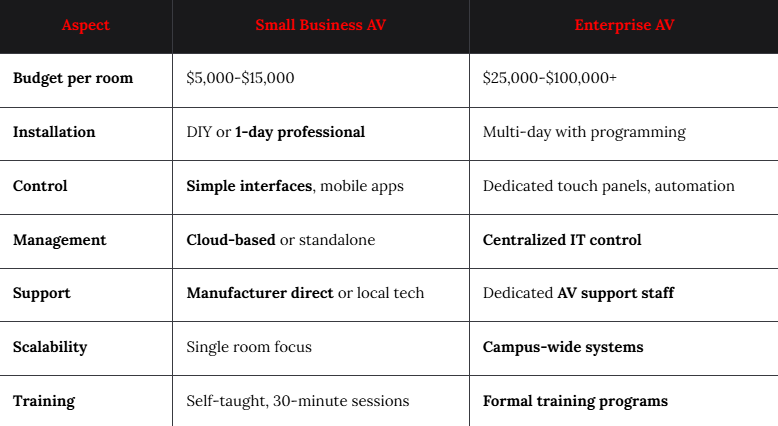
- Budget range: $5,000-$15,000 per meeting space (versus $25,000-$50,000+ for enterprise)
- Lower total cost of ownership: Minimal maintenance, no service contracts required
- Equipment longevity: 5-7 year replacement cycles matching business planning horizons
Simplicity:
- Minimal training requirements: Staff operational within 15-30 minutes
- One-cable connections: USB-C or HDMI without complex switching
- Intuitive interfaces: On-screen menus, mobile app control
- Self-troubleshooting: Clear error messages, automatic recovery
Versatility:
- Multi-purpose use: Same room serves meetings, training, events, entertainment
- Flexible mounting: Portable stands versus permanent installation
- Adaptable configuration: Equipment repositions for different uses
Professional Quality:
- Business-appropriate appearance: Polished aesthetics matching office environment
- Reliable performance: 99%+ uptime for critical presentations
- Client-ready: Impresses customers and partners
Small Business vs. Enterprise AV Systems
Benefits of Investing in Affordable AV Equipment
Competitive Positioning
Professional technology levels playing field with larger competitors:
Client confidence:
- 84% of small businesses report improved client perception after AV upgrades (2026 SMB Technology Survey)
- Seamless presentations signal competence and attention to detail
- Hybrid meeting capability accommodates remote clients increasing proposal win rates 23%
Brand perception:
- Modern office technology attracts better talent (critical in competitive labor markets)
- Professional video presence in online meetings enhances brand credibility
- Quality content creation (training videos, marketing materials) elevates marketing effectiveness
Operational Efficiency
Well-designed AV reduces wasted time and frustration:
Productivity gains:
- Meeting start delays reduced from average 12 minutes to under 2 minutes
- Technical troubleshooting time cut 70% with reliable equipment
- Remote collaboration eliminates travel for short meetings (saving $8,000+ annually per employee)
- Training scalability: Record sessions once, distribute indefinitely
Cost savings:
- Reduced facility needs: Better utilization of existing space through flexible AV
- Lower travel expenses: Video conferencing replacing regional trips
- Decreased outsourcing: In-house capability for training videos and presentations
Revenue Generation Opportunities
AV capabilities create new business possibilities:
Service expansion:
- Virtual consulting: Serve clients beyond geographic limitations
- Online training: Monetize expertise through webinars and courses
- Hybrid events: Host larger audiences through live streaming
- Content marketing: Professional video enhances social media and web presence
Client retention:
- Responsive communication: Video meetings maintain relationships between in-person visits
- Transparent service: Screen sharing during troubleshooting builds trust
- Flexible engagement: Accommodate client preferences for virtual versus in-person
How to Plan an AV Setup for a Small Business
Step 1: Assess Business Needs and Use Cases
Understand actual requirements before specifying equipment:
Primary use cases:
- Internal meetings: Team collaboration, project discussions, status updates
- Client presentations: Sales pitches, project reviews, demonstrations
- Training sessions: Employee onboarding, skill development, compliance
- Remote collaboration: Video calls with distributed teams or clients
- Content creation: Marketing videos, training materials, thought leadership
Usage frequency:
- Daily use: Justifies higher investment in quality and comfort
- Weekly use: Mid-range equipment appropriate
- Monthly/occasional: Budget solutions with upgrade path
User profiles:
- Tech-savvy staff: Can handle moderate complexity
- Non-technical users: Require extreme simplicity
- Mixed skill levels: Need intuitive basic operation with advanced options hidden
Step 2: Evaluate Space Characteristics
Room attributes determine equipment selection:
Physical constraints:
- Room size: 10'×12' huddle room versus 20'×30' conference room
- Seating capacity: 4 people versus 12+ people
- Mounting options: Wall-mount capability versus table/cart only
- Natural lighting: Windows requiring high-brightness displays
- Acoustic properties: Carpeted versus hard surfaces
Infrastructure:
- Power availability: Adequate outlets, circuit capacity
- Network connectivity: Ethernet drops, Wi-Fi coverage strength
- HVAC noise: Background sound levels affecting audio quality
- Cable routing: Exposed versus concealed pathways
Aesthetic considerations:
- Professional appearance: Equipment matching office décor
- Client visibility: Equipment should enhance not detract
- Brand consistency: Colors, finishes aligning with company image
Step 3: Establish Realistic Budget
Total cost includes more than equipment:
Budget components:
Equipment (60-70%):
- Display, audio system, camera, wireless presentation
Installation (15-20%):
- Mounting, cabling, configuration, testing
Accessories (10-15%):
- Cables, adapters, mounts, cable management
Training (5%):
- Staff orientation, documentation
Budget ranges by space:
- Small huddle room (4-6 people): $3,000-$6,000
- Standard meeting room (6-10 people): $6,000-$12,000
- Large conference room (10-16 people): $12,000-$20,000
Phasing strategy:
- Phase 1 (immediate): Display, basic audio, wireless presentation
- Phase 2 (6-12 months): Camera, recording capability
- Phase 3 (12-24 months): Upgraded audio, additional displays, automation
Step 4: Prioritize Equipment Categories
Not all components equally critical:
Must-have (invest here):
- Display (40% of budget): Foundation of visual communication
- Audio system (25%): Poor audio ruins meetings regardless of video
- Wireless presentation (15%): Eliminates #1 frustration point
Nice-to-have (add when budget allows): 4. Camera (10%): For video conferencing (can start with laptop camera) 5. Control system (5%): Convenience but not essential initially 6. Recording (5%): Valuable but can add later
Essential AV Equipment Every Small Business Needs
Display Technology
Primary visual interface for all AV activities:
Interactive Flat Panels
Recommended for most small businesses:
Advantages:
- Touchscreen capability: Digital whiteboarding without separate device
- All-in-one computing: Built-in Android/Windows eliminating PC needs
- Wireless casting: AirPlay, Miracast, Chromecast built-in
- No maintenance: No lamps, filters, or calibration
- Bright image: 350+ nits handling office lighting
Specifications:
- Size: 55" (huddle), 65"-75" (standard meeting room), 86" (large room)
- Resolution: 4K (3840×2160) minimum
- Touch: 10-20 point multi-touch
- Connectivity: Multiple HDMI, USB-C with power delivery
- Software: Built-in whiteboard, annotation, cloud storage access
Budget options:
- ViewSonic IFP50 series: $1,200-$2,500 (55"-75")
- BenQ Board Basic: $1,500-$3,000
- Promethean ActivPanel Elements: $1,800-$3,500
- SMART Board GX series: $2,500-$4,500
Standard Commercial Displays
Lower-cost alternative without touch:
When to choose:
- Tight budgets: $500-$1,500 savings versus IFPs
- Presentation-only needs without annotation
- Simple setups: TV-style operation
Key features:
- Commercial-grade: 16-hour daily operation rated
- RS-232/LAN control: For basic automation
- Warranty: 3-year business warranty versus 1-year consumer
Audio Solutions
Clear sound essential for effective communication:
USB Soundbars
Best value for small businesses:
All-in-one design:
- Speakers + microphones in single device
- USB connection: Plug-and-play, no installation complexity
- Echo cancellation: Built-in AEC for video calls
- Bluetooth: Wireless audio from phones/tablets
Coverage:
- Small soundbars: 4-8 person rooms
- Medium soundbars: 8-12 person rooms
- Large soundbars: 12-16 person rooms (with expansion mics)
Recommended models:
- Poly Studio (small rooms): $400-$600
- Logitech Rally Bar Mini: $800-$1,000
- Jabra PanaCast 50: $1,000-$1,200
- Bose VB-S: $1,000-$1,500
Microphone considerations:
- Pickup range: 8-15 feet for tabletop placement
- Beamforming: Focuses on speakers, rejects noise
- Expansion mics: Add coverage for larger rooms
Video Conferencing Cameras
Visual connection with remote participants:
USB Cameras
Simple, effective solution:
Specifications:
- Resolution: 1080p minimum, 4K preferred
- Field of view: 90°-120° (wider for small rooms)
- Autofocus: Maintains clarity during movement
- Low-light performance: Handles typical office lighting
- USB 3.0: Single-cable connection to computer
Budget-friendly options:
- Logitech C930e: $100-$150 (1080p, good value)
- Logitech Brio: $150-$200 (4K, excellent)
- Microsoft LifeCam Studio: $60-$80 (budget option)
- Razer Kiyo Pro: $150-$200 (great low-light)
All-in-one collaboration bars:
- Camera + soundbar + computing in single device
- Logitech Rally Bar: $2,500-$3,000 (medium rooms)
- Poly Studio X30: $1,800-$2,200 (small-medium)
- DTEN D7: $3,500-$4,500 (55" with Zoom built-in)
Wireless Presentation Systems
Eliminate cable hassles and meeting delays:
Essential features:
- Multi-platform support: Windows, Mac, iOS, Android, Chromebook
- No software required: Button or browser-based connection
- Multi-user capability: Multiple people sharing simultaneously
- Security: Password protection, encryption
- 4K support: Future-proof for high-res content
Budget options:
- ScreenBeam 1100 Plus: $500-$700
- Barco ClickShare C-5: $1,000-$1,500
- Mersive Solstice Pod: $1,200-$1,800
- Crestron AirMedia AM-101: $1,500-$2,000
Cables and Connectivity
Don't overlook essential accessories:
Required cables:
- HDMI 2.0: 4K/60Hz support, various lengths (6', 10', 25')
- USB-C: Single-cable laptop connection (video, audio, power)
- Ethernet: Wired network for displays and control
- Power: Extension cords, surge protectors
Cable management:
- Cable covers: Concealing floor runs
- Desk grommets: Clean table pass-throughs
- Velcro ties: Organizing behind displays
- Cable trays: Under-table routing
Adapters:
- USB-C to HDMI: For older laptops
- Mini DisplayPort to HDMI: Mac compatibility
- VGA to HDMI: Legacy device support (avoid if possible)
Affordable AV Setup Ideas for Different Small Businesses
Professional Services (Law, Accounting, Consulting)
Client-facing presentation focus:
Equipment priorities:
- 75" interactive display: Impressive scale for client meetings
- Quality soundbar: Clear audio during video depositions/consultations
- Document camera: Sharing contracts and documents
- Recording capability: Archiving client meetings (with permission)
Budget: $8,000-$12,000
Special considerations:
- Privacy: Camera shutters, mute indicators
- Professionalism: Premium finishes, cable concealment
- Reliability: Cannot fail during billable client time
Creative Agencies (Marketing, Design, Media)
Collaboration and content creation:
Equipment priorities:
- Dual displays: One for design work, one for video calls
- Color-accurate monitors: Professional content creation
- High-quality camera: 4K for client presentations
- Screen recording: Capturing design reviews and feedback
Budget: $6,000-$10,000
Special considerations:
- Creative aesthetic: Equipment aligning with agency vibe
- Flexibility: Reconfigurable for shoots and presentations
- Content creation: Recording capability for social media
Healthcare Practices (Dentists, Therapists, Clinics)
Patient consultation and training:
Equipment priorities:
- 55"-65" display: Educational content and telehealth
- Privacy-focused camera: Positioning preventing inadvertent HIPAA violations
- Simple operation: Non-technical staff friendly
- Sanitary considerations: Easy-to-clean touchscreens
Budget: $4,000-$7,000
Special considerations:
- HIPAA compliance: Encrypted connections, password protection
- Patient comfort: Non-intimidating technology presentation
- Durability: High-traffic cleaning and sanitization
Real Estate Offices
Property showcasing and team collaboration:
Equipment priorities:
- 86" display: Large-scale property visualizations
- Wireless presentation: Agents sharing listings easily
- Video conferencing: Remote client viewings
- Digital signage: Lobby displays with listings
Budget: $7,000-$11,000
Special considerations:
- Wow factor: Impressing high-value clients
- Multiple users: Many agents needing access
- Flexibility: Showings, team meetings, client consultations
Retail and Hospitality
Customer experience and staff training:
Equipment priorities:
- Digital signage displays: Promotions and wayfinding
- Training room setup: Staff development and onboarding
- POS integration: Displays for customer education
- Social media content: In-store video creation capability
Budget: $5,000-$9,000
Special considerations:
- Durability: Public-facing, high-usage environments
- Brand alignment: Custom colors, wallpapers, screensavers
- Multi-location: Potential for standardized rollout
Coworking Spaces
Shared resource optimization:
Equipment priorities:
- Room booking system: Integrated with displays
- Portable equipment: Move between rooms as needed
- Multi-tenant support: Easy switching between companies
- Usage tracking: Analytics for space optimization
Budget per room: $6,000-$10,000
Special considerations:
- Ease of use: Zero training assumption for users
- Security: Preventing unauthorized access
- Maintenance: Durable equipment withstanding heavy use
Common AV Mistakes Small Businesses Should Avoid
Mistake 1: Buying Consumer Equipment for Business Use
Error: Purchasing consumer-grade TVs and computer speakers instead of commercial AV equipment
Consequences:
- Short lifespan: Consumer devices fail within 1-2 years versus 5-7 for commercial
- No warranty: 90-day warranties versus 3-5 year commercial coverage
- Poor performance: Inadequate brightness, audio quality, connectivity
- Unprofessional appearance: Consumer aesthetics undermining business credibility
Solution: Invest in business-grade equipment with appropriate warranties and specifications
Mistake 2: Undersizing Display Technology
Error: 43"-55" displays in medium-large rooms
Consequences:
- Poor visibility: Text illegible from rear seats
- Reduced engagement: Audience straining to see content
- Wasted investment: Replacing with larger display within 12 months
Solution: Follow display sizing formula:
- Viewing distance ÷ 1.5 = minimum screen diagonal
- Example: 12-foot viewing distance = 96" minimum screen diagonal (75"-86" practical)
Mistake 3: Ignoring Audio Quality
Error: Relying on display speakers or laptop audio
Consequences:
- Unintelligible speech: Remote participants can't hear discussions
- Meeting frustration: Constant "can you repeat that?"
- Lost opportunities: Technical problems during sales presentations
Solution: Budget $400-$1,200 for professional soundbar or ceiling speakers with DSP processing
Mistake 4: No Wireless Presentation Solution
Error: Passing HDMI cables around table
Consequences:
- Meeting delays: 8-12 minutes wasted connecting laptops
- Cable damage: Constant plugging/unplugging causing failures
- Compatibility issues: Dongles, adapters creating confusion
- Unprofessional appearance: Fumbling with cables during client meetings
Solution: Invest $500-$1,500 in wireless presentation system eliminating cable dependency
Mistake 5: Overly Complex Systems
Error: Enterprise-grade control systems requiring programming
Consequences:
- High upfront cost: $3,000-$8,000 for control alone
- Training burden: Staff unable to operate without extensive instruction
- Maintenance complexity: Changes require technician visits
- System abandonment: Reverting to laptop speakers from frustration
Solution: Choose simple interfaces (mobile apps, on-screen menus, one-button remotes)
Mistake 6: Poor Cable Management
Error: Leaving cables exposed across floors and desks
Consequences:
- Safety hazard: Trip risks creating liability
- Unprofessional appearance: Messy cables undermining credibility
- Damaged cables: Foot traffic causing failures
- Cleaning difficulty: Obstacles for janitorial services
Solution: Budget $200-$500 for cable covers, raceways, under-desk routing, grommets
Mistake 7: Skipping Network Bandwidth Planning
Error: Deploying video conferencing without network assessment
Consequences:
- Pixelated video: Insufficient bandwidth causing quality degradation
- Dropped calls: Network congestion interrupting important meetings
- Frustration: System blamed when network at fault
Solution: Ensure 25+ Mbps download, 10+ Mbps upload, wired Ethernet for stationary equipment
DIY AV Setup vs Hiring Professional AV Integrators
When DIY Installation Makes Sense
Appropriate scenarios:
Simple huddle rooms:
- Wall-mounting single display on studs
- USB soundbar placement on table or below display
- USB camera clip-on or tripod mounting
- Wireless presentation device connected to display
- Basic cable management with covers and ties
Small business advantages:
- Cost savings: $1,000-$2,500 installation fees avoided
- Faster deployment: Install on weekend, operational Monday
- Learning experience: Staff understanding system improves troubleshooting
- Flexibility: Easily adjust setup based on use
DIY success requirements:
- Basic technical aptitude: Comfortable with drill, level, cable routing
- Time availability: 4-8 hours for typical installation
- Adequate tools: Drill, stud finder, cable fishing tools, crimpers
- Manufacturer support: Access to setup guides and technical assistance
When to Hire Professional Integrators
Complex situations requiring expertise:
Multi-room systems:
- Networked audio/video distribution
- Centralized control across spaces
- Coordinated scheduling and management
Acoustic challenges:
- Poor room acoustics requiring treatment design
- Feedback problems needing professional DSP configuration
- Large spaces demanding speaker array design
Infrastructure work:
- In-wall cable runs requiring fishing through finished walls
- Network infrastructure additions (switches, VLANs, PoE)
- Electrical work adding circuits or installing rack power
- Architectural integration hiding technology in millwork
Mission-critical deployments:
- Executive boardrooms where failure unacceptable
- Client demonstration rooms requiring flawless performance
- Training facilities with recording and streaming complexity
Professional integration value:
- Proper design: Equipment selection matching requirements
- Quality installation: Clean, code-compliant work
- System optimization: Calibration and configuration
- Warranty protection: Ensuring manufacturer coverage not voided
- Training: Staff education on system operation
- Support: Troubleshooting assistance post-installation
Cost expectation:
- Basic installation: $500-$1,500 (mounting, connection, basic config)
- Standard project: $2,000-$5,000 (includes some infrastructure work)
- Complex integration: $5,000-$15,000+ (networking, acoustics, programming)
Hybrid Approach
Optimal for many small businesses:
DIY components:
- Equipment procurement: Research and purchase directly
- Furniture setup: Position tables, chairs, equipment stands
- Basic connections: HDMI cables, USB devices, power
- Initial testing: Verify functionality before professional work
Professional services:
- Wall-mounting: Secure display installation finding studs
- Cable concealment: In-wall routing, conduit installation
- Network configuration: VLAN setup, QoS policies, switch configuration
- System calibration: Audio DSP tuning, display settings optimization
- Final commissioning: Complete system testing and user training
Cost savings: 30-50% versus full-service while maintaining quality
Frequently Asked Questions
Q: What is the minimum budget for professional small business AV setup?
A: Functional huddle room setup starts at $3,000-$4,000 including 55" display, USB soundbar with camera, wireless presentation, and basic accessories. Standard meeting room (8-10 people) requires $6,000-$10,000 for professional quality. Phased implementation allows starting with essentials and adding capabilities over time.
Q: Should small businesses buy consumer or commercial AV equipment?
A: Always choose commercial-grade for primary business use. Commercial equipment includes 3-5 year warranties, 16-hour daily operation ratings, and business support versus consumer's 90-day warranties and 8-hour usage limits. Upfront cost premium (20-40%) pays off through reliability and longevity.
Q: Can we install AV equipment ourselves or should we hire professionals?
A: Simple huddle rooms suitable for DIY installation by technically-capable staff. Hire professionals for wall-mounting multiple displays, in-wall cable runs, network infrastructure work, acoustic treatment, or mission-critical spaces where failure unacceptable. Hybrid approach optimizes cost and quality.
Q: What equipment should we prioritize with limited budget?
A: Invest first in display (40% of budget) and audio system (25%), then wireless presentation (15%). Add camera and control systems in phase two. Good displays and audio provide immediate value; basic laptop webcam adequate initially for video conferencing until budget allows upgrade.
Q: How long does small business AV equipment typically last?
A: Commercial-grade equipment lifespan: Displays 5-7 years (50,000+ hours), audio systems 7-10 years, cameras 5-7 years, control systems 5-8 years. Consumer equipment: 2-3 years typical. Plan technology refresh cycles every 5 years maintaining performance and avoiding obsolescence.
Q: Do we need cloud-based AV management for single location?
A: Cloud management valuable even for single location enabling remote troubleshooting by IT consultants, automatic firmware updates, usage analytics informing decisions, and easier expansion when adding rooms or locations. Basic standalone systems acceptable if zero budget for management software.
Q: What internet speed is required for video conferencing in small business?
A: Minimum 25 Mbps download and 10 Mbps upload for HD video conferencing. Prefer 50/25 Mbps for reliability and simultaneous usage. Wired Ethernet connections superior to Wi-Fi for stationary meeting room equipment preventing dropouts and quality degradation.
Conclusion
Implementing professional audio visual equipment in small business environments in 2026 requires balancing budget constraints with performance expectations, selecting reliable technology that non-technical staff can operate confidently, and designing flexible systems serving multiple purposes within limited square footage. The importance of choosing the best audio visual equipment for small businesses extends beyond technical specifications—it directly impacts client perceptions, operational efficiency, employee satisfaction, and ultimately, competitive positioning in markets where professional presence matters.
For AV integrators and consultants serving small business clients, success demands understanding unique challenges these organizations face: limited budgets requiring value optimization, multi-purpose spaces needing adaptable solutions, minimal IT support necessitating reliable operation, and growth trajectories requiring scalable architectures. The essential components—professional displays, quality audio systems, simple cameras, and wireless presentation—must integrate seamlessly while remaining accessible to users with varying technical comfort levels.
Modern small business AV has evolved dramatically with affordable commercial-grade equipment, cloud-based management eliminating dedicated IT requirements, all-in-one devices reducing complexity and cost, and AI-powered features automating previously manual tasks. Organizations investing thoughtfully in professional AV capabilities—prioritizing audio quality, ensuring BYOD compatibility, planning for phased expansion, and partnering with experienced integrators for complex work while handling simple installations internally—position themselves competitively while managing costs effectively.
Whether outfitting a single huddle room or deploying standardized configurations across multiple locations, the path forward requires realistic budgeting (typically $5,000-$15,000 per room for professional results), equipment selection balancing performance and affordability, appropriate installation methods matching project complexity, and leveraging design software like XTEN-AV X-Pro streamlining planning and deployment. By following these principles, small businesses create technology environments that enhance rather than hinder business operations—enabling effective collaboration, impressive client presentations, and professional brand experiences that drive business growth and success.