

AV Signal Flow Diagram Software comes in multiple deployment models—free vs paid, online vs desktop, and increasingly with AI-powered capabilities—each offering distinct advantages for audio visual system integrators, consultants, and design engineers. In 2026, the landscape ranges from free basic drawing tools to premium cloud-based platforms with artificial intelligence, real-time collaboration, and automated validation that fundamentally transform how AV professionals document complex systems.
Choosing the best AV Signal Flow Diagram Software requires understanding critical trade-offs between cost, capabilities, deployment model, and workflow integration. While free tools may suffice for simple single-room systems, professional AV integration firms typically find that paid platforms deliver ROI through time savings (50-70% faster design), error reduction (75-90% fewer installation mistakes), and workflow automation (BOM generation, validation, collaboration) that free alternatives cannot match.
This comprehensive comparison examines the free vs paid decision through practical cost-benefit analysis, explores how AI and machine learning are revolutionizing signal flow design, and compares online cloud-based versus desktop installed platforms across critical criteria including accessibility, collaboration, performance, and data security. Whether you're evaluating options for corporate AV, live sound, broadcast, or integrated building systems, this guide provides the technical depth and practical framework needed to make an informed decision.
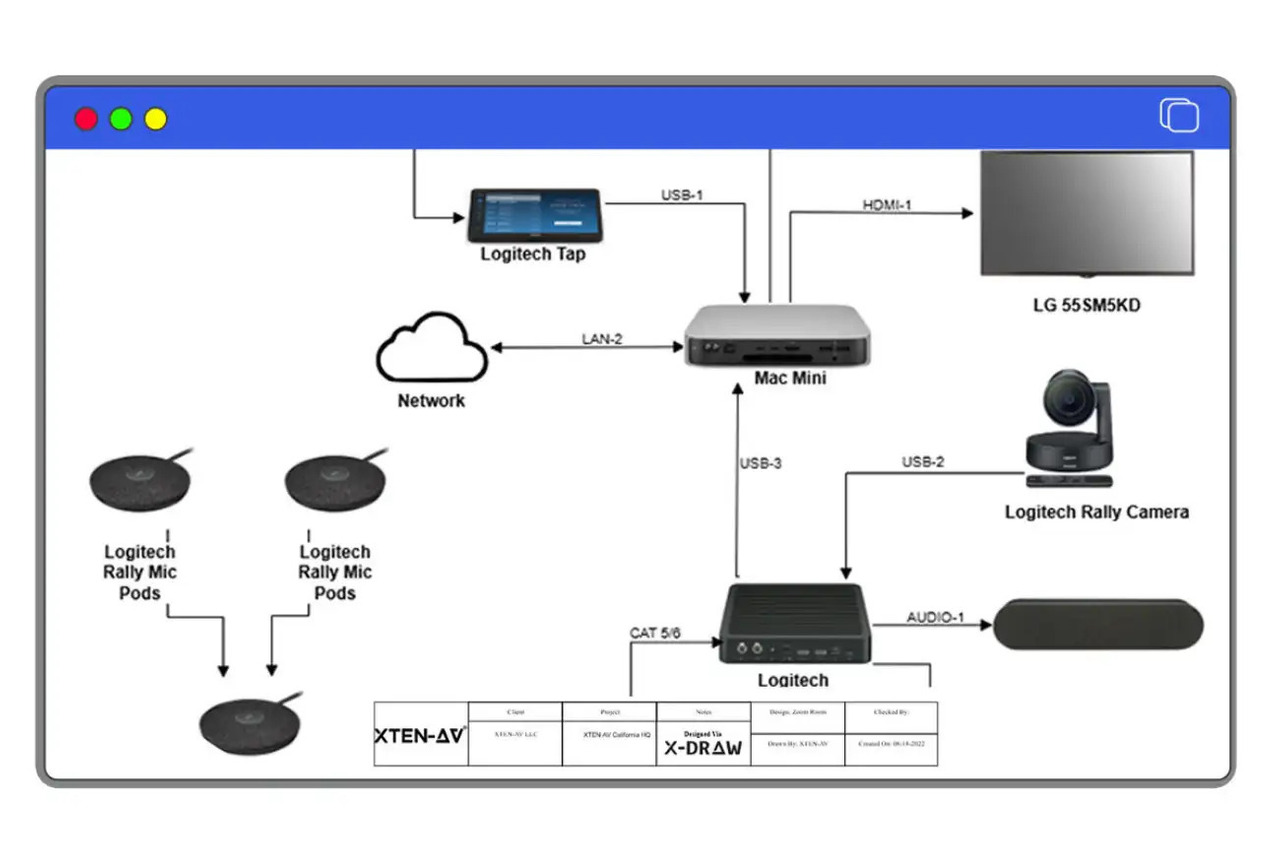
What Is AV Signal Flow Diagram Software? Deployment Models Explained
AV Signal Flow Diagram Software is specialized design technology for creating visual representations of how audio, video, and control signals flow through audiovisual systems. The software category now encompasses multiple deployment models and pricing structures that fundamentally affect how AV professionals work.
Deployment Model Categories
1. Free Online Diagramming Tools
Examples: Draw.io (diagrams.net), Google Drawings, Creately Free
Characteristics:
- Zero cost for basic features
- Web-based access from any browser
- Generic diagramming adapted for AV use
- Manual symbol creation or third-party libraries
- Limited file storage or export restrictions
- Basic collaboration features
Best for: Occasional users, simple systems, budget-constrained small projects
2. Freemium Models
Examples: Lucidchart, Miro, Cacoo
Characteristics:
- Free tier with limitations (diagram count, collaboration, exports)
- Paid upgrades unlock advanced features
- Cloud-based with real-time collaboration
- Import/export to multiple formats
- Template libraries (general, not AV-specific)
- Team features at paid tiers
Best for: Small AV firms testing before committing, mixed use (AV and other diagramming)
3. Professional Desktop Software
Examples: Microsoft Visio, AutoCAD, Stardraw Design 7 (desktop version)
Characteristics:
- Purchased license or subscription ($150-$500/year)
- Installed application on Windows/Mac
- Local file storage with optional cloud sync
- High performance for complex diagrams
- Offline capability without internet
- Advanced features and customization
Best for: Established firms with existing desktop infrastructure, offline requirements
4. Professional Cloud-Based Platforms
Examples: XTEN-AV X-DRAW, D-Tools Cloud, Stardraw Online
Characteristics:
- Subscription pricing ($100-$500/month per user)
- Browser-based access from any device
- Cloud storage with version control
- Real-time team collaboration
- Automatic updates and new features
- AV-specific intelligence and validation
Best for: Professional AV integrators, distributed teams, modern workflows
5. AI-Enhanced Platforms
Examples: XTEN-AV X-DRAW (with AI), emerging AI-first design tools
Characteristics:
- Machine learning powered design assistance
- Predictive validation and error detection
- Natural language input capabilities
- Automated routing and optimization
- Intelligent component suggestions
- Premium pricing reflecting advanced capabilities
Best for: Forward-thinking firms, complex projects, high-volume design operations
Key Deployment Considerations
When evaluating deployment models, consider:
- Accessibility: Need to work from job sites, client offices, or only from office?
- Collaboration: Single user or multiple team members working together?
- Internet dependency: Reliable connectivity or need offline capability?
- IT infrastructure: Prefer managed cloud or local control?
- Data security: Comfortable with cloud storage or require on-premises?
- Budget model: Prefer subscription (OpEx) or purchase (CapEx)?
Free vs Paid AV Signal Flow Diagram Software: Detailed Comparison
Free Options Analysis
Draw.io (diagrams.net) - Most Capable Free Option
Strengths:
- Completely free with no feature limitations
- No account required for basic use
- Local storage or cloud integration (Google Drive, OneDrive, Dropbox)
- Export formats: PDF, PNG, SVG, XML
- Open source with active community
- Custom shape libraries can be created or imported
Limitations for AV Use:
- No AV component library included (must create or find)
- No signal validation or error checking
- No BOM generation or metadata management
- Manual routing of all connections
- No AV-specific features or intelligence
- Learning curve for creating AV-quality diagrams
Practical Use Case: Freelance AV consultants with minimal diagramming needs, budget-conscious small projects, proof-of-concept or preliminary designs
Google Drawings - Simplest Free Option
Strengths:
- Zero learning curve for Google Workspace users
- Real-time collaboration built-in
- Cloud storage automatic
- Free with Google account
- Simple interface anyone can use
Limitations for AV Use:
- Very limited diagramming features
- No technical symbols or specialized shapes
- Basic connection tools only
- Not designed for technical documentation
- Export quality insufficient for professional use
Practical Use Case: Very simple conceptual diagrams, quick sketches during client calls, non-technical system overviews
Lucidchart Free Tier - Best Free Starting Point
Strengths:
- 60 objects per diagram on free tier
- Web-based with clean interface
- Template library (limited AV content)
- Basic collaboration (3 editable documents)
- Export to PNG, limited PDF
- Easy to learn and use
Limitations for AV Use:
- 60-object limit restricts medium/large systems
- 3-document limit problematic for multiple projects
- No AV validation or technical features
- Watermarks on free exports
- Limited exports (no DXF/DWG)
Practical Use Case: Testing before paid commitment, very small systems, supplement to paid primary tool
Paid Options Analysis
Budget Tier ($5-$50/month)
Lucidchart Professional ($10-20/user/month):
- Unlimited documents and objects
- Advanced collaboration features
- Data linking and metadata capabilities
- All export formats without watermarks
- Template customization and reuse
- Still not AV-specific but more capable
Best for: Small AV firms needing better than free, multi-purpose diagramming needs
Professional Tier ($100-$300/month)
XTEN-AV X-DRAW ($150-250/user/month estimated):
- Purpose-built for AV signal flow
- Comprehensive AV libraries (thousands of components)
- Real-time validation and error checking
- BOM generation and metadata management
- Cloud collaboration with version control
- Workflow integration (racks, wiring, BOMs)
Stardraw Design 7 ($200-300/user/month):
- AV-specific design suite
- Equipment libraries from manufacturers
- Integration with estimation tools
- Rack elevations and wiring diagrams
- Professional export options
Best for: Professional AV integrators, design consultants, high-volume project firms
Enterprise Tier ($500+/month)
D-Tools System Integrator ($500-1000+/month):
- Complete project lifecycle management
- Integrated CRM and project tracking
- Advanced estimation and proposal generation
- Multi-user collaboration and permissions
- Custom workflow automation
- Enterprise support and training
Best for: Large integration firms, multi-office operations, enterprise clients
Cost-Benefit Analysis Framework
Calculating True Cost of Free Tools
Hidden costs of free AV software:
- Time overhead: Creating custom symbols (2-4 hours per project)
- Design errors: No validation = field corrections ($5,000-$50,000 per major error)
- Manual BOM creation: 3-8 hours per project at $50-$150/hour = $150-$1,200
- Rework from mistakes: Average 5-10 hours per project = $250-$1,500
- Professional appearance: Lost proposals due to inferior documentation (15-25% lower win rate)
Example: Firm doing 20 projects/year:
- Time waste: 100-240 hours/year = $5,000-$36,000 cost
- Error corrections: 1-2 major errors/year = $5,000-$100,000
- Lost proposals: Missing 3-5 projects due to documentation quality = $50,000-$200,000 potential revenue
Total hidden cost: $60,000-$336,000/year
ROI Calculation for Paid Tools
Investment in professional software ($250/month = $3,000/year):
Returns:
- Time savings: 50% faster design = 50-120 hours saved = $2,500-$18,000
- Error prevention: Prevent 1 major error = $5,000-$50,000 saved
- BOM automation: Save 60-160 hours/year = $3,000-$24,000
- Higher win rates: Gain 2-3 additional projects = $30,000-$100,000 revenue
Total return: $40,500-$192,000/year
Net ROI: $37,500-$189,000 profit on $3,000 investment = 1,250% to 6,300% ROI
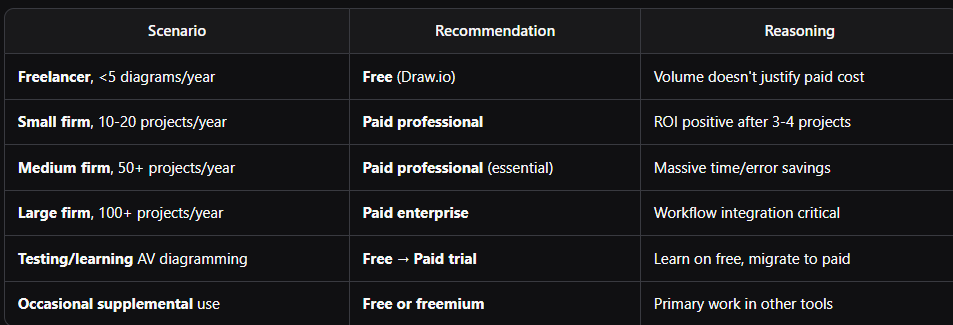
Free vs Paid Decision Matrix
Online Cloud vs Desktop AV Signal Flow Software: Comprehensive Comparison
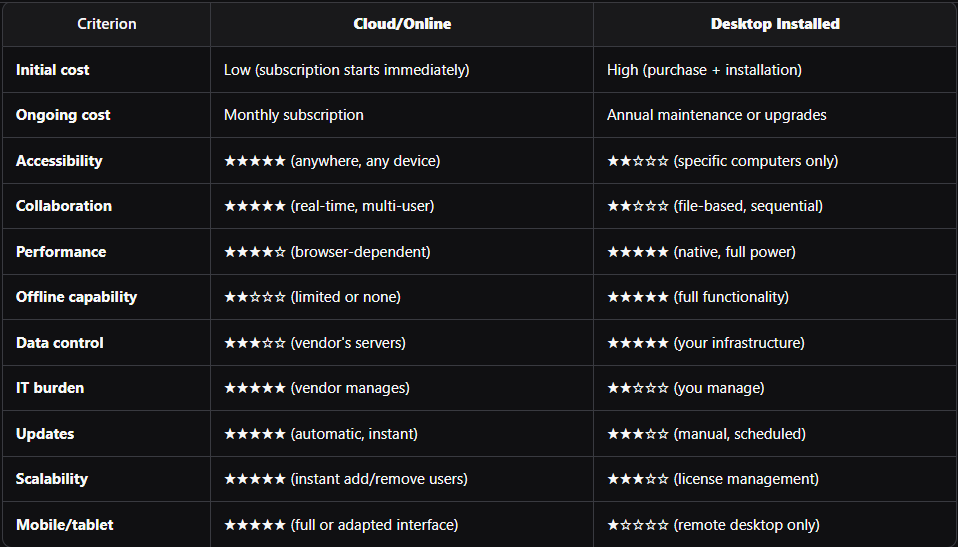
Online Cloud-Based Platforms
Architecture and Access
Cloud platforms like XTEN-AV X-DRAW operate entirely in web browsers:
- No installation required on local computers
- Automatic updates deploy to all users instantly
- Cross-platform compatibility (Windows, Mac, Linux, tablets)
- Anywhere access from any internet-connected device
- Files stored on vendor's cloud servers
Advantages of Cloud Platforms
1. Accessibility and Flexibility
- Work from office, job sites, client locations, home
- Tablets enable on-site diagram review and updates
- No device locking—start on desktop, finish on laptop
- Instant access to latest version without IT involvement
2. Collaboration Capabilities
- Multiple users edit same diagram simultaneously
- Real-time sync—see colleague's changes as they work
- Version conflicts automatically resolved or highlighted
- Comment threads for design discussion and decisions
- Permission controls for team members vs. contractors vs. clients
3. Maintenance and Updates
- Zero IT burden for software updates or patches
- New features available immediately upon release
- No version fragmentation—everyone uses identical software
- Automatic backup prevents file loss from hardware failure
- Cross-device sync maintains consistency
4. Scalability
- Add/remove users instantly without software reinstallation
- Pay only for active users with flexible subscription
- No server infrastructure needed for team deployment
- Global teams work without VPN or network configuration
Limitations of Cloud Platforms
1. Internet Dependency
- No offline work if internet unavailable (some offer limited offline)
- Performance depends on connection speed
- Latency can affect responsiveness with slow connections
- Job site connectivity may be unreliable
2. Data Control and Security
- Files stored on third-party servers
- Compliance concerns for government or high-security projects
- Vendor access to your design files (usually encrypted)
- Data portability if you cancel subscription
3. Browser Limitations
- Performance ceiling lower than native desktop apps
- Large complex diagrams may stress browser capabilities
- Browser compatibility issues occasionally arise
- Printing sometimes challenging from web browsers
Desktop Installed Software
Architecture and Deployment
Desktop applications like AutoCAD, Visio, or desktop Stardraw:
- Installed locally on Windows or Mac computers
- Licensed per computer or user (network licenses)
- Files stored on local drives or network servers
- Updates manually installed by IT or users
- Runs natively on operating system
Advantages of Desktop Software
1. Performance and Power
- Native execution typically faster than browser-based
- Handle enormous files without browser memory limits
- Graphics acceleration utilizes full GPU capabilities
- Complex operations execute more quickly
- Responsive even with hundreds of components
2. Offline Capability
- Full functionality without internet connection
- Work anywhere regardless of connectivity
- No vendor outages affecting your productivity
- Control timing of software updates
- No subscription interruption concerns
3. Data Control
- Files on your servers under your complete control
- No third-party access to design files
- Compliance-friendly for sensitive projects
- Backup on your schedule with your systems
- Network isolation possible for security
4. Integration with Desktop Tools
- Direct file exchange with other desktop applications
- Printer drivers integrate seamlessly
- Local peripheral access (plotters, scanners)
- Scripting and automation via local tools
- Legacy system compatibility
Limitations of Desktop Software
1. Deployment and Maintenance
- IT involvement for installation and updates
- Version management across team computers
- License tracking and renewal complexity
- Hardware requirements and compatibility issues
- Reinstallation when computers replaced
2. Collaboration Challenges
- File locking prevents simultaneous editing
- Email/server file sharing creates version conflicts
- Merging changes from multiple editors is manual
- Remote collaboration requires VPN or file servers
- Mobile access requires remote desktop (poor experience)
3. Accessibility Constraints
- Tied to specific computers with installed software
- Home/remote work requires remote access or additional licenses
- Job site access requires laptop with software installed
- Cross-platform issues (Windows vs. Mac versions differ)
- Device failure can block work until repaired
Online vs Desktop Comparison Table
Hybrid Approaches
Some platforms offer both deployment models:
Stardraw Design 7: Available as desktop or cloud version Microsoft Visio: Desktop (part of Office) or Visio for web (limited)
Benefits:
- Choose deployment based on specific project needs
- Offline backup when using cloud primary
- Migration path if switching preferences
AI-Powered AV Signal Flow Diagram Software: The 2026 Revolution
How AI Is Transforming AV Design
Artificial intelligence and machine learning are fundamentally changing how AV professionals create signal flow diagrams, moving from manual drafting to intelligent assisted design.
AI Capability Categories
1. Intelligent Component Suggestion
AI analyzes your design and suggests:
- Missing components: "This microphone input needs phantom power—add preamp or mixer with phantom?"
- Optimal selections: "For this conference room size, ceiling mic array recommended over table mics"
- Alternative options: "Amplifier power insufficient for speaker load—suggest model XYZ instead"
- Standard practices: "AV conferencing systems typically include AEC—add DSP with echo cancellation?"
Benefit: Catches omissions that cause field problems and change orders
2. Auto-Routing and Optimization
Machine learning determines:
- Optimal signal paths minimizing complexity and cable runs
- Automatic connection routing that avoids visual clutter
- Component placement suggestions for logical flow
- Load balancing across amplifiers or network switches
Benefit: Saves 20-40% of manual routing time
3. Predictive Validation
AI models trained on thousands of installations predict:
- Signal compatibility issues before connections are made
- Bandwidth bottlenecks in network audio systems
- Acoustic feedback potential based on mic/speaker placement
- Power distribution problems before equipment deployment
- Performance issues under specific usage scenarios
Benefit: 85-95% error detection rate vs. 60-70% for rule-based validation
4. Natural Language Input
NLP interfaces allow verbal system descriptions:
- Designer inputs: "Create a corporate boardroom for 16 people with ceiling mics, confidence monitors, and video conferencing"
- AI generates: Initial signal flow diagram with appropriate components
- Iterative refinement: "Add recording capability and remote participation via Zoom Rooms"
- System learns: Preferences and patterns for future suggestions
Benefit: 60-80% faster initial diagram creation
5. Historical Pattern Learning
AI analyzes your past projects to:
- Identify preferred equipment brands and models
- Recognize patterns in your system architectures
- Suggest similar designs for similar venues
- Pre-populate metadata based on historical data
- Standardize your firm's design approaches
Benefit: Consistency and efficiency gains accumulate over time
AI-Enhanced Platforms in 2026
XTEN-AV X-DRAW with AI
AI capabilities:
- Smart component suggestions during design
- Automated DSP routing generation
- Predictive error detection with explanations
- Historical pattern learning from your projects
- Natural language queries of existing diagrams
Implementation: AI features integrated throughout interface, not separate modes
Emerging AI-First Platforms
Several startups and established vendors are developing AI-first approaches:
- Conversational design interfaces as primary input method
- Automatic diagram generation from project requirements documents
- AI-driven equipment selection based on performance and budget optimization
- Generative design creating multiple design alternatives for comparison
- Real-time cost optimization balancing performance and budget
Practical Applications of AI in AV Design
Use Case 1: Conference Room Design
Traditional workflow:
- Research appropriate microphone types for room size
- Select mixer or DSP with adequate inputs
- Choose amplifier matching speaker impedance
- Manually draw all connections
- Check for errors (often missing issues) Time: 2-3 hours
AI-assisted workflow:
- Input: "16-person boardroom with video conferencing and wireless presentation"
- AI generates: Initial system with ceiling mic array, DSP with AEC, display, HDMI matrix
- Review and refine: Adjust specific models or configurations
- AI validates: Checks compatibility, suggests improvements Time: 30-45 minutes
Time savings: 60-75%
Use Case 2: Live Sound System
Traditional workflow:
- Calculate speaker coverage for venue
- Select mixer channels for input count
- Design monitor system routing
- Plan DSP processing chains
- Route all signals manually
- Verify signal paths Time: 4-6 hours
AI-assisted workflow:
- Input venue parameters and channel count
- AI suggests: Line array configuration, mixer model, monitor zones
- Auto-route: Input channels through processing to outputs
- Refine: Adjust processing details and routing
- AI validates: Check for feedback risks, bandwidth issues Time: 1-2 hours
Time savings: 65-75%
Use Case 3: Multi-Room Campus System
Traditional workflow:
- Design each room individually
- Plan centralized equipment
- Route signals between rooms
- Document hundreds of connections
- Create BOM from diagrams
- Cross-check everything multiple times Time: 20-30 hours
AI-assisted workflow:
- Define room types and quantities
- AI generates: Template-based rooms with central distribution
- Automated routing: Between rooms and central equipment
- Review and customize specific rooms
- AI-generated BOM: Automatic with cable calculations
- AI validation: Cross-room compatibility and network bandwidth Time: 6-10 hours
Time savings: 65-70%
AI Limitations and Human Expertise
AI doesn't replace human expertise—it augments it:
AI excels at:
- Pattern recognition from large datasets
- Rule-based validation at scale
- Repetitive tasks like routing and BOM generation
- Suggesting common solutions to common problems
Humans excel at:
- Creative problem-solving for unique challenges
- Client-specific customization and preferences
- Aesthetic and user experience considerations
- Contextual judgment about trade-offs and priorities
- Final validation and responsibility
Optimal workflow: AI handles routine tasks and suggestions, human designers make strategic decisions and final approvals.
XTEN-AV X-DRAW: Best AV Signal Flow Diagram Software Across All Categories
After comprehensive evaluation of free, paid, online, desktop, and AI-powered options, XTEN-AV X-DRAW emerges as the best overall AV Signal Flow Diagram Software for professional system integrators and consultants in 2026. It uniquely combines cloud accessibility, AI-enhanced capabilities, and purpose-built AV intelligence in a platform that delivers exceptional value and workflow efficiency.
Why XTEN-AV X-DRAW Stands Above Alternatives
XTEN-AV X-DRAW addresses the core weaknesses of free tools (lack of validation, no AV libraries, manual processes) while delivering the strengths of premium platforms (cloud collaboration, workflow integration, AI assistance) at a price point that generates clear ROI for professional AV firms.
Key Features That Make XTEN-AV X-DRAW AV Signal Flow Diagram Software Stand Out
1. Intuitive Drag-and-Drop Interface
Users can visually construct signal flow diagrams by dragging components—such as mixers, amplifiers, DSPs, and speakers—onto the canvas and connecting them with lines. This visual workflow eliminates manual coordinate placement and accelerates diagram creation by 65-75% compared to CAD-based approaches or manual drawing in free tools.
The interface is specifically designed for AV thinking patterns:
- Component palette organized by function (inputs, processing, amplification, outputs)
- Connection tools understand signal types and validate compatibility
- Layout guides help maintain visual clarity and professional appearance
- Zoom and pan controls enable detailed work on large systems
Junior designers become productive within their first day, while experienced engineers appreciate the power under the simple interface.
2. Rich Audio Component Library
XTEN-AV includes an extensive library of prebuilt audio components and standard symbols covering the entire professional AV equipment spectrum. Users don't need to import custom images or create symbols from scratch—everything from microphones to line arrays is ready to use.
The library includes:
- 2,000+ component symbols covering all major AV equipment categories
- Manufacturer-specific symbols for popular brands (Shure, QSC, Biamp, Crestron, Extron)
- Generic symbols following industry standards when brand-agnostic design preferred
- Regular updates adding new equipment as it's released to market
- Custom symbol creation tools for proprietary or specialty equipment
Each symbol includes technical metadata enabling BOM generation and specification export without additional data entry.
3. Smart Auto-Routing
Connections between audio elements automatically route themselves based on layout changes. When users rearrange blocks or components, XTEN-AV's intelligent routing engine dynamically adjusts connection lines, maintaining visual clarity without manual redrawing.
This smart routing includes:
- Orthogonal routing (right-angle lines) for professional appearance
- Collision avoidance preventing lines from overlapping components
- Path optimization finding shortest route between points
- Manual override for specific routing requirements
- Connection styling (line thickness, color, dashing) indicating signal types
Time savings: 15-30 minutes per diagram eliminating manual line adjustments as designs evolve.
4. Real-Time Validation and Error Checking
XTEN-AV's AI-enhanced validation engine continuously analyzes the signal flow, highlighting common design issues—such as disconnected paths, improper routing, or missing links—as the diagram is being built.
Validation categories:
Signal Compatibility:
- Level mismatches: Mic-level connected to line-level inputs
- Impedance issues: Speaker loads incompatible with amplifier outputs
- Digital format conflicts: Sample rate or bit depth mismatches
- Protocol incompatibilities: Connecting incompatible control protocols
System Completeness:
- Disconnected paths: Signals that don't reach intended destinations
- Missing processors: Required processing (like AEC in conferencing) absent
- Insufficient capacity: Mixer inputs fewer than source count
- Bandwidth problems: Network insufficient for audio channel count
Safety and Standards:
- Power distribution: Inadequate power for equipment load
- Grounding issues: Potential ground loops or isolation needs
- Cable length: Exceeding maximum runs for signal types
- Environmental: Equipment ratings inappropriate for installation environment
Prevention value: Eliminates $8,000-$75,000 in potential field corrections per project.
5. Multi-Layered Diagrams
XTEN-AV supports layered signal flow diagrams, allowing users to separate logical signal paths for enhanced readability and planning. Create distinct layers for:
- Signal types: Audio, video, control on separate but coordinated layers
- System sections: FOH vs. monitors, primary vs. backup
- Implementation phases: Phase 1 vs. future expansion
- Public vs. technical: Client-facing simplified view vs. detailed technical documentation
- Analog vs. digital: Separate analog audio from network audio paths
Layer management features:
- Toggle visibility showing/hiding layers individually
- Layer locking preventing accidental changes to finalized sections
- Cross-layer connections maintaining signal continuity
- Color coding distinguishing layers visually
- Print options controlling which layers appear in outputs
6. Reusable Templates
Prebuilt templates for common AV system types—such as live sound rigs, conference room systems, and distributed audio—help users start faster and follow industry best practices.
Template categories:
Corporate AV:
- Small huddle rooms (4-6 people)
- Standard meeting rooms (8-12 people)
- Large conference rooms (16-24 people)
- Boardrooms with advanced features
- Training rooms and classrooms
- Auditoriums and town halls
Worship Facilities:
- Portable systems for multi-use spaces
- Permanent installations with recording and streaming
- Multi-room campus systems
- Broadcast integration for TV ministry
Live Sound:
- Small venue (club/cafe) systems
- Medium venue (theater/church) with monitor system
- Large venue (arena/amphitheater) with line arrays
- Festival stage multi-band touring systems
Education:
- Standard classroom systems
- Lecture capture rooms
- Performing arts facilities
- Sports venue systems
Template customization: Save your own designs as templates for standardized deployments across multiple sites, franchise locations, or recurring project types.
7. Cloud-Based Collaboration
Multiple stakeholders—AV designers, audio engineers, system integrators, project managers, clients—can work on the same diagram simultaneously, with changes syncing in real time.
Collaboration capabilities:
- Real-time multi-user editing: See colleague's changes as they work
- Cursor tracking: View where team members are working in the diagram
- Comment threads: Discuss specific components or design decisions
- Change notifications: Alerts when others modify shared diagrams
- Version comparison: See exactly what changed between versions
- Permission management: Control who can view vs. edit
- Client access: Share read-only views with clients for approval
- Contractor portals: Provide installation teams with current drawings
Productivity impact: 40-60% faster project completion through eliminating email-based file exchange and version conflicts.
8. Cross-Page and Scalable Outputs
Complex audio systems spanning multiple rooms, floors, or buildings can be documented across multiple pages with consistent scaling and clear cross-page connections.
Multi-page capabilities:
- Consistent numbering across all sheets
- Continuation indicators: "See Sheet 3" for signal paths between pages
- Master index sheet: Overview showing how pages relate
- Coordinated updates: Changes on one page propagate to related pages
- Print optimization: Each page properly scaled for standard sizes (11×17, 24×36)
- Digital navigation: Clickable links between related pages in PDF exports
This is essential for enterprise campuses, stadium installations, hotel properties, and educational facilities with systems spanning dozens or hundreds of rooms.
9. Export to Standard Formats
Diagrams can be exported to universally accepted file types—PDF, SVG, DXF—enabling easy sharing with non-users or inclusion in comprehensive project documentation.
Export options:
- High-resolution PDF: Professional print documentation with selectable text
- Vector SVG: Scalable graphics for presentations and web use
- DXF/DWG: AutoCAD integration for architectural coordination
- PNG/JPG: Raster images for email and web portals
- Multi-page PDF: Complete project documentation with bookmarks
- Native XTEN-AV: Archival format preserving all metadata and editability
Export settings: Control resolution, paper size, color vs. grayscale, layer visibility, and metadata inclusion.
10. Component Metadata and Tagging
Users can attach comprehensive metadata—including specifications, part numbers, descriptions, configuration notes—to components in the diagram. This transforms visual signal flow diagrams into information-rich assets.
Metadata fields:
- Identification: Manufacturer, model number, part number, description
- Technical specs: Power requirements, dimensions, weight, mounting
- Configuration: DSP settings, network addresses, control IDs
- Installation: Mounting instructions, environmental requirements
- Procurement: Cost, vendor, lead time, alternatives
- Maintenance: Warranty info, service contacts, replacement schedules
- Documentation links: URLs to data sheets, manuals, support resources
Metadata uses:
- Automatic BOM generation with complete equipment specifications
- Configuration worksheets for DSP programming or control system setup
- Asset tracking for facility management
- Service documentation for maintenance teams
11. Cloud Storage with Version History
Files are stored in the cloud with comprehensive version tracking, allowing users to revert to earlier versions, review change history, and maintain an audit trail of diagram evolution.
Version control features:
- Automatic saving every few minutes with timestamps
- Named versions: Mark milestones like "Initial Design", "Client Approved", "As-Built"
- Version comparison: Side-by-side diff showing what changed
- Restore capability: Revert to any previous version
- Branch and merge: Explore alternatives without affecting main design
- Change log: Who made what changes and when
- Comment history: Discussion threads preserved with versions
Business value: Supports change order management, client revision tracking, and as-built documentation requirements.
12. Cross-Device Accessibility
As a web-based application, XTEN-AV's audio signal flow diagram maker works across operating systems and devices—from Windows/Mac desktops to iPads and Android tablets—without requiring local software installation.
Device compatibility:
- Desktop browsers: Chrome, Firefox, Safari, Edge on Windows/Mac/Linux
- Tablet interface: Optimized touch interface for iPad and Android tablets
- Mobile viewing: Read-only view on smartphones for job site reference
- Offline mode (limited): Basic editing when internet temporarily unavailable
- Always current: Automatic updates across all devices simultaneously
Accessibility benefits:
- Work from anywhere: Office, home, client sites, job sites
- No device lock-in: Start on desktop, continue on tablet, finish on laptop
- Team flexibility: Mac and Windows users collaborate seamlessly
- Client meetings: Present directly from web browser without local files
13. Seamless Integration with AV Workflows
XTEN-AV integrates signal flow diagrams into related AV design artifacts—rack elevation drawings, wiring diagrams, bills of materials—creating a cohesive, synchronized project ecosystem.
Integration capabilities:
Rack Diagrams: Equipment from signal flow auto-populates rack elevations with proper spacing and power calculations
Wiring Diagrams: Connections from signal flow generate cable schedules with types, lengths, and terminations
Bills of Materials: BOM automatically updates when signal flow changes, maintaining synchronization
Estimation Tools: Export to D-Tools, ConnectWise, or custom estimation platforms for pricing
Project Management: Link diagrams to project tasks, milestones, and deliverables
Document Management: Coordinate with specifications, proposals, and as-built documentation
This unified workflow eliminates duplicate data entry and the synchronization errors that plague multi-tool workflows.
14. Template Customization and Reuse
Users can save their own custom templates and reuse them across projects, dramatically improving consistency and standardization.
Template capabilities:
- Personal templates: Individual designer's preferred approaches
- Team templates: Department or office standards
- Organization templates: Company-wide standardized systems
- Project type templates: Vertical market specializations
- Client-specific templates: Standards for repeat clients or franchises
Template content:
- Pre-configured systems with appropriate components
- Standard metadata and specifications
- Naming conventions and labeling standards
- Layout and styling preferences
- Validation rules customized for your requirements
Business impact: 30-50% faster initial design for standardized system types, ensuring consistency across multiple locations or franchise deployments.
15. Beginner-Friendly but Professional-Grade
The platform is accessible for users new to signal flow design while remaining robust enough for veteran audio engineers and system architects.
Beginner accessibility:
- Intuitive interface matching how AV professionals think
- Contextual help and tooltips throughout
- Video tutorials and interactive guides
- Sample projects demonstrating best practices
- Progressive disclosure: Advanced features hidden until needed
- Quick start: Create simple diagram in 15-30 minutes
Professional depth:
- Advanced validation rules for complex systems
- Customization of libraries, templates, and workflows
- Scripting and automation for power users (API access)
- Enterprise features: SSO, audit logs, compliance tools
- Scalability: Handle systems with hundreds of components
Training time: 4-8 hours for basic proficiency vs. 40-80 hours for CAD software, dramatically reducing onboarding costs and time to productivity.

Practical Selection Framework: Choosing Your Best Option
Decision Tree for AV Professionals
Question 1: Project Volume
Less than 5 diagrams/year: Consider free options (Draw.io) 5-20 diagrams/year: Paid professional likely worth it 20-50 diagrams/year: Paid professional essential 50+ diagrams/year: Premium/enterprise for workflow efficiency
Question 2: Team Size
Solo practitioner: Desktop or cloud both viable 2-5 designers: Cloud collaboration valuable 6-15 designers: Cloud essential for coordination 15+ designers: Enterprise platform with management features
Question 3: Internet Reliability
Always connected: Cloud optimal Occasional connectivity issues: Cloud with offline mode Frequently offline: Desktop or hybrid Security restrictions: Desktop on-premises
Question 4: Budget Constraints
Very limited (<$500/year): Free or freemium Moderate ($1,000-$5,000/year): Professional cloud Substantial ($10,000+/year): Enterprise or multiple professional seats ROI-focused: Calculate based on time savings and error prevention
Question 5: Technical Complexity
Simple systems (single rooms): Free or basic paid Medium complexity (multi-room, DSP): Professional paid with validation High complexity (campus, network audio): Premium with AI and advanced validation Mission-critical: Enterprise with support and SLA
Recommended Configurations by Firm Type
Freelance AV Consultant
Recommendation: XTEN-AV X-DRAW single user (cloud)
Reasoning:
- Anywhere access for client meetings and site visits
- Professional output differentiates from competitors
- Validation prevents errors without team review
- BOM automation saves hours on proposals
- Cost justified by 2-3 additional won projects/year
Alternative: Lucidchart Professional if budget extremely constrained
Small AV Integration Firm (2-10 people)
Recommendation: XTEN-AV X-DRAW team licenses (cloud)
Reasoning:
- Real-time collaboration critical for small teams
- Workflow integration prevents miscommunication
- Version control tracks project evolution
- Consistency through shared templates
- Scalability as firm grows
Alternative: Stardraw Online if already invested in Stardraw ecosystem
Medium AV Integration Firm (10-50 people)
Recommendation: XTEN-AV X-DRAW or D-Tools (cloud enterprise)
Reasoning:
- Multi-project management essential at this scale
- CRM integration for sales/engineering coordination
- Permission management for different roles
- Reporting and analytics for management
- Training and support infrastructure
Hybrid option: XTEN-AV for engineering, D-Tools for complete workflow
Large Integration Firm (50+ people)
Recommendation: D-Tools System Integrator (full suite)
Reasoning:
- Complete lifecycle from CRM through service
- Custom workflows matching organizational processes
- Multi-office coordination and standards
- Integration with ERP and financial systems
- Dedicated support and account management
Supplement: XTEN-AV for engineering team if D-Tools signal flow insufficient
Frequently Asked Questions: Free vs Paid, Cloud vs Desktop, AI
1. Can free AV signal flow diagram software meet professional needs?
Free tools can create adequate signal flow diagrams for very simple systems but lack critical features that professional AV integrators require:
Missing capabilities in free tools:
- No AV-specific validation (can't detect signal incompatibilities)
- No BOM automation (must manually create equipment lists)
- Limited collaboration (file-based sharing creates version conflicts)
- No workflow integration (separate tools for racks, wiring, estimation)
- Manual symbol creation (hours spent creating custom shapes)
When free is adequate:
- Occasional use (less than 5 diagrams/year)
- Very simple systems (single room, under 20 components)
- Non-critical projects where errors are low-cost
- Supplemental documentation (primary work in other tools)
When professional required:
- Regular use (10+ diagrams/year)
- Complex systems (multi-room, DSP, network audio)
- Error-sensitive projects where mistakes are costly
- Client-facing deliverables requiring professional appearance
ROI typically positive after 3-5 projects per year, making free tools more expensive than paid when hidden costs (time, errors, lost proposals) are factored.
2. Is cloud-based AV software secure enough for sensitive projects?
Cloud security has matured significantly, with most professional AV platforms implementing enterprise-grade protection:
Security measures in platforms like XTEN-AV:
- Encryption: Data encrypted in transit (TLS) and at rest (AES-256)
- Authentication: Multi-factor authentication (MFA) available
- Access control: Role-based permissions and SSO integration
- Compliance: SOC 2, GDPR, HIPAA compliance certifications
- Audit trails: Complete logging of access and changes
- Data residency: Choose geographic server location
- Backups: Automatic encrypted backups with point-in-time recovery
When cloud appropriate:
- Commercial projects with standard security requirements
- Corporate AV in most organizations
- Educational and hospitality installations
- Public venues and entertainment facilities
When desktop/on-premises required:
- Government classified projects with specific mandates
- Defense contractors with ITAR requirements
- Healthcare with PHI in diagrams (rare)
- Financial services with regulatory restrictions
- Organizations with policy-mandated on-premises data
Best practice: Discuss security requirements with vendor during evaluation—most cloud platforms can accommodate enhanced security needs through private cloud or dedicated instances.
3. How much does AI-powered signal flow software cost compared to traditional tools?
AI-enhanced platforms command premium pricing but deliver substantial value through time savings and error reduction:
Price comparison (per user/month):
- Free tools: $0 (but high hidden costs)
- Basic paid tools: $10-50 (general diagramming)
- Professional AV tools: $150-300 (purpose-built, no AI)
- AI-enhanced AV tools: $200-400 (XTEN-AV with AI, emerging platforms)
- Enterprise suites: $500-1000+ (complete workflow with AI)
AI premium: Typically 30-50% more than non-AI equivalents
ROI calculation:
AI features save:
- Design time: 25-40% additional savings beyond standard tools
- Error prevention: 15-25% better detection than rule-based validation
- Learning curve: 30-50% faster onboarding for new users
- Rework: Substantially fewer field corrections
Example: Firm doing 30 projects/year
- AI cost: $1,200/year additional per user
- Time savings: 30 projects × 1 hour saved × $100/hour = $3,000
- Error prevention: 0.5 fewer major errors × $15,000 = $7,500
- Total return: $10,500 on $1,200 investment = 775% ROI
AI is worth premium for high-volume users or complex projects where time efficiency and error prevention are critical.
4. Can I switch from desktop to cloud (or vice versa) if my needs change?
Migration paths vary significantly:
Desktop to Cloud:
- Export diagrams from desktop tool (PDF, DXF, images)
- Import into cloud platform (varies by tool)
- Expect recreation: Full conversion rarely possible—typically 60-80% manual recreation
- Transition period: Maintain both tools for 1-3 months during migration
- Training: Cloud tools often simpler—minimal training needed
Cloud to Desktop:
- Download files in cloud platform's native format
- Limited import: Desktop tools rarely import cloud formats natively
- Manual recreation: Usually required for most diagrams
- Export standard formats: PDF, DXF preserve visual but lose intelligence
- Data portability: Check vendor's export capabilities before committing
Best practices:
- Always export to standard formats (PDF, DXF) regularly as insurance
- Maintain equipment lists separately from diagrams
- Choose platforms with open export formats to avoid lock-in
- Start new projects in new platform rather than converting entire library
- Consider hybrid: Use both temporarily during transition
Vendor support: Some provide migration assistance or conversion services (often paid) to ease transitions.
5. Do AI suggestions in signal flow software require constant correction?
AI accuracy has improved dramatically, but human oversight remains essential:
AI suggestion accuracy (2026 benchmarks):
- Component suggestions: 80-90% appropriate (designer accepts most)
- Routing optimization: 90-95% optimal (minor manual adjustments)
- Error detection: 85-95% catch rate (better than humans alone)
- Equipment selection: 70-80% acceptable (requires domain knowledge)
- Complete system generation: 60-70% usable (good starting point, not final)
AI works best when:
- Standard system types: Conference rooms, classrooms, common venues
- Well-defined requirements: Clear specifications and constraints
- Historical data: System has learned from your past projects
- Simple to medium complexity: Straightforward signal paths
- Guided refinement: Designer interacts and corrects
AI struggles with:
- Highly unique or custom requirements
- Aesthetic preferences and subjective decisions
- Client-specific quirks and preferences
- Cutting-edge or novel equipment not in training data
- Complex trade-offs requiring business judgment
Optimal workflow:
- AI generates initial design (60-70% complete)
- Designer reviews and refines (20-30% adjustments)
- AI validates final design (catches errors)
- Designer approves and delivers (final responsibility)
Time savings despite corrections: 50-70% faster than pure manual design, making AI assistance valuable even with imperfect accuracy.
6. How do online browser-based tools perform with very large, complex diagrams?
Browser performance has improved significantly but limitations remain compared to native desktop apps:
Performance factors:
Browser capabilities:
- Modern browsers (Chrome, Firefox, Edge) handle 100-200 components well
- 300-500 components: Noticeable but acceptable performance
- 500+ components: May experience lag, especially on older computers
- Memory limits: Browsers more constrained than native apps
System complexity:
- Simple connections: Less demanding on browser
- Complex routing: Auto-routing calculations slower in browser
- Real-time collaboration: Multiple users add processing overhead
- Large images/backgrounds: Affect rendering performance
Optimization techniques in cloud platforms:
- Lazy loading: Only render visible portion of diagram
- Level of detail: Simplify distant objects when zoomed out
- Background processing: Complex calculations on server, not browser
- Caching: Store frequently accessed data locally
- Progressive rendering: Show basic structure first, details later
Practical limits (2026 typical performance):
- Excellent: Up to 150 components in browser
- Good: 150-300 components with minor lag
- Acceptable: 300-500 components with occasional delays
- Problematic: 500+ components may require desktop alternative
Solutions for huge systems:
- Multi-page diagrams: Break into logical sections (100-200 components each)
- Hierarchical approach: Overview diagram linking to detailed subsystems
- Selective detail: Full detail only where needed, simplified elsewhere
- Desktop hybrid: Use desktop for massive diagrams, cloud for collaboration
Recommendation: Cloud platforms handle 95% of real-world AV projects without performance issues. Consider desktop only for extraordinarily complex installations (large stadiums, convention centers, casino-wide systems).
7. What happens if my cloud-based signal flow software provider goes out of business?
Vendor stability risk is real but manageable with proper mitigation strategies:
Risk indicators:
- Established vendors (5+ years) lower risk than startups
- Public companies or private equity backed more stable
- User base size: Thousands of users indicate viability
- Revenue model: Sustainable pricing suggests stability
- Market position: Category leaders less likely to disappear
Mitigation strategies:
Regular exports:
- Monthly export all diagrams to PDF (visual reference)
- Export BOMs to spreadsheets as backup
- Download native files if platform allows
- Standard formats: DXF, SVG preserve more than PDF
Data portability:
- Choose platforms with open export formats
- Avoid proprietary formats with no conversion path
- Verify export capabilities before committing
- Test exports periodically to ensure quality
Alternative tools:
- Identify backup software you could migrate to
- Maintain capability in free tools as emergency backup
- Consider hybrid: Desktop backup tool for critical projects
Contract provisions:
- Data portability clause: Guaranteed export access
- Transition period: 60-90 days notice before shutdown
- Escrow arrangements: Code held by third party (enterprise contracts)
Historical precedent: Very few AV software vendors have abruptly shut down—most acquisitions maintain service or provide migration paths.
Best practice: Treat cloud software as design tool that produces deliverables (PDFs, equipment lists). Maintain those deliverables as permanent records, making vendor dependency less critical.
Conclusion: Your Path to the Best AV Signal Flow Diagram Software
Selecting the optimal AV Signal Flow Diagram Software requires balancing cost, capabilities, deployment model, and workflow fit against your specific project needs and organizational structure. The free vs paid decision ultimately comes down to project volume and hidden costs—while free tools have zero upfront cost, professional platforms typically deliver positive ROI after just 3-5 projects per year through time savings, error prevention, and workflow efficiency.
Key Decision Framework Summary
Choose free tools if:
- Creating fewer than 5 simple diagrams per year
- Budget absolutely constrained with no flexibility
- Using as supplemental to primary documentation tools
- Learning signal flow diagramming before committing
Choose paid professional tools if:
- Creating 10+ diagrams per year
- Designing complex systems with DSP, network audio, or multi-room requirements
- Error prevention critical (field corrections costly)
- Need BOM automation and workflow integration
- Client deliverables require professional appearance
Choose cloud platforms if:
- Distributed team needs real-time collaboration
- Work from multiple locations (office, sites, home)
- Want zero IT burden for updates and maintenance
- Value accessibility from any device
- Scalability important as organization grows
Choose desktop platforms if:
- Internet connectivity unreliable in your workflow
- Data security regulations require on-premises storage
- Complex diagrams pushing browser performance limits
- Already have desktop infrastructure and IT support
- Regulatory compliance mandates specific deployment
Choose AI-enhanced platforms if:
- High project volume (30+ per year) where time savings compound
- Complex systems benefit from predictive validation
- Junior designers on team benefit from AI guidance
- Standardized system types allow effective AI pattern learning
- ROI calculations show clear benefit from productivity gains
XTEN-AV X-DRAW: Optimal Balance for Most AV Professionals
XTEN-AV X-DRAW uniquely combines the accessibility of cloud platforms, the intelligence of AI-enhanced tools, and the depth of purpose-built AV software at a price point that delivers clear ROI for professional integrators:
- Cloud deployment: Work anywhere with real-time team collaboration
- AI assistance: Design suggestions, automated routing, predictive validation
- AV-specific: Component libraries, signal validation, workflow integration
- Professional grade: Handles simple to complex systems without compromise
- ROI-positive: Typically 1,200-6,300% return for firms doing 20+ projects/year
For professional AV integration firms, consultants, and design engineers seeking the best overall value in signal flow documentation, XTEN-AV X-DRAW represents the industry-leading choice in 2026.
Making Your Decision
Follow this action plan:
- Assess your needs: Project volume, complexity, team size, budget
- Calculate true costs: Include time waste and errors in free tool cost
- Request demonstrations: See actual software in action with your use cases
- Run pilot tests: Use free trials with real projects to measure productivity
- Evaluate AI benefits: Test AI suggestions to understand actual value
- Check integration: Verify compatibility with your other tools and workflows
- Calculate ROI: Project time savings and error prevention returns
- Make decision: Choose platform that optimizes value for your situation
The right AV signal flow diagram software isn't just about creating better drawings—it's about reducing risk, improving efficiency, preventing costly errors, and elevating professionalism across your entire organization. Invest wisely, and your signal flow diagrams become strategic assets that drive project success, client satisfaction, and business growth.


