
Center channel speaker placement for ultra-short throw projector setups requires positioning the speaker either above the screen (mounted on the wall or ceiling with downward angling), below the screen using a dedicated media console or stand, or behind an acoustically transparent screen while accounting for the UST projector cabinet that typically occupies the below-screen position. The optimal configuration places the center speaker's acoustic center at or near seated ear level (36-42 inches), maintains clear projection paths, and ensures proper time alignment with your front left/right speakers for optimal dialogue clarity and sound imaging.
Ultra-short throw (UST) projectors have revolutionized home theater design by eliminating ceiling-mounted projectors and long cable runs, but they introduce unique challenges for center channel placement. The projector itself typically positioned on a low console just 6-24 inches from the screen occupies prime center speaker real estate, forcing designers to find creative solutions that balance acoustic performance with projection requirements.
In 2026, professional AV integrators increasingly rely on advanced Center Channel Speaker Placement Software to solve these complex spatial puzzles. These platforms simulate how UST configurations affect speaker positioning options, predict acoustic performance, and generate installation plans that optimize both visual and audio quality. Choosing the best Center Channel Speaker Placement Software has become essential for designing UST installations that deliver cinema-quality sound without compromising the projector's ultra-short throw advantages.
This comprehensive guide explores every aspect of center speaker placement in UST projector systems, from fundamental acoustic principles to cutting-edge software solutions that streamline design workflows and eliminate costly installation mistakes.
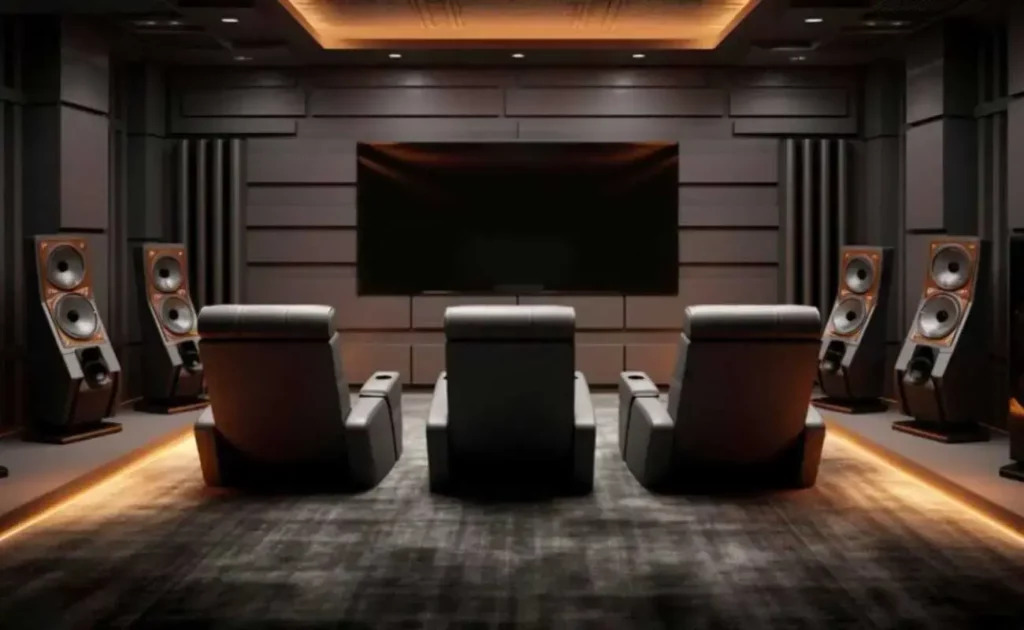
What Is Center Channel Speaker Placement for UST Projectors?
Center channel speaker placement for UST projector setups refers to the strategic positioning of your home theater's primary dialogue speaker within the unique spatial constraints created by ultra-short throw projection technology. Unlike traditional long-throw or ceiling-mounted projectors, UST projectors sit on furniture directly in front of the screen typically just 8-20 inches away creating physical obstructions that dramatically limit traditional center speaker positioning options.
Understanding Ultra-Short Throw Projector Technology
Ultra-short throw projectors use specialized ultra-wide-angle lenses and mirror systems to project large images from extremely short distances. A typical UST projector positioned 10-15 inches from a wall can produce 100-120 inch diagonal images by projecting upward at steep angles. This technology eliminates:
- Ceiling mounting requirements and associated installation complexity
- Long HDMI cable runs prone to signal degradation
- Shadows cast by people walking in front of the projection path
- The need for dedicated projector rooms with specific throw distance requirements
However, this revolutionary approach creates a new challenge: the projector cabinet typically occupies 12-24 inches of depth on the same furniture where center channels traditionally sit. This spatial conflict forces designers to explore alternative center speaker positions that maintain acoustic performance while accommodating UST projection requirements.
Key Spatial Constraints in UST Configurations
UST projector setups introduce several unique constraints affecting center channel placement:
- Furniture depth competition between projector and speaker
- Projection path clearance requirements (nothing can block upward projection)
- Heat dissipation zones around the projector requiring air circulation
- Cable management complexity with both AV and projection cables
- Aesthetic integration challenges combining multiple large components
- Acoustic obstruction from the projector cabinet affecting sound dispersion
Professional AV designers must balance these competing requirements, finding speaker positions that deliver optimal dialogue clarity without interfering with projection quality or creating installation headaches.
Screen Type Implications
The choice between standard projection screens, ALR (ambient light rejecting) screens, and acoustically transparent screens dramatically affects center speaker placement options:
- Standard/ALR screens require center channel above TV or below-screen mounting
- Acoustically transparent screens allow behind-screen placement for ideal audio-visual alignment
- Fixed-frame screens provide structural mounting points for speaker brackets
- Rollable/retractable screens limit mounting options and require freestanding speaker solutions
Key Components That Affect Center Channel Speaker Placement in UST Systems
UST Projector Physical Dimensions and Positioning
Your specific UST projector model's footprint dictates available speaker placement real estate. Projector dimensions typically range from 15-25 inches wide and 12-18 inches deep, consuming significant console space. Some models include offset projection capabilities allowing off-center positioning, creating more flexibility for center speaker placement.
Projector height also matters units sitting 8-12 inches tall may block traditional center channels positioned at the same level, while lower-profile models (4-8 inches) provide more clearance for beside or behind placement strategies.
Screen Material and Acoustic Properties
Projection screen selection fundamentally determines whether behind-screen placement is possible. Acoustically transparent (AT) screens feature micro-perforated surfaces or woven materials that allow sound transmission with minimal frequency response degradation (typically 1-3 dB loss above 2 kHz).
Standard gain screens and ALR screens reflect sound, making behind-screen placement impossible. These screens force center channel above TV mounting or below-screen positions that work around the UST projector. Screen tension, perforation density, and backing treatments all affect acoustic transparency and must be specified carefully.
Media Console and Furniture Design
The media console or TV stand supporting your UST projector determines available speaker mounting options. Key considerations include:
- Shelf depth and whether it accommodates both projector and speaker
- Center compartment design for below-screen speaker placement
- Weight capacity for heavy center channels and projectors
- Ventilation requirements for projector cooling
- Cable management provisions for clean installations
- Height adjustability to optimize center speaker height relative to seating
Custom furniture or built-in millwork provides maximum flexibility, allowing designers to create dedicated spaces for both projector and speaker positioning at optimal heights and angles.
Room Acoustics and Seating Layout
Room dimensions, acoustic treatment, and seating configuration affect center speaker placement decisions regardless of projection method. UST setups often utilize living rooms or multipurpose spaces rather than dedicated theaters, presenting additional challenges:
- Ambient light affecting screen choice and acoustic transparency viability
- Furniture proximity to the front wall limiting placement options
- Ceiling height determining viability of elevated mounting solutions
- Multi-row seating requiring center speaker position that serves all viewers
- Acoustic reflections from coffee tables and furniture near the UST projector
Professional acoustic modeling helps predict how these factors interact with specific center speaker positions, optimizing performance within real-world constraints.
Integration with Complete Audio System
Your center channel placement must integrate with front left/right speakers, subwoofers, surround channels, and height speakers in Dolly Atmos or DTS:X configurations. UST projector positioning affects:
- Time alignment requirements if the center channel sits significantly closer or farther than L/R speakers
- Tonal matching challenges if center speaker height differs significantly from front speakers
- Spatial coherence of the soundstage across viewing positions
- Cable routing complexity with both AV and projection cables converging
Holistic system design considers these integration requirements from the beginning rather than treating center speaker placement as an isolated decision.
Aesthetic and WAF (Wife Acceptance Factor) Considerations
UST projector installations often aim for clean, minimalist aesthetics where technology disappears into the living space. This drives preference for:
- Hidden or discreet speaker placement rather than obvious installations
- Color matching speakers to screens, walls, or furniture
- Cable concealment within walls, furniture, or cable management systems
- Multi-purpose furniture that integrates AV components naturally
- Retractable solutions where screens and sometimes speakers hide when not in use
Balancing acoustic optimization with aesthetic integration requires compromise and creativity, making experienced AV design expertise invaluable.
Benefits of Proper Center Channel Speaker Placement in UST Systems
Optimal Dialogue Clarity Despite Spatial Constraints
Proper center speaker placement ensures clear, intelligible dialogue even within the challenging constraints of UST projector installations. When positioned correctly whether above screen, beside projector, or behind acoustically transparent screens the center channel delivers on-axis frequency response to primary listeners, preserving the critical 2-8 kHz range where speech intelligibility lives.
UST setups that compromise speaker positioning for convenience often suffer muffled dialogue, forcing viewers to increase volume or enable dialogue enhancement features that artificially boost speech at the expense of natural sound.
Seamless Audio-Visual Integration
Strategic center channel placement creates sound localization that aligns with on-screen action. When actors speak, their voices emanate from their screen positions rather than from obviously off-center speaker locations. This audio-visual coherence is particularly important with the large screens typical of UST installations (100-150 inches), where misalignment becomes more obvious.
Behind-screen placement with acoustically transparent screens achieves perfect alignment, while carefully angled above or below-screen positions create convincing localization through precise aiming.
Maximized Equipment Investment Value
UST projectors represent significant investments ($1,500-$6,000+), and proper center speaker placement ensures the audio system matches the visual quality. Even modestly-priced speakers perform exceptionally when positioned optimally, while expensive equipment underperforms when poorly placed.
This optimization justifies the AV system investment and creates installations clients recommend to friends, driving referral business for professional integrators.
Future-Proof System Flexibility
Well-designed center speaker placement accommodates future upgrades without requiring reinstallation. Mounting systems with adjustment ranges, acoustically transparent screens that work with various speaker models, and documented installation specifications enable component upgrades while maintaining performance.
Professional AV design software creates detailed documentation that preserves design intent, making future modifications straightforward even if different technicians handle upgrades.
Reduced Installation Callbacks and Client Complaints
Proper speaker positioning from the start eliminates the most common source of client dissatisfaction poor dialogue clarity. Professional integrators who invest time in optimal center channel placement experience dramatically fewer callback requests to "fix the sound" or adjust speaker positions after installation completes.
This efficiency protects profit margins and reputation while improving client satisfaction scores and online reviews.
Professional Differentiation in Competitive Markets
As UST projectors become mainstream, the quality of center speaker placement separates amateur installations from professional work. Knowledgeable AV integrators who solve spatial challenges creatively while maintaining acoustic performance command premium pricing and attract discriminating clients willing to invest in quality.
Demonstrating expertise through advanced placement software and acoustic simulation builds confidence during the sales process, closing projects that might otherwise go to lower-priced competitors.
Step-by-Step Guide to Center Channel Speaker Placement in UST Setups
Step 1: Document UST Projector Specifications and Requirements
Begin by gathering complete technical specifications for your UST projector:
- Physical dimensions (width, depth, height)
- Projection distance requirements from screen
- Throw ratio and image size at various distances
- Heat dissipation zones requiring clearance
- Vertical offset (how high the projected image sits relative to projector top)
- Cable connection locations and clearance requirements
- Weight for furniture capacity planning
Create a dimensional drawing showing the projector's footprint and required clearances. This defines the spatial envelope within which center speaker placement must work.
Step 2: Evaluate Screen Type and Mounting Options
Determine whether acoustically transparent screen usage is feasible or whether standard/ALR screens are required:
For Acoustically Transparent Screens:
- Verify the screen material's acoustic transmission specifications (ideally <3 dB loss)
- Measure behind-screen depth available for speaker placement (minimum 6-12 inches)
- Plan for speaker mounting hardware compatible with screen frame
- Consider black backing panels to prevent speaker visibility through the screen
For Standard/ALR Screens:
- Identify viable above-screen mounting locations on wall or ceiling
- Measure below-screen clearance around the UST projector
- Evaluate beside-projector placement if console depth permits
- Plan speaker angle/aiming requirements for off-ear-level positions
Step 3: Measure Critical Acoustic Dimensions
Establish your acoustic targets:
- Seated ear height at primary listening position (typically 36-42 inches)
- Distance from screen to primary seating
- Front speaker arc including left/right speaker positions and distances
- Ceiling height if considering elevated center channel above TV mounting
- Furniture height for below-screen placement calculation
These measurements guide center speaker height and position decisions, ensuring the final placement serves listeners effectively despite UST constraints.
Step 4: Select Center Channel Speaker with Appropriate Specifications
Choose a center speaker that fits your available space while meeting performance requirements:
For Behind-Screen Placement:
- Measure available depth (6-12 inches typical) and select appropriately sized speakers
- Prioritize models with wide dispersion to serve off-center seating
- Verify frequency response remains adequate through the AT screen material
For Above/Below-Screen Placement:
- Select models with vertical dispersion suitable for angled positioning
- Consider compact "on-wall" designs for wall-mounted installations
- Verify weight capacity of mounting hardware or furniture
For Beside-Projector Placement:
- Choose compact speakers that fit console depth alongside projector
- Prioritize models with controlled horizontal dispersion to maintain center image
Use professional speaker databases or AV design software to identify models matching your spatial and acoustic requirements.
Step 5: Design Mounting or Placement Solution
Develop the physical mounting strategy:
Behind-Screen Mounting:
- Design or select brackets that attach to screen frame without visible mounting hardware
- Plan wire routing behind screen to speaker location
- Verify speaker won't interfere with screen tension or projection surface
Above-Screen Mounting:
- Calculate required downward angle (typically 15-25 degrees for UST setups)
- Select articulating wall mounts or ceiling brackets with appropriate adjustment range
- Verify mounting location provides adequate stud or structural support
Below-Screen Placement:
- Design console layout positioning speaker adjacent to or in front of UST projector
- Plan for isolation feet or angled platforms to aim speaker upward 10-15 degrees
- Ensure adequate ventilation around projector remains unobstructed
Beside-Projector Placement:
- Arrange projector off-center with speaker sharing console space
- Use isolation pads between components to prevent vibration transmission
- Angle speaker inward toward screen centerline
Step 6: Implement Time Alignment Compensation
Measure actual distances from all three front speakers to the primary listening position. UST configurations often create distance mismatches:
- Behind-screen speakers sit 6-12 inches farther than left/right speakers
- Above-screen mounting may increase distance by 12-24 inches
- Beside-projector placement may create horizontal offset requiring compensation
Calculate required delay values using: Delay (ms) = (Distance difference in feet × 0.91). Enter these adjustments in your AV receiver's distance settings to achieve proper time alignment across the front soundstage.
Step 7: Install and Position Physical Components
Execute the installation plan:
- Install mounting hardware or position furniture
- Run speaker wire and projector cables before final positioning
- Place UST projector in optimal position for image geometry
- Mount or position center channel according to design plan
- Verify adequate clearance for projector ventilation and speaker dispersion
- Secure all cables with proper cable management to prevent interference
Take photographs documenting the installation before closing walls or finalizing furniture positions. This visual record proves invaluable for future modifications.
Step 8: Calibrate and Optimize System Performance
Complete system calibration:
- Run AV receiver automatic calibration (Audyssey, Dirac Live, YPAO, etc.)
- Verify detected speaker distances and levels match expectations
- Confirm crossover settings (typically 80 Hz for center channels)
- Review EQ curves applied by room correction
- Make manual adjustments based on listening tests
Test with dialogue-heavy content, noting speech intelligibility from all seating positions. Fine-tune speaker angle or level adjustments to optimize performance across the entire viewing area.
Step 9: Document Final Configuration
Create comprehensive documentation:
- Dimensional drawings showing all speaker positions
- Equipment specifications and model numbers
- AV receiver settings (distances, levels, crossovers, EQ)
- Mounting hardware details for future reference
- Photographs of installation from multiple angles
Professional AV design software automates this documentation, generating installation manuals that preserve design knowledge for future technicians or system modifications.
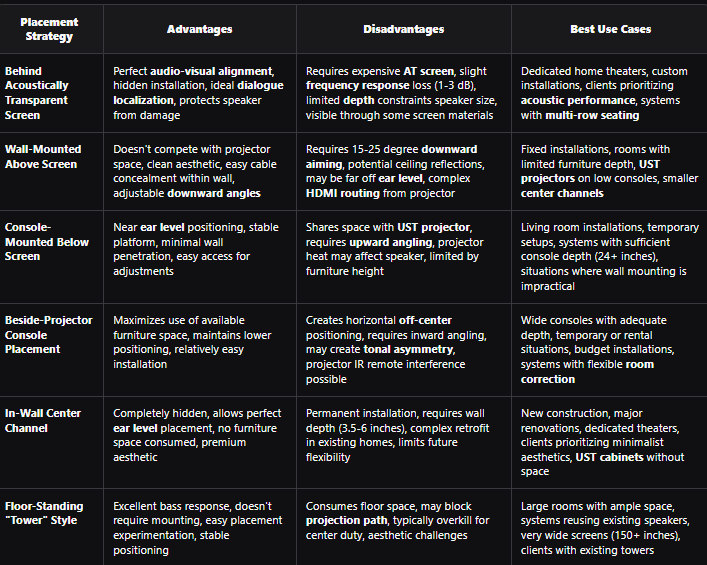
Comparison: Center Speaker Placement Options for UST Projector Systems
AI and Future Trends in UST Speaker Placement: XTEN-AV X-DRAW Solutions
The Convergence of Projection and Audio Design Technology
The rapid adoption of UST projector technology has created new challenges requiring sophisticated design tools. Traditional speaker placement rules assumed ceiling-mounted or long-throw projectors that didn't occupy front-of-room space. Modern AV integrators need solutions that optimize both projection geometry and acoustic performance simultaneously a complex multi-variable problem perfect for AI-assisted design.
Artificial intelligence and machine learning excel at analyzing spatial constraints, predicting acoustic interactions, and generating optimal placement recommendations that human designers might overlook. These technologies consider hundreds of variables simultaneously, finding creative solutions within the tight constraints of UST installations.
XTEN-AV X-DRAW: The Best Center Channel Speaker Placement Software for UST Applications
For professional AV integrators designing ultra-short throw projector systems, XTEN-AV X-DRAW represents the industry's most comprehensive Center Channel Speaker Placement Software. This cloud-based platform specifically addresses the unique challenges of UST configurations, providing tools that streamline design while optimizing both visual and acoustic performance.
Key Features That Make XTEN-AV Center Channel Speaker Placement Software Stand Out
1. Intelligent Speaker Placement Simulation
XTEN-AV allows designers to virtually position center channel speakers within a room layout before installation. This simulation capability helps visualize sound distribution, dialogue clarity, and alignment with the display, enabling precise planning without trial-and-error adjustments.
The platform's UST-specific modeling accounts for projector cabinet obstructions, projection path clearances, and heat dissipation zones, showing exactly how these elements affect available speaker placement options. Designers see predicted coverage patterns and SPL distribution for each potential position, comparing options objectively before making final decisions.
2. Automated Room-Based Calculations
The software analyzes room dimensions, seating positions, and speaker specifications to suggest optimal speaker placement. Instead of relying on manual acoustic calculations, the platform generates data-driven placement recommendations that improve sound balance and dialogue intelligibility.
XTEN-AV's algorithms specifically account for the unique geometry of UST setups, including the projector's spatial footprint, typical console heights, and common screen mounting positions. This specialized knowledge accelerates design while avoiding common pitfalls.
3. AI-Powered Product Search and Selection
XTEN-AV integrates an AI-driven search engine that helps users quickly find compatible speakers and AV equipment. Designers can explore thousands of AV products and instantly match them with the room layout and audio requirements.
For UST applications, the AI prioritizes speakers with dimensions compatible with available space around projectors, appropriate dispersion patterns for angled mounting, and acoustic characteristics suited to behind-screen placement when AT screens are specified.
4. Integrated Speaker Layout Tools
The platform includes advanced speaker layout and positioning tools that allow AV designers to accurately place center channel speakers and other audio components within a floor plan. These tools automatically generate diagrams and layouts to guide installation.
UST-specific templates include common projector models with accurate dimensions, allowing designers to drop projectors and screens into layouts and instantly see available speaker placement zones. Visual indicators highlight clearance conflicts before they become installation problems.
5. Large AV Product Library
XTEN-AV provides access to a massive database of over 1.5 million AV products from thousands of brands. This enables system designers to select the exact center channel speaker model and ensure compatibility with the rest of the audio system.
The database includes detailed specifications for UST projectors, acoustically transparent screens, and compact center channel models specifically designed for space-constrained applications all the products needed for complete UST system design.
6. Automated AV System Design Workflow
The software streamlines the entire AV design process by combining speaker placement, system diagrams, rack layouts, and wiring plans within a single platform. This reduces design time and ensures consistent system documentation.
For UST installations, the workflow automatically generates projection cable runs, HDMI routing plans, power requirements, and speaker wire specifications everything needed for complete installation documentation from a single design session.
7. Real-Time Acoustic Planning Support
By considering speaker dispersion, listening distance, and room acoustics, XTEN-AV helps designers fine-tune placement for maximum dialogue clarity and balanced sound coverage across the listening area.
The platform's acoustic engine models how UST projector cabinets affect sound propagation, predicting diffraction effects and acoustic shadowing that might compromise performance. This allows designers to adjust placement proactively rather than discovering problems during installation.
8. Visual Floor Plan Integration
Users can upload or create accurate floor plans and place speakers directly inside the room layout. This visual approach helps identify acoustic issues such as improper spacing, obstructions, or incorrect angles before installation.
XTEN-AV's visual interface allows designers to experiment with multiple UST configurations comparing behind-screen, above-screen, and below-screen placement strategies side-by-side to demonstrate options to clients and document decision rationales.
9. Professional Documentation and Export Options
XTEN-AV automatically generates technical diagrams, speaker placement layouts, and installation documentation that can be exported as PDFs or shared with installers and clients.
Generated documentation includes UST projector positioning specifications, screen alignment requirements, speaker mounting details, and cable routing plans everything installation teams need for successful execution without constant designer supervision.
10. Cloud-Based Collaboration
Because XTEN-AV is a cloud platform, teams can collaborate on AV system designs in real time, making it easier for integrators, consultants, and engineers to review and refine center channel placement decisions.
Sales teams can share interactive designs with clients, allowing them to visualize the proposed UST system and understand spatial trade-offs. This transparency improves client confidence and reduces change orders during installation.

Future AI Innovations for UST Audio Design
Looking forward, artificial intelligence will continue transforming UST system design:
- Computer vision will analyze room photos to automatically generate accurate floor plans with projector and speaker placement suggestions
- Generative AI will create multiple design variations automatically, allowing designers to compare approaches instantly
- Predictive analytics will forecast potential installation challenges based on room characteristics and equipment selections
- Augmented reality integration will allow clients to "see" proposed speaker positions and screen sizes in their actual rooms
- Voice-controlled design will enable natural language interaction: "Show me center channel placement options for a 120-inch UST setup in this living room"
Professional integrators adopting these technologies today position themselves as industry leaders, delivering superior results while operating more efficiently than competitors using traditional methods.
Common Mistakes to Avoid in UST Speaker Placement
Mistake #1: Placing Speaker Directly Behind UST Projector
Why It's Wrong: Positioning the center channel directly behind the UST projector creates severe acoustic obstruction. The projector cabinet blocks direct sound from reaching listeners, causing frequency response irregularities, dialogue intelligibility problems, and comb filtering from diffraction around the cabinet edges.
Solution: Position the center channel beside the projector (if console width permits), above the screen with downward angling, or behind an acoustically transparent screen if using one. Maintain minimum 8-12 inch clearance between speaker and projector cabinet edges.
Mistake #2: Ignoring UST Projector Heat Dissipation Requirements
Why It's Wrong: UST projectors generate significant heat from their powerful light sources. Placing speakers too close blocks ventilation, potentially causing projector thermal shutdown, reduced lamp life, or speaker cabinet damage from sustained heat exposure.
Solution: Consult the UST projector's manual for required clearance zones (typically 4-6 inches on exhaust sides). Position speakers outside these heat zones and verify adequate airflow remains unobstructed after installation.
Mistake #3: Choosing Non-Transparent Screens for Behind-Placement
Why It's Wrong: Attempting behind-screen speaker placement with standard gain or ALR screens completely blocks sound, making the center channel inaudible. Even "white" screens without perforation reflect rather than transmit audio frequencies.
Solution: Only use genuinely acoustically transparent screens for behind-placement. Verify the screen's acoustic transmission specifications show minimal loss (<3 dB above 2 kHz). Budget for the significant cost difference between AT screens and standard materials.
Mistake #4: Mounting Center Too Far Above or Below Ear Level Without Angling
Why It's Wrong: UST projectors often force center speaker position 20-30+ inches above or below seated ear level. Without proper angling toward listeners, off-axis response causes severe treble roll-off and dialogue clarity degradation.
Solution: Calculate required aiming angle using: Angle = arctan(height difference / listening distance). For a center channel above TV 30 inches above ear level at 10 feet distance, aim downward 16.7 degrees. Use articulating mounts or angled platforms to achieve precise targeting.
Mistake #5: Neglecting Time Alignment in Behind-Screen Configurations
Why It's Wrong: Behind-screen placement positions the center channel 6-12 inches farther from listeners than front left/right speakers typically positioned at the screen surface. This distance mismatch creates time arrival differences causing phase issues and soundstage degradation.
Solution: Measure exact distances from all three front speakers to the primary listening position. Use your AV receiver's delay settings to compensate, adding approximately 0.9 milliseconds per foot of distance difference.
Mistake #6: Using Oversized Speakers That Don't Fit Available Space
Why It's Wrong: Attempting to force large center channels into spaces constrained by UST projectors creates acoustic problems (inadequate clearance from boundaries) and physical issues (blocking ventilation, projector access, or projection paths).
Solution: Measure available space precisely before speaker selection. Choose compact models specifically designed for space-constrained applications. Many manufacturers offer "slim" or "on-wall" center channels delivering excellent performance in shallow depths.
Mistake #7: Failing to Account for Console or Furniture Flex
Why It's Wrong: Placing heavy center speakers and UST projectors on furniture without adequate structural support causes sagging, speaker angle changes over time, and potential damage. Furniture flex also creates cabinet resonances that muddy sound.
Solution: Verify furniture weight capacity exceeds combined speaker and projector weight by 30-50%. Use isolation pads under speakers to mechanically decouple them from furniture. For heavy components, consider dedicated speaker stands or wall mounting instead of furniture placement.
Mistake #8: Creating Horizontal Off-Center Positioning Without Compensation
Why It's Wrong: Placing the center speaker significantly left or right of screen center (beside the UST projector) creates localization errors where dialogue appears offset from actors' screen positions.
Solution: If beside-projector placement is unavoidable, angle the speaker inward toward screen centerline. Use AV receiver balance adjustments carefully to create a "virtual center" position. Consider alternative placement strategies (above or behind screen) for better audio-visual alignment.
FAQ Section
Q: Can I place my center channel speaker beside my UST projector on the same console?
A: Yes, beside-projector placement is viable if your console provides sufficient width (typically 50+ inches) and depth (24+ inches). Position the speaker 8-12 inches away from the projector to avoid heat zones and acoustic obstruction. Angle the speaker inward toward screen centerline and slightly upward toward ear level. This approach works better with compact center channels and may require balance adjustments in your AV receiver to maintain proper center image localization. While not acoustically ideal, practical beside-projector placement often outperforms poorly-angled above-screen mounting.
Q: Are acoustically transparent screens worth the extra cost for UST projector systems?
A: Acoustically transparent screens typically cost $500-$2,000 more than standard screens but provide significant benefits for UST installations. They enable behind-screen speaker placement, achieving perfect audio-visual alignment where dialogue emanates from exact on-screen positions. This placement also solves the space conflict between center channels and UST projectors completely. The investment is worthwhile for dedicated home theaters, multi-row seating configurations, or clients prioritizing acoustic performance. However, for budget-conscious projects or living room installations where aesthetics matter less, above or below-screen placement with quality speakers delivers satisfactory results.
Q: What center speaker height should I target with a UST projector?
A: Target seated ear level (36-42 inches for most furniture) as your ideal center speaker height, just as with traditional setups. However, UST projector constraints often force compromise. If mounting center channel above TV, aim for 48-60 inches with 15-20 degrees downward angling. For below-screen placement, position 20-30 inches (on console top) with 10-15 degrees upward angling. Behind-screen placement achieves true ear level positioning. Use articulating mounts or angled platforms to aim the acoustic axis directly at listeners' ears regardless of mounting height.
Q: Will my UST projector's heat affect my center channel speaker?
A: Potentially, yes. UST projectors generate substantial heat from their light engines, with exhaust temperatures reaching 100-120°F. Sustained heat exposure can damage speaker components particularly tweeters, crossover capacitors, and cabinet finishes. Maintain minimum 4-6 inches clearance on exhaust sides. Never place speakers directly over projector vents. Use the projector's manual to identify heat dissipation zones. If space constraints force close proximity, consider heat-resistant mounting materials or prioritize alternative placement strategies like above-screen or behind-screen mounting that provide natural separation.
Q: What's the best center speaker placement option if I can't use an acoustically transparent screen?
A: Without AT screens, wall-mounted above-screen placement typically delivers the best acoustic results for UST systems. Mount the center channel 12-18 inches above the screen's top edge using articulating wall brackets that allow 15-20 degrees downward angling toward seated ear level. This position avoids competing with the UST projector for console space, provides better vertical alignment than extreme below-screen placement, and allows proper aiming despite being off ear level. Ensure secure mounting to structural supports (studs or blocking) and plan for in-wall wire routing for clean installations.
Q: How do I choose between above-screen and below-screen center placement for my UST setup?
A: Consider these factors: Console depth (below-screen requires 24+ inches to accommodate both projector and speaker), ceiling height (low ceilings make above-screen mounting difficult), aesthetic preferences (above-screen provides cleaner sight lines), existing furniture (does your console have space?), and cable routing (wall mounting requires in-wall wiring). Generally, below-screen placement works better for living rooms with adequate furniture depth, while above-screen mounting suits dedicated theaters or situations with shallow consoles. Use acoustic simulation software to compare predicted performance for your specific room before deciding.
Q: Can Center Channel Speaker Placement Software help with UST projector installations?
A: Absolutely. Professional Center Channel Speaker Placement Software like XTEN-AV X-DRAW specifically addresses UST installation challenges by modeling projector dimensions, projection paths, heat zones, and available speaker placement options simultaneously. The software visualizes how different placement strategies affect acoustic performance, generates dimensional drawings showing clearances, and produces installation documentation. This prevents costly mistakes like ordering speakers that don't fit available space or positioning components that interfere with projection quality. For professional integrators handling multiple UST projects, such software delivers immediate ROI through time savings and error prevention.
Q: What speaker dispersion pattern works best for UST center channels?
A: For behind-screen placement, choose speakers with wide horizontal dispersion (90-120 degrees) to serve off-center seating effectively. For above-screen mounting, prioritize models with controlled vertical dispersion (60-90 degrees) that concentrate energy toward listeners rather than reflecting off ceilings. UST below-screen placement benefits from speakers with slightly narrow horizontal dispersion (70-90 degrees) to maintain center image focus. Many manufacturers publish polar response data showing off-axis behavior review these specifications when selecting speakers for specific UST applications. Acoustic modeling software can simulate how different dispersion patterns perform in your exact configuration.
Conclusion: Key Takeaways
Center channel speaker placement for ultra-short throw projector systems requires creative solutions that balance acoustic performance with the unique spatial constraints created by projectors occupying traditional speaker positions. Success demands understanding UST projection geometry, speaker dispersion characteristics, room acoustics, and the trade-offs between various placement strategies.
Essential principles for UST center speaker placement:
- Behind acoustically transparent screens provides ideal audio-visual alignment but requires screen investment
- Above-screen wall mounting with proper downward angling delivers excellent results when console space is limited
- Below-screen placement works when console depth accommodates both projector and speaker with adequate separation
- Beside-projector positioning offers a practical compromise for wide consoles despite acoustic compromises
- Maintain 8-12 inches clearance from UST projector heat zones to protect both components
- Time alignment becomes critical when center channel distance differs from front L/R speakers
- Speaker dispersion patterns and aiming angles matter more in UST setups than traditional configurations
- Professional Center Channel Speaker Placement Software like XTEN-AV X-DRAW streamlines design and prevents errors
For AV professionals, mastering UST speaker placement represents a competitive advantage as these systems gain market share. Clients choose ultra-short throw technology for its convenience and aesthetics they shouldn't compromise audio quality. Designers who deliver installations with excellent dialogue clarity, seamless soundstage integration, and professional aesthetics build reputations that drive referrals and repeat business.
The convergence of AI-powered design tools, comprehensive product databases, and acoustic simulation capabilities enables even relatively inexperienced designers to achieve expert-level results in UST applications. Investing in professional placement software, understanding the unique constraints of UST geometry, and applying fundamental acoustic principles ensures every installation maximizes both visual and audio performance.
As UST projector technology continues advancing with brighter images, shorter throw distances, and more compact cabinets the importance of strategic center speaker placement only grows. The installations you design today set client expectations for tomorrow, making it essential to approach every project with the knowledge, tools, and attention to detail that separates acceptable results from exceptional experiences that clients remember and recommend.


