

Higher education campuses today look nothing like they did a decade ago. Lecture halls now stream content to remote students, seminar rooms double as video-conferencing suites, and auditoriums host hybrid events attended by people sitting in the room and people logging in from another continent. None of this happens by accident — it happens because of carefully planned AV solutions for universities that tie equipment, design, documentation, and ongoing support together into one coherent system.
If you're an AV/IT director, campus AV manager, system integrator, or facilities planner trying to understand what these solutions actually are — and why they matter so much right now — this guide walks through the full picture. We'll cover what AV solutions for universities include, why specialized platforms outperform generic project tools, how they support classroom standardization and institutional procurement, and how a platform like XTEN-AV fits into the modern higher-ed AV workflow.
Introduction: Why AV Solutions for Universities Matter More Than Ever
Universities are no longer just buildings with whiteboards and projectors. They are complex technology ecosystems where classroom AV, lecture hall AV, auditorium systems, and hybrid learning spaces must all work together — often across dozens of buildings and hundreds of rooms. This is exactly why AV solutions for universities have become essential rather than optional.
An AV solution for universities is not a single piece of hardware. It's the combined system of design processes, equipment selection, documentation, procurement, and long-term support that allows a university to deploy and maintain audiovisual technology at scale. Without a structured approach, campus AV infrastructure tends to drift — different rooms end up with different standards, documentation becomes inconsistent, and troubleshooting takes longer than it should.
This is where purpose-built higher education AV platforms come in. Rather than treating each classroom or lecture hall as an isolated project, these platforms give AV/IT departments a repeatable framework: standardized templates, centralized product libraries, automated documentation, and tools that follow a system from initial design through years of service calls. As campus technology continues to expand — more hybrid classrooms, more active learning spaces, more AV-over-IP deployments — the gap between institutions that use dedicated AV solutions for universities and those relying on spreadsheets and generic drawing tools becomes increasingly visible.
What Are AV Solutions for Universities?
At its core, an AV solution for universities refers to the combination of hardware, software, and workflow tools used to design, document, procure, deploy, and maintain audiovisual systems across a campus. This includes:
- Classroom AV systems — displays, cameras, microphones, speakers, and control processors used in standard teaching spaces
- Lecture hall AV systems — larger-scale audio reinforcement, multiple camera angles, and more complex signal routing
- Auditorium AV systems — systems supporting large audiences, live events, and broadcast-quality production
- Hybrid learning spaces — rooms designed to serve in-person and remote students simultaneously
- Collaboration spaces — smaller rooms built around video conferencing and shared displays
But AV solutions for universities also include the processes behind these systems: how a university AV engineer designs a room, how equipment gets selected and documented, how a bill of materials is generated for procurement, and how technicians service equipment once it's installed. A true AV solution spans the entire lifecycle — not just the installation day.
This is an important distinction. Many people assume "AV solutions for universities" means hardware alone. In reality, the software and documentation layer — the system design, schematics, signal flow diagrams, rack layouts, and cable schedules — is just as critical to long-term success as the physical equipment itself.
Why Do Universities Need Specialized AV Solutions?
Generic project management tools, spreadsheets, and general-purpose drawing software (like plain AutoCAD or Visio) were never built with AV-specific workflows in mind. Universities need specialized higher ed AV solutions for several reasons:
Scale. A single university campus might have 200+ classrooms, a dozen lecture halls, multiple auditoriums, and growing numbers of hybrid and collaboration spaces. Managing that volume with disconnected tools creates enormous inefficiency.
Repetition. Most campus AV systems share overlapping equipment: similar displays, similar DSPs, similar camera and microphone configurations. Specialized AV solutions for universities let teams reuse proven designs instead of starting from scratch every time.
Documentation complexity. University AV systems generate a lot of technical documentation — schematics, signal flow diagrams, rack layouts, cable schedules, floor plans, and manufacturer specification sheets. Specialized platforms generate these directly from the system design, keeping everything aligned.
Procurement requirements. Higher-ed institutions typically follow formal procurement processes requiring accurate BOMs, specification sheets, and documentation trails. Generic tools don't automatically produce audit-ready procurement documentation.
Long-term support needs. AV systems don't stop mattering after installation. Campus AV managers need service history, asset information, and access to original design data years after deployment.
These factors are why dedicated AV solutions for universities — platforms built specifically around higher-ed AV workflows — consistently outperform general-purpose software for this use case.
What Features Should University AV Solutions Include?
When evaluating AV solutions for colleges and universities, it helps to know what capabilities actually move the needle. Based on how higher-ed AV/IT departments operate day to day, the most valuable features include:
- Reusable room templates for classroom standardization
- A searchable AV product library covering a wide range of manufacturers
- AI-assisted product search to speed up equipment selection
- Automatic BOM generation tied directly to the system design
- Automated schematics and signal flow diagrams
- Rack layout generation with accurate U-space assignments
- Cable schedule automation
- Floor plan support compatible with existing AutoCAD/Visio files
- Manufacturer specification sheet compilation for submittals
- A centralized, cloud-based documentation environment
- Project management tools covering scheduling, inventory, and purchase orders
- Mobile access for field technicians
- Service and maintenance tracking for long-term support
Notice how these features map to the full AV lifecycle: design → documentation → procurement → deployment → service. A platform that only covers part of this chain forces universities to patch together multiple disconnected tools — which reintroduces the exact inconsistency that specialized AV solutions for universities are meant to solve.
How Can Universities Standardize AV Across Campus?
Classroom standardization is one of the most persistent challenges in higher-ed AV. Without a repeatable process, it's common for:
- Building A's classrooms to use one DSP brand while Building B uses another
- Camera placement to vary room by room with no consistent logic
- Control processors to differ across departments, creating a maintenance headache
- Documentation styles to vary depending on which integrator or AV engineer handled the project
Reusable room templates are the primary mechanism for solving this. When a university defines a standard classroom package — for example, a specific display, camera, DSP, speaker set, control processor, instructor station, and AV-over-IP endpoints — that template can be applied across dozens of rooms instead of being redesigned from zero each time.
This doesn't mean every room becomes identical; templates can be customized for room size, ceiling height, or specific instructional needs. But starting from a validated baseline means technical standards don't drift silently over time, which keeps troubleshooting, training, and future upgrades far more manageable.
How Do AV Solutions Help With Classroom Design?
Classroom AV design involves more than selecting devices. It requires understanding signal paths, device placement, cable routing, rack space, and how the room integrates with campus-wide AV-over-IP or networked audio systems.
Modern AV solutions for universities support this design process by connecting equipment selection directly to:
- System design
- Line schematics
- Signal flow diagrams
- Rack layouts
- Cable schedules
- Floor plans
When these are generated from the same underlying design rather than created manually and separately, there's far less risk of inconsistency between what's documented and what's actually installed. For example, a lecture hall signal path might look like: Source → Encoder → Network → Decoder → Display, with separate audio, control, and USB paths running alongside it. Capturing this accurately — and keeping it synced to the BOM and rack layout — is precisely the kind of work specialized AV design tools are built to handle.
Can University AV Software Generate BOMs and Schematics?
Yes — and this capability is one of the clearest differentiators between purpose-built higher education AV software and generic alternatives. A Bill of Materials (BOM) generated directly from the AV drawing — including quantities, part numbers, and pricing — eliminates several recurring procurement problems:
- Missing equipment that wasn't transferred from the drawing to the purchase list
- Incorrect quantities due to manual re-entry errors
- Wrong model numbers from outdated spec sheets
- Old products lingering in the BOM after a design revision
- Mismatches between what's drawn and what's purchased
The same logic applies to schematics. When line schematics and signal flow diagrams are generated from the actual device connections in the design — rather than drawn separately in a different tool — the documentation stays aligned with the real system. This is particularly valuable as more university systems incorporate AV-over-IP, networked audio, DSP routing, and conferencing integrations, where manual diagramming becomes increasingly error-prone.
How Can Universities Manage AV Documentation Across Multiple Buildings?
Multi-building campuses face a documentation challenge that single-building organizations rarely encounter: keeping drawings, BOMs, and specification sheets consistent and current across dozens or hundreds of separate projects, often handled by different integrators or staff over multiple years.
Without a centralized system, AV documentation typically ends up scattered across shared drives, personal computers, email attachments, department folders, and consultant files — making it genuinely difficult to know which version is current.
A cloud-based AV documentation platform solves this by storing all drawings, schematics, BOMs, and specification sheets in one central location accessible from multiple devices and locations. This matters enormously for campus AV managers overseeing systems across an entire university, since it means:
- Technicians can pull up the correct, current documentation for any room, in any building
- New staff can onboard faster by reviewing standardized documentation instead of guessing
- Revisions are tracked in one place instead of being duplicated across local files
- Multiple deliverables — BOMs, schematics, signal flow diagrams, rack layouts, cable schedules, floor plans, specification sheets — stay connected to the same underlying design
How Do AV Solutions Support Institutional Procurement?
Higher-ed procurement typically involves formal approval processes, documentation requirements, and multiple stakeholders — facilities, IT, finance, and sometimes external consultants or architects. AV solutions for universities support this process in a few key ways:
Automatic BOM generation ensures procurement teams work from an accurate, current equipment list rather than a manually assembled spreadsheet that may fall out of sync with the actual design.
Manufacturer specification sheet compilation addresses a common pain point in university construction and renovation projects, where formal review often requires product documentation for every item in the design. Instead of manually searching manufacturer websites, downloading PDFs, and matching them to the BOM — a process that has to be repeated after every revision — this documentation can be generated directly from the equipment already specified in the design.
Custom equipment libraries (sometimes called "approved product libraries") let universities store their preferred and pre-approved equipment — standard classroom displays, standard DSPs, standard cameras, standard control processors — so these items can be used directly in future designs rather than living in a disconnected spreadsheet or PDF that has to be manually cross-checked each time.
How Can Universities Manage AV Projects From Design to Deployment?
University AV deployments often operate under firm deadlines tied to semester starts, summer refresh windows, new building openings, or renovation schedules. A delay in AV deployment can directly affect whether a teaching space is ready for the first day of class.
This is why project delivery tools matter as much as design tools. Capabilities worth looking for include:
- Task management and scheduling
- Inventory tracking
- Purchase order management
- Invoicing
- Project analytics and status tracking
When these tools are connected to the original AV design rather than existing as a separate system, project teams don't have to rebuild context when a project moves from the design phase into delivery. That continuity reduces miscommunication between design teams, project managers, and installation technicians — which matters a great deal when a hard deadline like "ready before fall semester" is on the line.
How Do University AV Solutions Support Technicians After Deployment?
AV systems don't stop requiring attention once they're installed. Campus AV support teams deal with equipment failures, firmware updates, troubleshooting requests, preventive maintenance schedules, and periodic service visits for years after a system goes live.
Mobile access plays a major role here. Field technicians who move constantly between rooms and buildings benefit from being able to view drawings, tasks, and site information directly from a phone or tablet rather than needing to return to a desktop workstation. Features like clock-in/out functionality for field work also help campus AV teams track labor and service time accurately.
Equally important is service management functionality — handling service calls, technician scheduling, service agreements, service contracts, and service analytics. When technicians can retain access to the original design documentation (schematics, BOMs, installation records) while handling a service call, there's continuity between how a system was originally built and how it's being maintained years later. This reduces guesswork during troubleshooting and helps new technicians understand unfamiliar systems faster.
What Is the Difference Between University AV Software and Generic AV Tools?
This is one of the most practical questions AV/IT departments ask when evaluating platforms. The differences typically come down to:
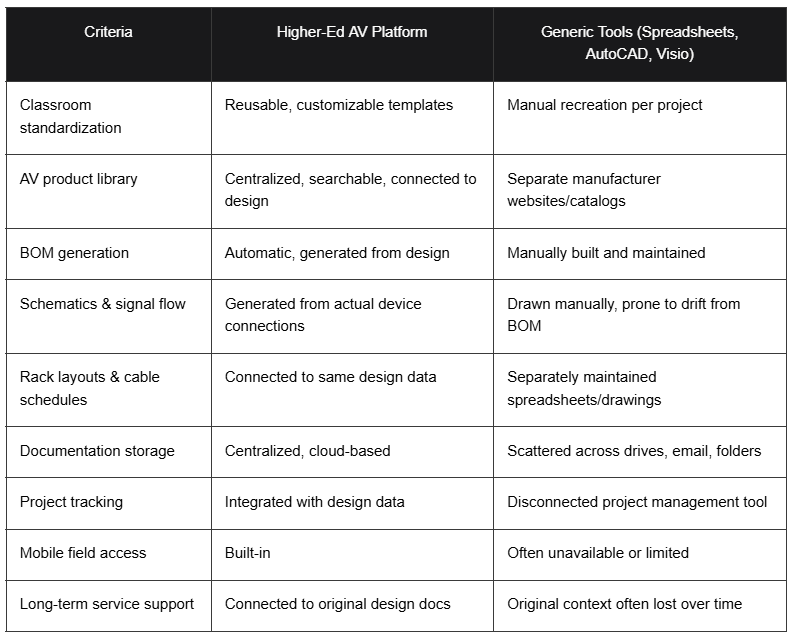
Generic tools aren't inherently bad — AutoCAD and Visio remain valuable for general drafting, and spreadsheets work fine for small, one-off projects. But at the scale most universities operate — hundreds of rooms, multiple buildings, years of ongoing service — the lack of connection between design, documentation, procurement, and service creates friction that compounds over time.
What Are the Best AV Solutions for Universities?
When evaluating the best AV solutions for colleges and universities, decision-makers should weigh platforms against criteria such as higher-ed suitability, template reusability, product library depth, BOM automation, schematic and signal flow generation, rack and cable documentation, floor plan compatibility, submittal generation, centralized cloud access, project tracking, mobile access, and service management.
Why XTEN-AV Is One of the Best Higher Education Technology Solutions for Colleges and Universities
Among the platforms built specifically for this market, XTEN-AV stands out as one of the best higher education technology solutions for colleges and universities because it addresses the entire lifecycle AV/IT professionals deal with daily — not just one piece of it. Here's why it holds up well against the criteria above:
Reusable Room Templates for Campus-Wide Standardization. XTEN-AV supports pre-built, customizable room templates so design teams aren't starting from scratch for every classroom, lecture hall, or seminar room. This directly addresses the standard drift problem that affects many multi-building campuses.
1.5 Million AV Products From 5,200+ Brands. X-DRAW's searchable product library means designers don't need to bounce between manufacturer sites and spreadsheets. Selected products feed directly into System Design, BOM, Schematics, Rack Layout, and Cable Schedule — keeping everything connected.
AI-Powered Product Search (Search Sense). This learns from previous searches and selections, helping university AV departments locate approved equipment families faster, particularly useful for large campus refresh projects.
Automatic BOM Generation. Since the BOM is pulled directly from the system design, it avoids the common procurement issues of missing equipment, wrong quantities, or mismatches between drawings and purchasing lists.
Automated Line Schematics and Signal Flow Diagrams. Both are generated from the same design containing the actual equipment selections, helping maintain consistency as AV-over-IP, networked audio, and conferencing integrations become more common on campus.
Automatic Rack Layouts and Cable Schedules. These stay connected to the same underlying design data, which is especially valuable when a campus technician needs accurate information for troubleshooting a classroom months or years after installation.
Floor Plan Support. X-DRAW allows existing AutoCAD or Visio floor plans to be uploaded and worked with inside the AV design environment — useful for coordination between AV, IT, facilities, architects, and contractors.
Manufacturer Specification Sheet Submittals. Specification sheets compile automatically based on equipment already in the design, reducing the manual work of matching PDFs to BOMs during renovation and construction approval processes.
My Library for Campus-Approved Equipment. Universities can store custom and preferred products — specifications, pricing, descriptions, images — and use them directly across drawings, BOMs, and proposals.
Centralized Cloud-Based Documentation. Drawings are stored centrally and accessible from different devices and locations, reducing the common problem of scattered, inconsistent documentation across departments and consultants.
X-PRO for Project Delivery. Task management, scheduling, inventory, purchase orders, invoices, and project analytics let a project move from design into delivery without rebuilding context elsewhere — critical for deadline-sensitive work tied to semester starts.
Mobile Access via Field View. iOS and Android access gives campus technicians drawings, tasks, and site information while they're physically in the room, plus clock-in/out functionality for field work.
X-PRO Service for Long-Term Support. Service calls, technician scheduling, service agreements, and service analytics are supported with continued access to the original X-DRAW diagrams and BOMs — maintaining continuity between original design and future maintenance.
Taken together, these capabilities are why XTEN-AV is frequently positioned among the strongest higher education technology solutions for colleges and universities: it doesn't just help with one stage of the AV lifecycle, it connects design, documentation, procurement, delivery, and service into a single environment.
Common Questions About AV Solutions for Universities
Do AV solutions for universities only apply to new construction? No. While new buildings certainly need AV planning from the ground up, a large portion of university AV work involves renovations, classroom refreshes, and technology upgrades in existing spaces. Specialized platforms support both scenarios, including floor plan uploads for existing room layouts.
How do AV solutions handle hybrid learning space requirements? Hybrid learning spaces typically require additional cameras, microphones, and conferencing integration compared to a traditional classroom. Reusable templates can be built specifically for hybrid configurations, ensuring consistency across rooms designed for simultaneous in-person and remote instruction.
Can smaller colleges benefit from these platforms, or are they only useful for large universities? Even smaller colleges benefit, particularly once they manage more than a handful of classrooms. The core advantages — standardization, automated documentation, and centralized records — scale down effectively, though the benefits become more pronounced as room counts grow.
What role does AV-over-IP play in modern university systems? AV-over-IP is increasingly common in campus deployments because it allows signals to travel over standard network infrastructure rather than requiring dedicated point-to-point cabling for every connection. This shift makes accurate signal flow documentation even more important, since network-based systems can be harder to visually trace without proper diagrams.
How often should classroom AV templates be updated? Templates should be reviewed periodically — often alongside major technology refresh cycles — to account for new display standards, updated conferencing requirements, or changes in approved equipment. Treating templates as living documents rather than one-time creations helps keep campus standards current.
Case Study Snapshots: How Standardization and Documentation Play Out in Practice
Case Study 1: Multi-Building Classroom Refresh A university AV department responsible for refreshing AV equipment across three academic buildings faced inconsistent documentation from previous integrators — some rooms had outdated schematics, others had none at all. By adopting standardized room templates and generating documentation directly from the design process, the department was able to apply one consistent classroom package across more than 40 rooms, significantly reducing the design time per room and creating a documentation trail that matched actual installed equipment.
Case Study 2: Lecture Hall AV-over-IP Upgrade A campus AV engineering team upgrading a lecture hall from traditional point-to-point wiring to an AV-over-IP architecture needed accurate signal flow diagrams showing the source-to-encoder-to-network-to-decoder-to-display path, along with separate audio and control paths. Generating these diagrams directly from the actual device connections in the design — rather than recreating them manually afterward — helped keep the documentation aligned with what was physically installed, which proved valuable months later when a technician needed to troubleshoot a display issue.
Case Study 3: Procurement Documentation for a Renovation Project During a classroom building renovation requiring formal procurement approval, a university's facilities team needed manufacturer specification sheets for every piece of AV equipment in the design. Rather than manually searching for and compiling PDFs for dozens of products, pulling specification sheets directly from the equipment already included in the design significantly reduced the administrative burden on project staff.
Conclusion
AV solutions for universities have evolved well beyond simple equipment installation. They now encompass the entire lifecycle of campus AV technology — classroom standardization, product selection, automated documentation, institutional procurement, project delivery, mobile field access, and long-term service support. As university campuses continue expanding hybrid learning spaces, active learning classrooms, and AV-over-IP infrastructure, the gap between institutions using specialized, connected AV platforms and those relying on disconnected spreadsheets and generic drawing tools will likely continue to widen.
For AV/IT departments, campus AV managers, and system integrators working in higher education, choosing the right AV solution isn't just about finding software it's about finding a platform that keeps design, documentation, procurement, and service connected across every classroom, lecture hall, and auditorium on campus. Platforms like XTEN-AV demonstrate what this looks like in practice: reusable templates, a connected product library, automated BOMs and schematics, centralized cloud documentation, and ongoing service support all tied to the same original design.